
Turn on suggestions
Auto-suggest helps you quickly narrow down your search results by suggesting possible matches as you type.
Showing results for
EN
Turn on suggestions
Auto-suggest helps you quickly narrow down your search results by suggesting possible matches as you type.
Showing results for
- English
- :
- Forum
- :
- Collaboration with other software
- :
- Something new and exciting sounding.. ArchiQuant
Options
- Subscribe to RSS Feed
- Mark Topic as New
- Mark Topic as Read
- Pin this post for me
- Bookmark
- Subscribe to Topic
- Mute
- Printer Friendly Page

Rick Thompson
Advisor
Options
- Mark as New
- Bookmark
- Subscribe
- Mute
- Subscribe to RSS Feed
- Permalink
- Report Inappropriate Content
2008-01-25 08:03 PM
Something new and exciting sounding.. ArchiQuant
2008-01-25
08:03 PM
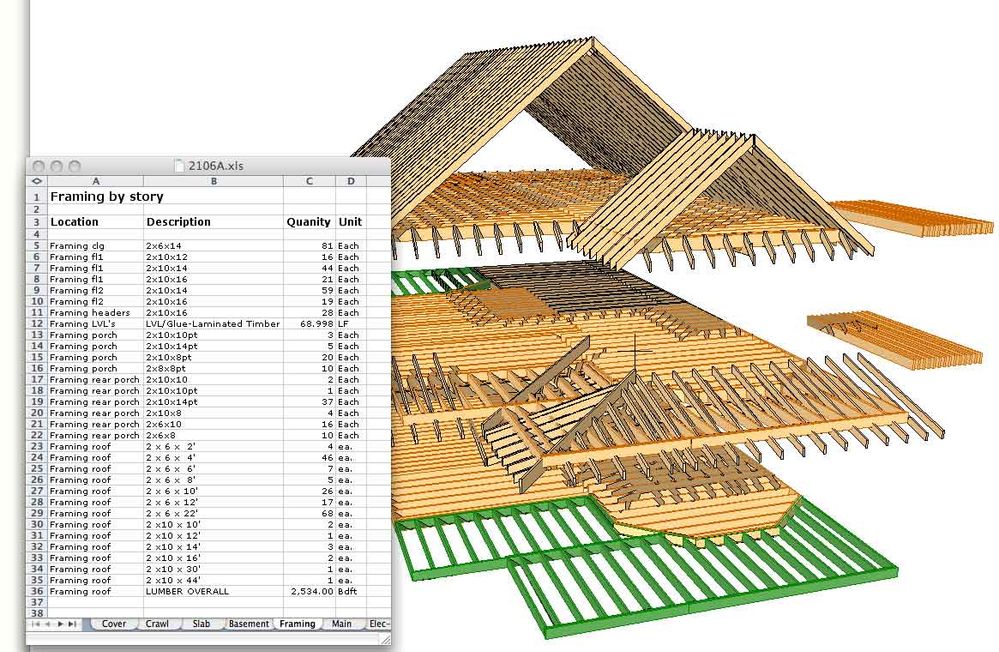
If anyone has used it, or Cigraph is listening in, I have a little script I use to convert the objects (rafters etc) generated from the roof wizard that takes the unusable lengths Ac spits out, and converts them to standard lumber ordering lengths... 2x10x10, rather than 2x10-x9'-3.33333". This is essential for a usable bill of materials. How many 2x10x12's to order, versus a poop load of 2x10x of many different inches that translate into 2x10x12's.
The only way I know to do floor framing is to manually place (multiply/drag copies) for all the joist. I key and quantify these by the ID's (2x10x10, 2x10x14 etc) I assume ArchiQuant will organize all the lumber by ID's? If I could get the info on the screen shot to look like it does in the spread sheet, without having to use the spread sheet, I would be a happy camper.
This is very exciting. The first thing available to generate a bill of materials other than the failed GS's ancient built-in version.
I am also assuming this means AC has committed to not doing any development along this line.
Read-Only
Labels:
- Labels:
-
Data management
39 Replies 39

Thomas Holm
Enthusiast
Options
- Mark as New
- Bookmark
- Subscribe
- Mute
- Subscribe to RSS Feed
- Permalink
- Report Inappropriate Content
2008-04-28 05:45 PM
2008-04-28
05:45 PM
Krippahl wrote:
but a simple formula that lets me know, at any given time, how much the building I am currently designing will cost to build.
 If you find that, please phone me directly, I'll come and rob you of it and sell it world-wide. Won't ever have to work again
Also, I'm interested in the brain upgrade... I do have issues with Cigraph's manuals...
AC4.1-AC26SWE; MacOS13.5.1; MP5,1+MBP16,1

Anonymous
Not applicable
Options
- Mark as New
- Bookmark
- Subscribe
- Mute
- Subscribe to RSS Feed
- Permalink
- Report Inappropriate Content
2008-04-28 05:55 PM
2008-04-28
05:55 PM
This little magic window on my workspace, this is what I am dreaming of:


KeesW
Advocate
Options
- Mark as New
- Bookmark
- Subscribe
- Mute
- Subscribe to RSS Feed
- Permalink
- Report Inappropriate Content
2008-04-30 01:46 AM
2008-04-30
01:46 AM
Miguel Krippahl
Sounds as if we are taking the same journey to the same destination. I've also bought the French book 'from Cad to quantity survey' and found it tedious and far too detailed. I've downloaded ArchiQuant demo and will probably buy the real thing. I'd like an order of cost as I go - not a detailed costing.
However, somewhere in the back of my mind, a small, quiet message says that I am wasting my money because we can already do this in standard ArchiCad - if only there were some clear (VERY clear in my case) instructions of how to do it.
Sounds as if we are taking the same journey to the same destination. I've also bought the French book 'from Cad to quantity survey' and found it tedious and far too detailed. I've downloaded ArchiQuant demo and will probably buy the real thing. I'd like an order of cost as I go - not a detailed costing.
However, somewhere in the back of my mind, a small, quiet message says that I am wasting my money because we can already do this in standard ArchiCad - if only there were some clear (VERY clear in my case) instructions of how to do it.
Cornelis (Kees) Wegman
cornelis wegman architects
AC 5 - 26 Dell XPS 8940 Win 10 16GB 1TB SSD 2TB HD RTX 3070 GPU
Laptop: AC 24 - 26 Win 10 16GB 1TB SSD RTX 3070 GPU
cornelis wegman architects
AC 5 - 26 Dell XPS 8940 Win 10 16GB 1TB SSD 2TB HD RTX 3070 GPU
Laptop: AC 24 - 26 Win 10 16GB 1TB SSD RTX 3070 GPU
Anonymous
Not applicable
Options
- Mark as New
- Bookmark
- Subscribe
- Mute
- Subscribe to RSS Feed
- Permalink
- Report Inappropriate Content
2008-04-30 09:49 AM
2008-04-30
09:49 AM
KeesW
I started to work with Archiquant yesterday, and so far I am impressed. It is very malleable.
For instance, if you are a calculus freak, you can extract the quantities of bricks from a given wall (great for site planning, but then I would use VICO).
If, on the other hand, you are an architect that only need rough estimates, then you can assign a price to a composite wall, taking into account all the components of that wall in a single go.
The later one is really what I am interested in.
When I am designing a building, on an early stage, I have a pretty good idea how much it will cost, just by multiplying the area by a square meter cost.
After 20 years practice, it is fairly easy for me to know the price per square meter, with maybe a 10% error margin, of a given construction method, based on former projects.
My main problem is, clients don´t BELIEVE the price that comes out this way. They usually think I am BS them, and give me the go ahead even if they don´t have the money to build it.
This results, as we all know, in later "financial engineering", when, at the bidding stage, they find out I was right.
To late then.
So, I want a tool that gives me the same price but shows them a list of components with price attached.
This way, it will be much harder for them to ignore those early warnings, and also, it will be easier for me to show them what the consequences of each design choice are on those early stages.
So, I am very optimistic on Archiquant, because, unlike standard AC calculus is very flexible on the detail level.
Ill keep you posted on my progress
I started to work with Archiquant yesterday, and so far I am impressed. It is very malleable.
For instance, if you are a calculus freak, you can extract the quantities of bricks from a given wall (great for site planning, but then I would use VICO).
If, on the other hand, you are an architect that only need rough estimates, then you can assign a price to a composite wall, taking into account all the components of that wall in a single go.
The later one is really what I am interested in.
When I am designing a building, on an early stage, I have a pretty good idea how much it will cost, just by multiplying the area by a square meter cost.
After 20 years practice, it is fairly easy for me to know the price per square meter, with maybe a 10% error margin, of a given construction method, based on former projects.
My main problem is, clients don´t BELIEVE the price that comes out this way. They usually think I am BS them, and give me the go ahead even if they don´t have the money to build it.
This results, as we all know, in later "financial engineering", when, at the bidding stage, they find out I was right.
To late then.
So, I want a tool that gives me the same price but shows them a list of components with price attached.
This way, it will be much harder for them to ignore those early warnings, and also, it will be easier for me to show them what the consequences of each design choice are on those early stages.
So, I am very optimistic on Archiquant, because, unlike standard AC calculus is very flexible on the detail level.
Ill keep you posted on my progress
Anonymous
Not applicable
Options
- Mark as New
- Bookmark
- Subscribe
- Mute
- Subscribe to RSS Feed
- Permalink
- Report Inappropriate Content
2008-05-26 10:09 AM
2008-05-26
10:09 AM
I can say that my first experience with Archiquant is going very well.
It took me about 2 hours to input all the data, which I chose to be simplified. I have no data for each small element, but for the big ones (the receipt in AC).
This way, I get a nice price decomposition by built elements, so I can discuss the solution with the client knowing what each choice costs.
I am very happy with this. its not perfect, but, for 2 hours work, it is more than enough.
It took me about 2 hours to input all the data, which I chose to be simplified. I have no data for each small element, but for the big ones (the receipt in AC).
This way, I get a nice price decomposition by built elements, so I can discuss the solution with the client knowing what each choice costs.
I am very happy with this. its not perfect, but, for 2 hours work, it is more than enough.

Anonymous
Not applicable
Options
- Mark as New
- Bookmark
- Subscribe
- Mute
- Subscribe to RSS Feed
- Permalink
- Report Inappropriate Content
2008-06-11 09:27 AM
2008-06-11
09:27 AM
"Krippahl" wrote:
KeesW
For instance, if you are a calculus freak, you can extract the quantities of bricks from a given wall
Huh?? What has calculus got to do with extracting brick quantities. Isn't that arithmetic?
Anonymous
Not applicable
Options
- Mark as New
- Bookmark
- Subscribe
- Mute
- Subscribe to RSS Feed
- Permalink
- Report Inappropriate Content
2008-06-11 09:33 AM
2008-06-11
09:33 AM
Marcus wrote:You are right Marcus, of course.
Huh?? What has calculus got to do with extracting brick quantities. Isn't that arithmetic?
Maybe I should stick to my native language, Portuguese, so as not to make any mistakes that could induce people into wrong assumptions.
Rick Thompson
Advisor
Options
- Mark as New
- Bookmark
- Subscribe
- Mute
- Subscribe to RSS Feed
- Permalink
- Report Inappropriate Content
2008-06-11 03:15 PM
2008-06-11
03:15 PM
Glad this seems to be working for you. I found it too repetitive to set up, and re-set up for each and every pln. (I have many I work with).
You probably know this, but extracting the number of brick, or whatever, is pretty easy with AC, and once set up can be automatic for other plns. My gripe is the formatting limitations with AC. I am needing to export into Excel to get a nice looking presentation, and to combine a few things. In AC that wasn't something I could make happen, so I export. The issue there, is making one simple change mean another export and adjustment. If AC had better graphic manipulation I would be a happy camper.
You probably know this, but extracting the number of brick, or whatever, is pretty easy with AC, and once set up can be automatic for other plns. My gripe is the formatting limitations with AC. I am needing to export into Excel to get a nice looking presentation, and to combine a few things. In AC that wasn't something I could make happen, so I export. The issue there, is making one simple change mean another export and adjustment. If AC had better graphic manipulation I would be a happy camper.
Anonymous
Not applicable
Options
- Mark as New
- Bookmark
- Subscribe
- Mute
- Subscribe to RSS Feed
- Permalink
- Report Inappropriate Content
2008-06-11 03:36 PM
2008-06-11
03:36 PM
Rick
To tell you the truth, I tried to make ac work but my brain could not cope with it.
On the other hand, I learned ArchiQuant in under an hour.
It is a bit like using Artlantis instead of Lightworks in ac.
Which I do
To tell you the truth, I tried to make ac work but my brain could not cope with it.
On the other hand, I learned ArchiQuant in under an hour.
It is a bit like using Artlantis instead of Lightworks in ac.
Which I do

Achille Pavlidis
Advocate
Options
- Mark as New
- Bookmark
- Subscribe
- Mute
- Subscribe to RSS Feed
- Permalink
- Report Inappropriate Content
2009-02-18 01:04 PM
2009-02-18
01:04 PM
hi Krippahl,
i have been using Archiquant in the past few days, and i have some questions. Unfortunatelly i havent found many infos around so i would to ask you if don't mind, some clarifications...
I use the demo version of ArchiQuant, so i have many limitations, but i have found it very user-friendly. Before buying though i would like to know a couple of things:
1) Is it possible to modify the Components List once it has been saved? I have tried to, and seems i can't. But i do not know if this is because of the demo version. On the manual this thing is pretty unclear.
2) Is it possible to do a "reverse check"? I mean to find where a component has been linked to an Archicad element. I also didn't find anything on the manual but it is very usefull because sometimes when you get a number that doesn't seems right you need a cross-check.
Thanks in advance for your help!
i have been using Archiquant in the past few days, and i have some questions. Unfortunatelly i havent found many infos around so i would to ask you if don't mind, some clarifications...
I use the demo version of ArchiQuant, so i have many limitations, but i have found it very user-friendly. Before buying though i would like to know a couple of things:
1) Is it possible to modify the Components List once it has been saved? I have tried to, and seems i can't. But i do not know if this is because of the demo version. On the manual this thing is pretty unclear.
2) Is it possible to do a "reverse check"? I mean to find where a component has been linked to an Archicad element. I also didn't find anything on the manual but it is very usefull because sometimes when you get a number that doesn't seems right you need a cross-check.
Thanks in advance for your help!
Mac OS 26.4 | AC 29.2.1 INT 5101 FULL
Still looking?

Suggested topics
- Archicad 28 global library sounds very promising in Libraries & objects
- TIP: Fill Area Text position is scale-dependent in Documentation
- Quantity and Cost estimation from Archicad in Project data & BIM
- Sound or blinking reservation alert? in Teamwork & BIMcloud
- Archicad sounds turned off, but still getting sounds when trimming roofs together? in Modeling
