
Turn on suggestions
Auto-suggest helps you quickly narrow down your search results by suggesting possible matches as you type.
Showing results for
EN
Turn on suggestions
Auto-suggest helps you quickly narrow down your search results by suggesting possible matches as you type.
Showing results for
- English
- :
- Forum
- :
- Documentation
- :
- Re: Bad Dimension Chain
Options
- Subscribe to RSS Feed
- Mark Topic as New
- Mark Topic as Read
- Pin this post for me
- Bookmark
- Subscribe to Topic
- Mute
- Printer Friendly Page

Steve Jepson
Virtuoso
Options
- Mark as New
- Bookmark
- Subscribe
- Mute
- Subscribe to RSS Feed
- Permalink
- Report Inappropriate Content
2006-06-27
11:45 PM
- last edited on
2023-05-30
03:24 PM
by
 Rubia Torres
Bad Dimension Chain
2006-06-27
11:45 PM
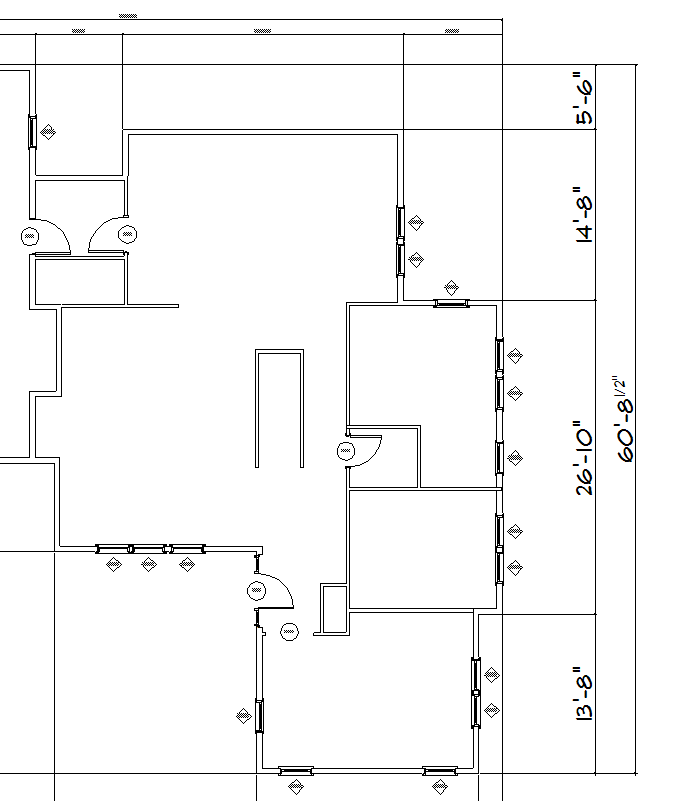
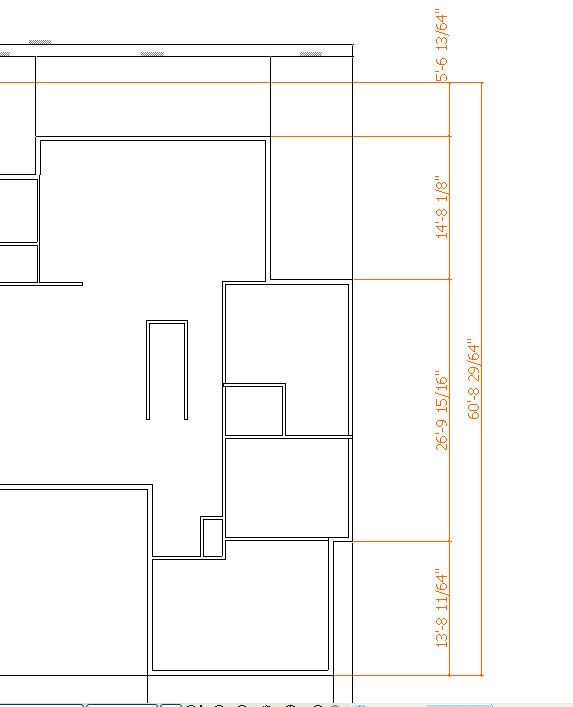
There are no fractions in it, the overall dimension should not have any either.
Yes, I have checked the obvious settings. All are set to max. (1/64")
Any ideas?
ArchiCAD 25 7000 USA - Windows 10 Pro 64x - Dell 7720 64 GB 2400MHz ECC - Xeon E3 1535M v6 4.20GHz - (2) 1TB M.2 PCIe Class 50 SSD's - 17.3" UHD IPS (3840x2160) - Nvidia Quadro P5000 16GB GDDR5 - Maxwell Studio/Render 5.2.1.49- Multilight 2 - Adobe Acrobat Pro - ArchiCAD 6 -25
Read-Only
Labels:
- Labels:
-
Dimension Tools
4 Replies 4
 Link
Link
Graphisoft Partner
Options
- Mark as New
- Bookmark
- Subscribe
- Mute
- Subscribe to RSS Feed
- Permalink
- Report Inappropriate Content
2006-06-28 12:14 AM
2006-06-28
12:14 AM
Steve,
Can you upload a file containing this dimension chain and the associated building elements?
Cheers,
Link.
Can you upload a file containing this dimension chain and the associated building elements?
Cheers,
Link.
Steve Jepson
Virtuoso
Options
- Mark as New
- Bookmark
- Subscribe
- Mute
- Subscribe to RSS Feed
- Permalink
- Report Inappropriate Content
2006-06-28 12:32 AM
2006-06-28
12:32 AM
this is it. I deleted the windows and doors to get the file small enough to post.
ArchiCAD 25 7000 USA - Windows 10 Pro 64x - Dell 7720 64 GB 2400MHz ECC - Xeon E3 1535M v6 4.20GHz - (2) 1TB M.2 PCIe Class 50 SSD's - 17.3" UHD IPS (3840x2160) - Nvidia Quadro P5000 16GB GDDR5 - Maxwell Studio/Render 5.2.1.49- Multilight 2 - Adobe Acrobat Pro - ArchiCAD 6 -25
Link
Graphisoft Partner
Options
- Mark as New
- Bookmark
- Subscribe
- Mute
- Subscribe to RSS Feed
- Permalink
- Report Inappropriate Content
2006-06-28 12:41 AM
2006-06-28
12:41 AM
And you said you checked all the obvious settings! 
Seriously, did you set your Dimension preferences to 1/64"? This is different than your Working Units.
Cheers,
Link.
Seriously, did you set your Dimension preferences to 1/64"? This is different than your Working Units.
Cheers,
Link.
Steve Jepson
Virtuoso
Options
- Mark as New
- Bookmark
- Subscribe
- Mute
- Subscribe to RSS Feed
- Permalink
- Report Inappropriate Content
2006-06-28 12:43 AM
2006-06-28
12:43 AM

ArchiCAD 25 7000 USA - Windows 10 Pro 64x - Dell 7720 64 GB 2400MHz ECC - Xeon E3 1535M v6 4.20GHz - (2) 1TB M.2 PCIe Class 50 SSD's - 17.3" UHD IPS (3840x2160) - Nvidia Quadro P5000 16GB GDDR5 - Maxwell Studio/Render 5.2.1.49- Multilight 2 - Adobe Acrobat Pro - ArchiCAD 6 -25

Still looking?

