
Turn on suggestions
Auto-suggest helps you quickly narrow down your search results by suggesting possible matches as you type.
Showing results for
EN
Turn on suggestions
Auto-suggest helps you quickly narrow down your search results by suggesting possible matches as you type.
Showing results for
- English
- :
- Forum
- :
- Documentation
- :
- Can't you reduce the font size by just one line in...
Options
- Subscribe to RSS Feed
- Mark Topic as New
- Mark Topic as Read
- Pin this post for me
- Bookmark
- Subscribe to Topic
- Mute
- Printer Friendly Page

LeeJaeYoung
Virtuoso
Options
- Mark as New
- Bookmark
- Subscribe
- Mute
- Subscribe to RSS Feed
- Permalink
- Report Inappropriate Content
2022-06-29
07:13 PM
- last edited on
2023-05-17
05:30 PM
by
 Gordana Radonic
Can't you reduce the font size by just one line in the schedule?
2022-06-29
07:13 PM
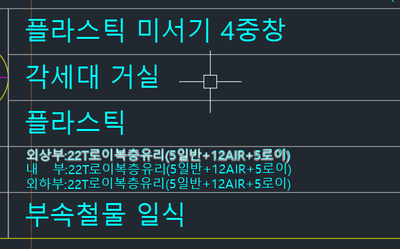
Can't you reduce the font size by just one line in the schedule?
I'm going to reduce the font size of the whole thing ^^
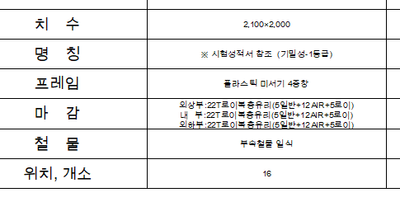
AC27 on window 11
Solved! Go to Solution.
1 Solution
Accepted Solutions

Karl Ottenstein
Moderator Emeritus
Options
- Mark as New
- Bookmark
- Subscribe
- Mute
- Subscribe to RSS Feed
- Permalink
- Report Inappropriate Content
2022-06-29 07:46 PM
2022-06-29
07:46 PM
You can specify different fonts and sizes for headers vs detail rows (for example)... but every detail row will have be the same size.
Vote for Wish: Copy/Paste in 3D
AC 29 USA and earlier • hardware key • macOS Tahoe 26.7 MacBook Pro M2 Max 12CPU/30GPU cores, 32GB
AC 29 USA and earlier • hardware key • macOS Tahoe 26.7 MacBook Pro M2 Max 12CPU/30GPU cores, 32GB
Solution
6 Replies 6
Karl Ottenstein
Moderator Emeritus
Options
- Mark as New
- Bookmark
- Subscribe
- Mute
- Subscribe to RSS Feed
- Permalink
- Report Inappropriate Content
2022-06-29 07:46 PM
2022-06-29
07:46 PM
You can specify different fonts and sizes for headers vs detail rows (for example)... but every detail row will have be the same size.
Vote for Wish: Copy/Paste in 3D
AC 29 USA and earlier • hardware key • macOS Tahoe 26.7 MacBook Pro M2 Max 12CPU/30GPU cores, 32GB
AC 29 USA and earlier • hardware key • macOS Tahoe 26.7 MacBook Pro M2 Max 12CPU/30GPU cores, 32GB
Solution
LeeJaeYoung
Virtuoso
Options
- Mark as New
- Bookmark
- Subscribe
- Mute
- Subscribe to RSS Feed
- Permalink
- Report Inappropriate Content
2022-06-30 03:51 AM
2022-06-30
03:51 AM
thank you ^^
When will the schedule get better? ㅠㅠ
AC27 on window 11
Karl Ottenstein
Moderator Emeritus
Options
- Mark as New
- Bookmark
- Subscribe
- Mute
- Subscribe to RSS Feed
- Permalink
- Report Inappropriate Content
2022-06-30 04:14 AM
2022-06-30
04:14 AM
I've not really seen any wishes for improvements to the schedules other than for the ability to include formulas directly.
Formatting as it is currently done is identical to almost any database report writer which has no ability to distinguish one row from another.
What you're asking for - a smaller font for a particular row - is unusual. You can manually do this by exporting your schedule to Excel, changing the font there, and placing a PDF of the Excel back into your layout. Of course, that is no longer live.
On the other hand, it seems reasonable to wish for a capability to shrink the font of a cell if the content does not fit at the specified setting. You might create a wish like that in the Wishes Forum here:
https://community.graphisoft.com/t5/Wishes-forum/bd-p/ideas
and either post your images again there... or include a link back to this topic.
Vote for Wish: Copy/Paste in 3D
AC 29 USA and earlier • hardware key • macOS Tahoe 26.7 MacBook Pro M2 Max 12CPU/30GPU cores, 32GB
AC 29 USA and earlier • hardware key • macOS Tahoe 26.7 MacBook Pro M2 Max 12CPU/30GPU cores, 32GB
LeeJaeYoung
Virtuoso
Options
- Mark as New
- Bookmark
- Subscribe
- Mute
- Subscribe to RSS Feed
- Permalink
- Report Inappropriate Content
2022-06-30 04:51 AM - edited 2022-06-30 04:52 AM
2022-06-30
04:51 AM
"I've not really seen any wishes for improvements to the schedules other than for the ability to include formulas directly."
What does is mean?
Where can I learn what to study?
AC27 on window 11
Karl Ottenstein
Moderator Emeritus
Options
- Mark as New
- Bookmark
- Subscribe
- Mute
- Subscribe to RSS Feed
- Permalink
- Report Inappropriate Content
2022-06-30 11:29 PM
2022-06-30
11:29 PM
I think we are having language difficulties. I feel badly for that.
What I mean is that I do not remember reading in the forums of many wishes for new features to schedules other than to include formulas in a column ... like Excel, to multiply one column by another for example.
There is nothing to study. :-). "Wishes" are requests to Graphisoft to add new features.
Vote for Wish: Copy/Paste in 3D
AC 29 USA and earlier • hardware key • macOS Tahoe 26.7 MacBook Pro M2 Max 12CPU/30GPU cores, 32GB
AC 29 USA and earlier • hardware key • macOS Tahoe 26.7 MacBook Pro M2 Max 12CPU/30GPU cores, 32GB
LeeJaeYoung
Virtuoso
Options
- Mark as New
- Bookmark
- Subscribe
- Mute
- Subscribe to RSS Feed
- Permalink
- Report Inappropriate Content
2022-07-01 03:53 AM
2022-07-01
03:53 AM
ah! yes~~~
thank you
AC27 on window 11

Still looking?

Suggested topics
- automatic sill line in window schedule in Project data & BIM
- Some free useful objects: Road signs, parametric pathway, roof crickets, crowds in Libraries & objects
- Surface / Component Schedule Bug: Automatic Column Wrapping Ignores Folded Geometry and Returns Flat in Project data & BIM
- A Description line is blank in Keynotes in Documentation
- wall schedule, surface area issue in Project data & BIM
