
Turn on suggestions
Auto-suggest helps you quickly narrow down your search results by suggesting possible matches as you type.
Showing results for
EN
Turn on suggestions
Auto-suggest helps you quickly narrow down your search results by suggesting possible matches as you type.
Showing results for
- English
- :
- Forum
- :
- Documentation
- :
- Re: Composite Wall SHow Colour in Section
Options
- Subscribe to RSS Feed
- Mark Topic as New
- Mark Topic as Read
- Pin this post for me
- Bookmark
- Subscribe to Topic
- Mute
- Printer Friendly Page

Ode1
Booster
Options
- Mark as New
- Bookmark
- Subscribe
- Mute
- Subscribe to RSS Feed
- Permalink
- Report Inappropriate Content
2023-03-17 04:46 AM
Composite Wall SHow Colour in Section
2023-03-17
04:46 AM
Hi.
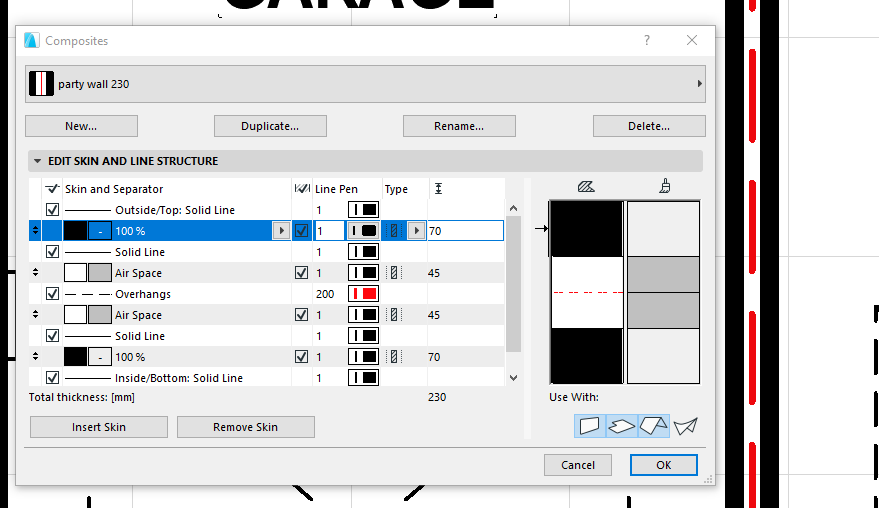
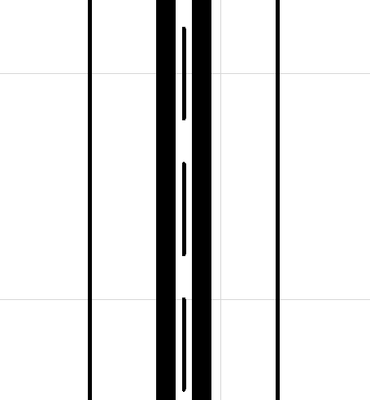
I have a composite wall that shows a red dashed line through the centre. The red only shows on the floor plan. I would like it show in section (2nd pic) as well but don't know what to do. Any ideas?
It used to work in A17 but stopped by 20 if not 19...
Thanks.
Odette Salem
www.virtualhouse.com.au
AC22 AUS . Intel(R) Core(TM) i7-7800X CPU @ 3.50GHz . 32.0 GB ram . 64-bit operating system, x64-based processor
www.virtualhouse.com.au
AC22 AUS . Intel(R) Core(TM) i7-7800X CPU @ 3.50GHz . 32.0 GB ram . 64-bit operating system, x64-based processor
Labels:
- Labels:
-
Graphic Overrides
4 Replies 4

Barry Kelly
Moderator
Options
- Mark as New
- Bookmark
- Subscribe
- Mute
- Subscribe to RSS Feed
- Permalink
- Report Inappropriate Content
2023-03-17 06:16 AM
2023-03-17
06:16 AM
Are you using a different pen set in your section?
Or in your section settings,
You have the cut elements set to use 'uniform pen'.
Barry.
One of the forum moderators.
Versions 6.5 to 27
i7-10700 @ 2.9Ghz, 32GB ram, GeForce RTX 2060 (6GB), Windows 10
Lenovo Thinkpad - i7-1270P 2.20 GHz, 32GB RAM, Nvidia T550, Windows 11
Versions 6.5 to 27
i7-10700 @ 2.9Ghz, 32GB ram, GeForce RTX 2060 (6GB), Windows 10
Lenovo Thinkpad - i7-1270P 2.20 GHz, 32GB RAM, Nvidia T550, Windows 11

Tim Ball
Expert
Options
- Mark as New
- Bookmark
- Subscribe
- Mute
- Subscribe to RSS Feed
- Permalink
- Report Inappropriate Content
2023-03-18 09:47 AM
2023-03-18
09:47 AM
If you pick an edge of a fill you can override the line type and colour
I use this to add a reference line to say a wall that aligns with my grid lines
Tim Ball
AC26, iMac
User since V5
AC26, iMac
User since V5
Ode1
Booster
Options
- Mark as New
- Bookmark
- Subscribe
- Mute
- Subscribe to RSS Feed
- Permalink
- Report Inappropriate Content
2023-03-21 03:46 AM
2023-03-21
03:46 AM
Exactly! I will swear I have unticked the uniform pen box and didn't get a result but I probably had something else ticked that overrode it.
Thank you as usual for your help.
Odette Salem
www.virtualhouse.com.au
AC22 AUS . Intel(R) Core(TM) i7-7800X CPU @ 3.50GHz . 32.0 GB ram . 64-bit operating system, x64-based processor
www.virtualhouse.com.au
AC22 AUS . Intel(R) Core(TM) i7-7800X CPU @ 3.50GHz . 32.0 GB ram . 64-bit operating system, x64-based processor
Ode1
Booster
Options
- Mark as New
- Bookmark
- Subscribe
- Mute
- Subscribe to RSS Feed
- Permalink
- Report Inappropriate Content
2023-03-21 04:25 AM
2023-03-21
04:25 AM
Thank you Tim, I will take a look at that.
Odette Salem
www.virtualhouse.com.au
AC22 AUS . Intel(R) Core(TM) i7-7800X CPU @ 3.50GHz . 32.0 GB ram . 64-bit operating system, x64-based processor
www.virtualhouse.com.au
AC22 AUS . Intel(R) Core(TM) i7-7800X CPU @ 3.50GHz . 32.0 GB ram . 64-bit operating system, x64-based processor

Still looking?

