
Turn on suggestions
Auto-suggest helps you quickly narrow down your search results by suggesting possible matches as you type.
Showing results for
EN
Turn on suggestions
Auto-suggest helps you quickly narrow down your search results by suggesting possible matches as you type.
Showing results for
- English
- :
- Forum
- :
- Documentation
- :
- Re: Elevation levels overlapping. How to adjust th...
Options
- Subscribe to RSS Feed
- Mark Topic as New
- Mark Topic as Read
- Pin this post for me
- Bookmark
- Subscribe to Topic
- Mute
- Printer Friendly Page

Anonymous
Not applicable
Options
- Mark as New
- Bookmark
- Subscribe
- Mute
- Subscribe to RSS Feed
- Permalink
- Report Inappropriate Content
2015-12-22
10:44 AM
- last edited on
2023-05-23
03:08 AM
by
 Gordana Radonic
Elevation levels overlapping. How to adjust them?
2015-12-22
10:44 AM

Read-Only
Labels:
- Labels:
-
Elevations
16 Replies 16

Polar Bear
Booster
Options
- Mark as New
- Bookmark
- Subscribe
- Mute
- Subscribe to RSS Feed
- Permalink
- Report Inappropriate Content
2021-11-06 05:54 PM
2021-11-06
05:54 PM
I am having the same problem. Coming from Revit, the elevations levels are fully adjustable. Why we like to link certain element to it, for exemple, concrete lintel in a stabilised earth building: to adjust levels as design progresses (BIM basic function).
So i guest it's a work around to "hide" the elevation or simply not use them for mid-way structural elements.
Archicad 25 - 5010
Macbook pro 13" /Big sur 11.4 + External 4K 27"
Macbook pro 13" /Big sur 11.4 + External 4K 27"
 Laszlo Nagy
Community Admin
Options
- Mark as New
- Bookmark
- Subscribe
- Mute
- Subscribe to RSS Feed
- Permalink
- Report Inappropriate Content
2021-11-07 01:23 AM
2021-11-07
01:23 AM
There is a free Story Marker which I think will solve this issue. It looks like it is already updated for AC25, with previous versions also available:
https://www.indigofigs.com/story-marker/
Loving Archicad since 1995 - Find Archicad Tips at x.com/laszlonagy
AMD Ryzen9 5900X CPU, 64 GB RAM 3600 MHz, Nvidia GTX 1060 6GB, 500 GB NVMe SSD
2x28" (2560x1440), Windows 10 PRO ENG, Ac20-Ac29
AMD Ryzen9 5900X CPU, 64 GB RAM 3600 MHz, Nvidia GTX 1060 6GB, 500 GB NVMe SSD
2x28" (2560x1440), Windows 10 PRO ENG, Ac20-Ac29

Ignacio Azpiazu
Ace
Options
- Mark as New
- Bookmark
- Subscribe
- Mute
- Subscribe to RSS Feed
- Permalink
- Report Inappropriate Content
2021-11-07 02:39 AM
2021-11-07
02:39 AM
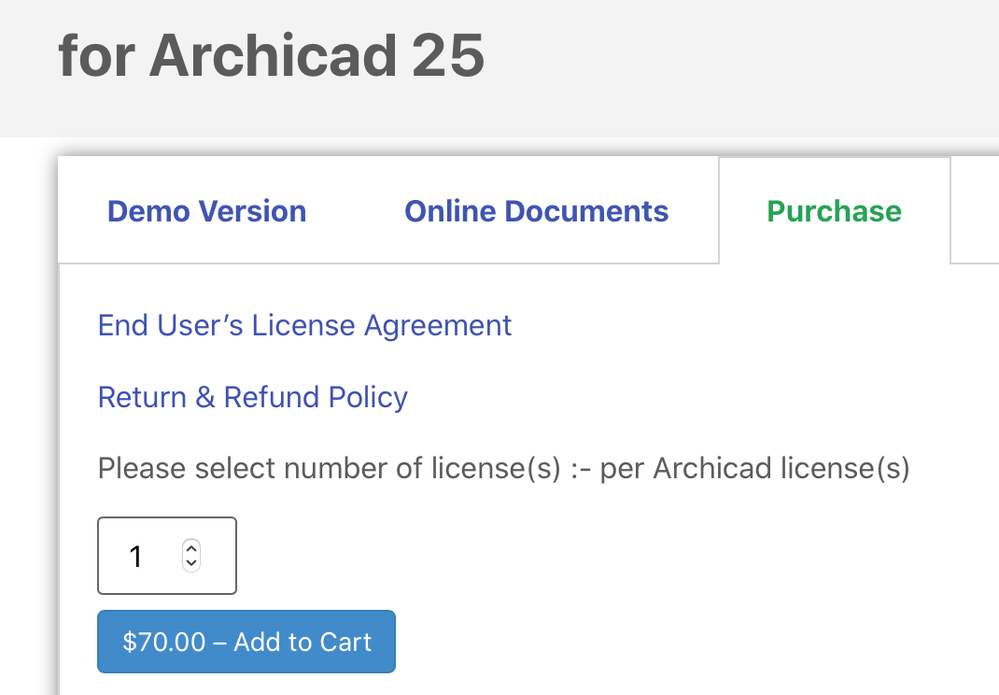
Not free.

 Laszlo Nagy
Community Admin
Options
- Mark as New
- Bookmark
- Subscribe
- Mute
- Subscribe to RSS Feed
- Permalink
- Report Inappropriate Content
2021-11-07 05:09 AM
2021-11-07
05:09 AM
Ah, OK, sorry, I remembered that it used to be free, seems like it is no longer the case.
Loving Archicad since 1995 - Find Archicad Tips at x.com/laszlonagy
AMD Ryzen9 5900X CPU, 64 GB RAM 3600 MHz, Nvidia GTX 1060 6GB, 500 GB NVMe SSD
2x28" (2560x1440), Windows 10 PRO ENG, Ac20-Ac29
AMD Ryzen9 5900X CPU, 64 GB RAM 3600 MHz, Nvidia GTX 1060 6GB, 500 GB NVMe SSD
2x28" (2560x1440), Windows 10 PRO ENG, Ac20-Ac29
Ignacio Azpiazu
Ace
Options
- Mark as New
- Bookmark
- Subscribe
- Mute
- Subscribe to RSS Feed
- Permalink
- Report Inappropriate Content
2021-11-07 06:29 AM
2021-11-07
06:29 AM
Realised post-facto: previous versions (up to AC24) are free. I don't know if there is anything in the script stopping one from using the AC24 title on AC25. In any case, it is free for AC24.
Polar Bear
Booster
Options
- Mark as New
- Bookmark
- Subscribe
- Mute
- Subscribe to RSS Feed
- Permalink
- Report Inappropriate Content
2021-11-08 09:03 PM
2021-11-08
09:03 PM
Thanks a lot!
Archicad 25 - 5010
Macbook pro 13" /Big sur 11.4 + External 4K 27"
Macbook pro 13" /Big sur 11.4 + External 4K 27"
Polar Bear
Booster
Options
- Mark as New
- Bookmark
- Subscribe
- Mute
- Subscribe to RSS Feed
- Permalink
- Report Inappropriate Content
2021-11-08 09:18 PM
2021-11-08
09:18 PM
I have looked at the indigo marker, and even that isn't so easy grab and aranged. I was looking at a revit like easiness of customizing the level marker...
Archicad 25 - 5010
Macbook pro 13" /Big sur 11.4 + External 4K 27"
Macbook pro 13" /Big sur 11.4 + External 4K 27"
- « Previous
-
- 1
- 2
- Next »
- « Previous
-
- 1
- 2
- Next »
Still looking?

