
Turn on suggestions
Auto-suggest helps you quickly narrow down your search results by suggesting possible matches as you type.
Showing results for
EN
Turn on suggestions
Auto-suggest helps you quickly narrow down your search results by suggesting possible matches as you type.
Showing results for
- English
- :
- Forum
- :
- Documentation
- :
- Re: How to override door or window fill?
Options
- Subscribe to RSS Feed
- Mark Topic as New
- Mark Topic as Read
- Pin this post for me
- Bookmark
- Subscribe to Topic
- Mute
- Printer Friendly Page

Achille Pavlidis
Advocate
Options
- Mark as New
- Bookmark
- Subscribe
- Mute
- Subscribe to RSS Feed
- Permalink
- Report Inappropriate Content
2020-11-03
10:53 AM
- last edited on
2025-02-06
11:32 AM
by
 Aruzhan Ilaikova
How to override door or window fill?
2020-11-03
10:53 AM
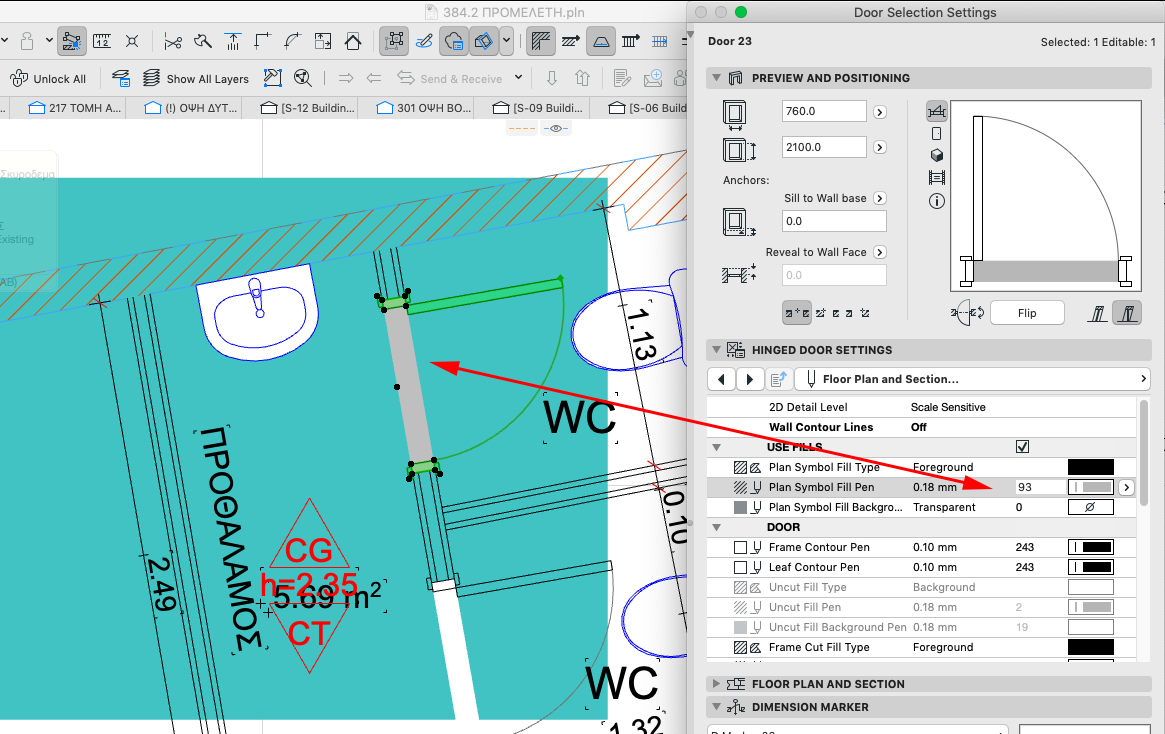
I'm trying to override the fills of doors and windows, and I cannot get it work.
How do I get to set the Plan symbol fill of a door to be transparent with GO?
I've set a rule that the Doors fills are overriden to "empty fill" which works for the leaf, casing etc, but the Plan Symbol Fill doesn't get overridden...
Why?
How do I get to set the Plan symbol fill of a door to be transparent with GO?
I've set a rule that the Doors fills are overriden to "empty fill" which works for the leaf, casing etc, but the Plan Symbol Fill doesn't get overridden...
Why?
Mac OS 26.1 | AC 29.1.0 INT 4006 FULL
Solved! Go to Solution.
1 Solution
Accepted Solutions
 Laszlo Nagy
Community Admin
Options
- Mark as New
- Bookmark
- Subscribe
- Mute
- Subscribe to RSS Feed
- Permalink
- Report Inappropriate Content
2020-11-03 06:09 PM
2020-11-03
06:09 PM
Achille,
If you apply a Graphic Override Rule that makes Cover Fills transparent, it will work. I just tried it in AC24 and it works for me.
If you apply a Graphic Override Rule that makes Cover Fills transparent, it will work. I just tried it in AC24 and it works for me.
Loving Archicad since 1995 - Find Archicad Tips at x.com/laszlonagy
AMD Ryzen9 5900X CPU, 64 GB RAM 3600 MHz, Nvidia GTX 1060 6GB, 500 GB NVMe SSD
2x28" (2560x1440), Windows 10 PRO ENG, Ac20-Ac29
AMD Ryzen9 5900X CPU, 64 GB RAM 3600 MHz, Nvidia GTX 1060 6GB, 500 GB NVMe SSD
2x28" (2560x1440), Windows 10 PRO ENG, Ac20-Ac29
Solution
2 Replies 2
Laszlo Nagy
Community Admin
Options
- Mark as New
- Bookmark
- Subscribe
- Mute
- Subscribe to RSS Feed
- Permalink
- Report Inappropriate Content
2020-11-03 06:09 PM
2020-11-03
06:09 PM
Achille,
If you apply a Graphic Override Rule that makes Cover Fills transparent, it will work. I just tried it in AC24 and it works for me.
If you apply a Graphic Override Rule that makes Cover Fills transparent, it will work. I just tried it in AC24 and it works for me.
Loving Archicad since 1995 - Find Archicad Tips at x.com/laszlonagy
AMD Ryzen9 5900X CPU, 64 GB RAM 3600 MHz, Nvidia GTX 1060 6GB, 500 GB NVMe SSD
2x28" (2560x1440), Windows 10 PRO ENG, Ac20-Ac29
AMD Ryzen9 5900X CPU, 64 GB RAM 3600 MHz, Nvidia GTX 1060 6GB, 500 GB NVMe SSD
2x28" (2560x1440), Windows 10 PRO ENG, Ac20-Ac29
Solution
Achille Pavlidis
Advocate
Options
- Mark as New
- Bookmark
- Subscribe
- Mute
- Subscribe to RSS Feed
- Permalink
- Report Inappropriate Content
2020-11-04 02:35 PM
2020-11-04
02:35 PM
Thanks Laszlo!
Mac OS 26.1 | AC 29.1.0 INT 4006 FULL

Still looking?
Suggested topics
- Section Views and Plan Views in Documentation
- Detailing | Better methods of 2d drafting, creation of Blocks , Detail Elements , 2d Objects in Documentation
- W Lesene 27, complex profile wall fill direction problem in Modeling
- Window Schedule - View from Opening Side Display Colors in Documentation
- Graphic overrides for lines in Documentation
