
Turn on suggestions
Auto-suggest helps you quickly narrow down your search results by suggesting possible matches as you type.
Showing results for
EN
Turn on suggestions
Auto-suggest helps you quickly narrow down your search results by suggesting possible matches as you type.
Showing results for
- English
- :
- Forum
- :
- Documentation
- :
- Identical objects/materials show "connected" in 3D
Options
- Subscribe to RSS Feed
- Mark Topic as New
- Mark Topic as Read
- Pin this post for me
- Bookmark
- Subscribe to Topic
- Mute
- Printer Friendly Page

Voytek
Enthusiast
Options
- Mark as New
- Bookmark
- Subscribe
- Mute
- Subscribe to RSS Feed
- Permalink
- Report Inappropriate Content
2021-11-18 08:19 AM - edited 2021-11-18 08:30 AM
Identical objects/materials show "connected" in 3D
2021-11-18
08:19 AM
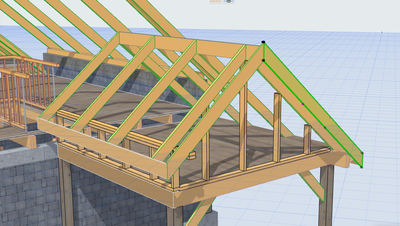
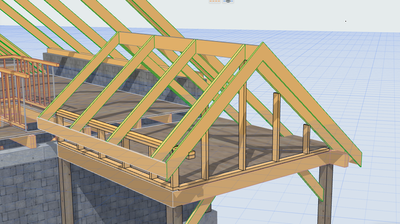
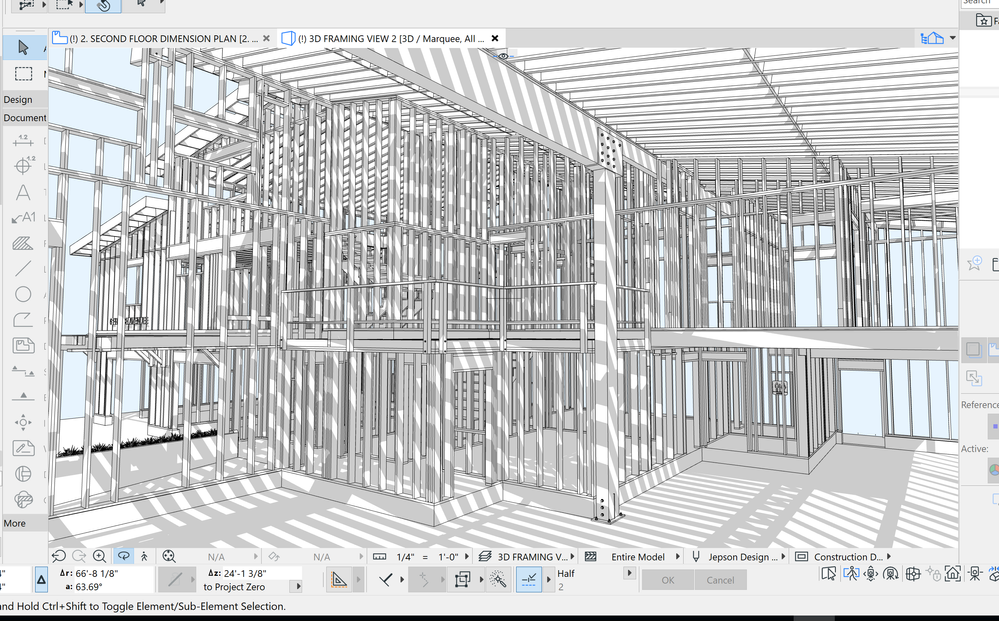
Please refer to the attached screen-prints. I am looking for a thin line separating the facia members (rafters) where they meet on top. They currently show as one L-shape member, which is inaccurate. Simple ways to overcome this issue would be appreciated.
AC 4.55 to AC 29 USA Studio - Windows 11 Pro - HP ZBook Fury G1i 18 inch Mobile Workstation, Intel® Core™ Ultra 9 285HX128 GB RAM2 TB SSD18" WQXGA, 165 HzNVIDIA® RTX PRO™ 5000 PC Display 2560x1600
Solved! Go to Solution.
Solved
Read-Only
3 Solutions
Accepted Solutions

Barry Kelly
Moderator
Options
- Mark as New
- Bookmark
- Subscribe
- Mute
- Subscribe to RSS Feed
- Permalink
- Report Inappropriate Content
2021-11-18 08:34 AM - edited 2021-11-18 08:37 AM
2021-11-18
08:34 AM
That depends on how the objects are scripted.
Here are 2 similar objects,
One merges and the other doesn't.
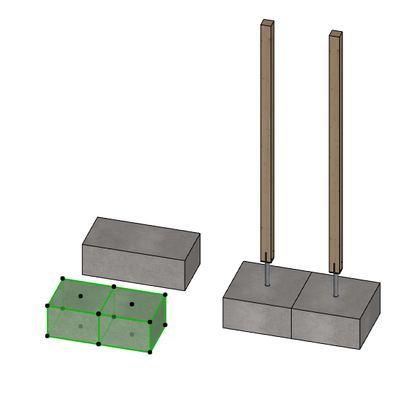
There is not much you can do about it unless you want to go amending the GDL scripts.
Unless you create 2 separate surfaces/materials that look the same but have slightly different names.
Barry.
One of the forum moderators.
Versions 6.5 to 27
i7-10700 @ 2.9Ghz, 32GB ram, GeForce RTX 2060 (6GB), Windows 10
Lenovo Thinkpad - i7-1270P 2.20 GHz, 32GB RAM, Nvidia T550, Windows 11
Versions 6.5 to 27
i7-10700 @ 2.9Ghz, 32GB ram, GeForce RTX 2060 (6GB), Windows 10
Lenovo Thinkpad - i7-1270P 2.20 GHz, 32GB RAM, Nvidia T550, Windows 11

DGSketcher
Legend
Options
- Mark as New
- Bookmark
- Subscribe
- Mute
- Subscribe to RSS Feed
- Permalink
- Report Inappropriate Content
2021-11-18 09:29 AM
2021-11-18
09:29 AM
@Voytek Given the advanced state of modelling...
1. ^^^ Do as Barry says with the materials. Maintains everything as standard.
2. Introduce operator "error" and pull objects a TINY amount out of place.
3. Adjust the length of the object to do the same as 2.
4. Draw a single Morph boundary line. Unfortunately these get left floating if the model changes.
Apple iMac Intel i9 / macOS Sonoma / AC27UKI (most recent builds.. if they work)

Steve Jepson
Virtuoso
Options
- Mark as New
- Bookmark
- Subscribe
- Mute
- Subscribe to RSS Feed
- Permalink
- Report Inappropriate Content
2021-11-19 02:13 AM - edited 2021-11-19 02:20 AM
2021-11-19
02:13 AM
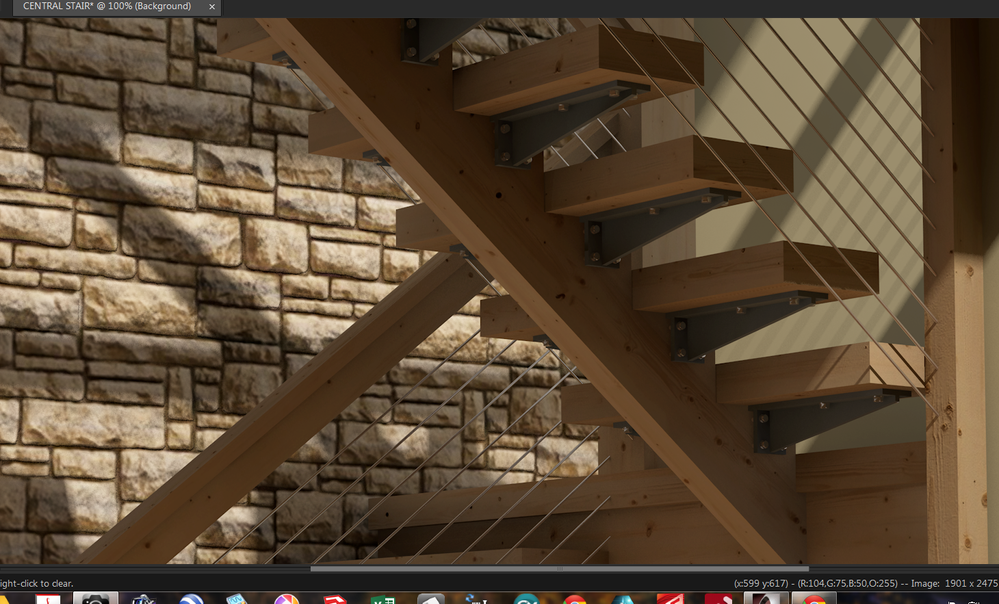
This is very easy to fix. Just duplicate the Surface with a slightly different name. Surface, Surface1, Surface2... the only thing that has to be different is the name and it will display the line. This is also important if you want this to work in White Models, or in projects where you need those lines everywhere, not just one or two you could fix with a morph line. I would also add that making some duplicate Surfaces for wood materials is something you may want to do anyway so you can always have the correct orientation of the wood grain. Nothing wrecks a good rendering like having the woodgrain going in the opposite direction !
ArchiCAD 25 7000 USA - Windows 10 Pro 64x - Dell 7720 64 GB 2400MHz ECC - Xeon E3 1535M v6 4.20GHz - (2) 1TB M.2 PCIe Class 50 SSD's - 17.3" UHD IPS (3840x2160) - Nvidia Quadro P5000 16GB GDDR5 - Maxwell Studio/Render 5.2.1.49- Multilight 2 - Adobe Acrobat Pro - ArchiCAD 6 -25
6 Replies 6
Barry Kelly
Moderator
Options
- Mark as New
- Bookmark
- Subscribe
- Mute
- Subscribe to RSS Feed
- Permalink
- Report Inappropriate Content
2021-11-18 08:34 AM - edited 2021-11-18 08:37 AM
2021-11-18
08:34 AM
That depends on how the objects are scripted.
Here are 2 similar objects,
One merges and the other doesn't.
There is not much you can do about it unless you want to go amending the GDL scripts.
Unless you create 2 separate surfaces/materials that look the same but have slightly different names.
Barry.
One of the forum moderators.
Versions 6.5 to 27
i7-10700 @ 2.9Ghz, 32GB ram, GeForce RTX 2060 (6GB), Windows 10
Lenovo Thinkpad - i7-1270P 2.20 GHz, 32GB RAM, Nvidia T550, Windows 11
Versions 6.5 to 27
i7-10700 @ 2.9Ghz, 32GB ram, GeForce RTX 2060 (6GB), Windows 10
Lenovo Thinkpad - i7-1270P 2.20 GHz, 32GB RAM, Nvidia T550, Windows 11
DGSketcher
Legend
Options
- Mark as New
- Bookmark
- Subscribe
- Mute
- Subscribe to RSS Feed
- Permalink
- Report Inappropriate Content
2021-11-18 09:29 AM
2021-11-18
09:29 AM
@Voytek Given the advanced state of modelling...
1. ^^^ Do as Barry says with the materials. Maintains everything as standard.
2. Introduce operator "error" and pull objects a TINY amount out of place.
3. Adjust the length of the object to do the same as 2.
4. Draw a single Morph boundary line. Unfortunately these get left floating if the model changes.
Apple iMac Intel i9 / macOS Sonoma / AC27UKI (most recent builds.. if they work)
Steve Jepson
Virtuoso
Options
- Mark as New
- Bookmark
- Subscribe
- Mute
- Subscribe to RSS Feed
- Permalink
- Report Inappropriate Content
2021-11-19 02:13 AM - edited 2021-11-19 02:20 AM
2021-11-19
02:13 AM
This is very easy to fix. Just duplicate the Surface with a slightly different name. Surface, Surface1, Surface2... the only thing that has to be different is the name and it will display the line. This is also important if you want this to work in White Models, or in projects where you need those lines everywhere, not just one or two you could fix with a morph line. I would also add that making some duplicate Surfaces for wood materials is something you may want to do anyway so you can always have the correct orientation of the wood grain. Nothing wrecks a good rendering like having the woodgrain going in the opposite direction !
ArchiCAD 25 7000 USA - Windows 10 Pro 64x - Dell 7720 64 GB 2400MHz ECC - Xeon E3 1535M v6 4.20GHz - (2) 1TB M.2 PCIe Class 50 SSD's - 17.3" UHD IPS (3840x2160) - Nvidia Quadro P5000 16GB GDDR5 - Maxwell Studio/Render 5.2.1.49- Multilight 2 - Adobe Acrobat Pro - ArchiCAD 6 -25
Voytek
Enthusiast
Options
- Mark as New
- Bookmark
- Subscribe
- Mute
- Subscribe to RSS Feed
- Permalink
- Report Inappropriate Content
2021-11-25 10:23 PM
2021-11-25
10:23 PM
Thanks for your contribution. Assigning different name is my preferred way forward.
AC 4.55 to AC 29 USA Studio - Windows 11 Pro - HP ZBook Fury G1i 18 inch Mobile Workstation, Intel® Core™ Ultra 9 285HX128 GB RAM2 TB SSD18" WQXGA, 165 HzNVIDIA® RTX PRO™ 5000 PC Display 2560x1600
Voytek
Enthusiast
Options
- Mark as New
- Bookmark
- Subscribe
- Mute
- Subscribe to RSS Feed
- Permalink
- Report Inappropriate Content
2021-11-25 10:24 PM
2021-11-25
10:24 PM
Thanks. Very helpful.
AC 4.55 to AC 29 USA Studio - Windows 11 Pro - HP ZBook Fury G1i 18 inch Mobile Workstation, Intel® Core™ Ultra 9 285HX128 GB RAM2 TB SSD18" WQXGA, 165 HzNVIDIA® RTX PRO™ 5000 PC Display 2560x1600
Voytek
Enthusiast
Options
- Mark as New
- Bookmark
- Subscribe
- Mute
- Subscribe to RSS Feed
- Permalink
- Report Inappropriate Content
2021-11-25 10:26 PM
2021-11-25
10:26 PM
Good advice. Thank you. BTW: Nice work presented.
AC 4.55 to AC 29 USA Studio - Windows 11 Pro - HP ZBook Fury G1i 18 inch Mobile Workstation, Intel® Core™ Ultra 9 285HX128 GB RAM2 TB SSD18" WQXGA, 165 HzNVIDIA® RTX PRO™ 5000 PC Display 2560x1600

Still looking?

Suggested topics
- Rounded Wall Corner displays correctly in Floor Plan but glitches in 3D Document in Modeling
- Recurring dyld/Mach-O SIGBUS crash in Archicad 29 (v2025 FULL INT, Build 5101) in Installation & update
- Automatic View Names in Documentation
- Favorites Palette 2.0! – Free add-on for Archicad 29 in General discussions
- SAF import/export for Archicad in Project data & BIM
