
Turn on suggestions
Auto-suggest helps you quickly narrow down your search results by suggesting possible matches as you type.
Showing results for
EN
Turn on suggestions
Auto-suggest helps you quickly narrow down your search results by suggesting possible matches as you type.
Showing results for
- English
- :
- Forum
- :
- Documentation
- :
- Re: Section Part Marker and Section Marker Rotatio...
Options
- Subscribe to RSS Feed
- Mark Topic as New
- Mark Topic as Read
- Pin this post for me
- Bookmark
- Subscribe to Topic
- Mute
- Printer Friendly Page
rob2218
Enthusiast
Options
- Mark as New
- Bookmark
- Subscribe
- Mute
- Subscribe to RSS Feed
- Permalink
- Report Inappropriate Content
2020-02-21
07:27 PM
- last edited on
2023-05-30
12:25 PM
by
 Rubia Torres
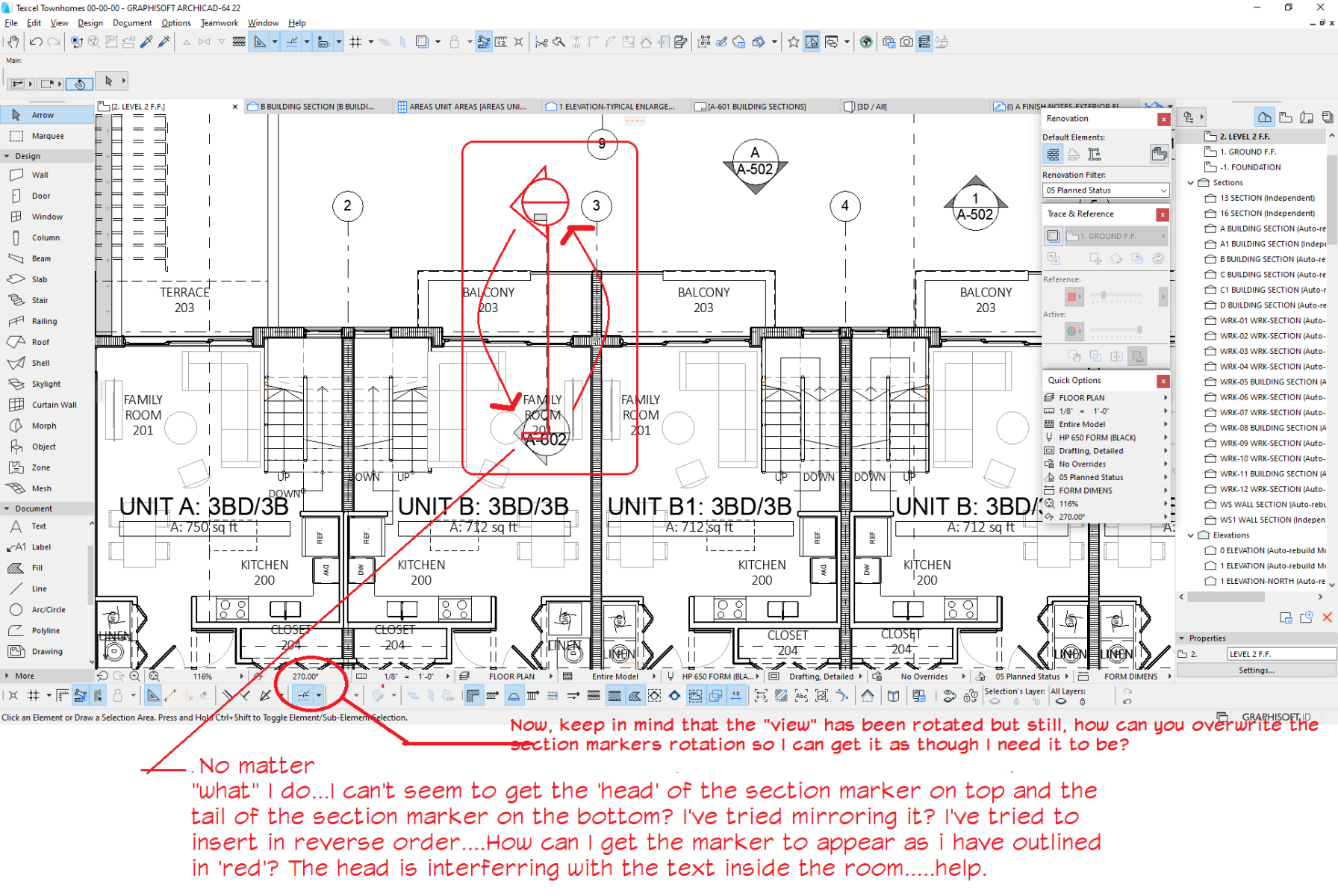
Section Part Marker and Section Marker Rotations.....locked into showing the information certain way
2020-02-21
07:27 PM
...Bobby Hollywood live from...
i>u
Edgewater, FL!
SOFTWARE VERSION:
Archicad 22, Archicad 23
Windows7 -OS, MAC Maverick OS
i>u
Edgewater, FL!
SOFTWARE VERSION:
Archicad 22, Archicad 23
Windows7 -OS, MAC Maverick OS
4 Replies 4

David Maudlin
Rockstar
Options
- Mark as New
- Bookmark
- Subscribe
- Mute
- Subscribe to RSS Feed
- Permalink
- Report Inappropriate Content
2020-02-22 02:14 PM
2020-02-22
02:14 PM
rob2218:
If it is the Section Part Marker_NCS 23, then Section settings > Marker Symbol and Text > Marker Geometry, Appearance > Flip Marker.
David
If it is the Section Part Marker_NCS 23, then Section settings > Marker Symbol and Text > Marker Geometry, Appearance > Flip Marker.
David
David Maudlin / Architect
www.davidmaudlin.com
Digital Architecture
AC29 USA Perpetual • Mac mini M4 Pro OSX15 | 64 gb ram • MacBook Pro M3 Pro OSX14 | 36 gb ram
www.davidmaudlin.com
Digital Architecture
AC29 USA Perpetual • Mac mini M4 Pro OSX15 | 64 gb ram • MacBook Pro M3 Pro OSX14 | 36 gb ram
rob2218
Enthusiast
Options
- Mark as New
- Bookmark
- Subscribe
- Mute
- Subscribe to RSS Feed
- Permalink
- Report Inappropriate Content
2020-02-25 07:48 PM
2020-02-25
07:48 PM
I'm using AC22....is it the same parameter?
...Bobby Hollywood live from...
i>u
Edgewater, FL!
SOFTWARE VERSION:
Archicad 22, Archicad 23
Windows7 -OS, MAC Maverick OS
i>u
Edgewater, FL!
SOFTWARE VERSION:
Archicad 22, Archicad 23
Windows7 -OS, MAC Maverick OS
rob2218
Enthusiast
Options
- Mark as New
- Bookmark
- Subscribe
- Mute
- Subscribe to RSS Feed
- Permalink
- Report Inappropriate Content
2020-02-25 07:50 PM
2020-02-25
07:50 PM
David wrote:
rob2218:
If it is the Section Part Marker_NCS 23, then Section settings > Marker Symbol and Text > Marker Geometry, Appearance > Flip Marker.
David
...Bobby Hollywood live from...
i>u
Edgewater, FL!
SOFTWARE VERSION:
Archicad 22, Archicad 23
Windows7 -OS, MAC Maverick OS
i>u
Edgewater, FL!
SOFTWARE VERSION:
Archicad 22, Archicad 23
Windows7 -OS, MAC Maverick OS

rob2218
Enthusiast
Options
- Mark as New
- Bookmark
- Subscribe
- Mute
- Subscribe to RSS Feed
- Permalink
- Report Inappropriate Content
2020-02-25 07:56 PM
2020-02-25
07:56 PM
in AC22....it's located slightly differently than in AC23.
Go figure. GS...always switching and hiding where those darn "check boxes" and "functionalities" are.
thanks.
Go figure. GS...always switching and hiding where those darn "check boxes" and "functionalities" are.
thanks.
...Bobby Hollywood live from...
i>u
Edgewater, FL!
SOFTWARE VERSION:
Archicad 22, Archicad 23
Windows7 -OS, MAC Maverick OS
i>u
Edgewater, FL!
SOFTWARE VERSION:
Archicad 22, Archicad 23
Windows7 -OS, MAC Maverick OS


Still looking?
Suggested topics
- Ci Tools Keynotes | Archicad Keynotes | Properties | Attributes in Project data & BIM
- Archicad 29 AI Visualizer – Licence Issue in Installation & update
- Best free IFC viewer / checking workflow for Archicad on macOS? in Collaboration with other software
- BIMx sign-in fails on iPadOS 16 due to untrusted Graphisoft certificate in BIMx
- MULTIPLE VIEWING OPTIONS in Visualization
