
Turn on suggestions
Auto-suggest helps you quickly narrow down your search results by suggesting possible matches as you type.
Showing results for
EN
Turn on suggestions
Auto-suggest helps you quickly narrow down your search results by suggesting possible matches as you type.
Showing results for
- English
- :
- Forum
- :
- Documentation
- :
- Re: Show X & Y dimensions of zone tool in plan vie...
Options
- Subscribe to RSS Feed
- Mark Topic as New
- Mark Topic as Read
- Pin this post for me
- Bookmark
- Subscribe to Topic
- Mute
- Printer Friendly Page

fortyone
Participant
Options
- Mark as New
- Bookmark
- Subscribe
- Mute
- Subscribe to RSS Feed
- Permalink
- Report Inappropriate Content
2019-09-11
05:39 AM
- last edited on
2023-05-09
01:27 PM
by
 Gordana Radonic
Show X & Y dimensions of zone tool in plan view..
2019-09-11
05:39 AM
Good afternoon team,
Is there a way of showing the X and Y dimensions of a zone? I cant seem to use associative text label in plan view and the zone stamp tool doesn't have this option. AC22
Do you know of a way of doing this?
Is there a way of showing the X and Y dimensions of a zone? I cant seem to use associative text label in plan view and the zone stamp tool doesn't have this option. AC22
Do you know of a way of doing this?
32 Replies 32

Cosminn
Enthusiast
Options
- Mark as New
- Bookmark
- Subscribe
- Mute
- Subscribe to RSS Feed
- Permalink
- Report Inappropriate Content
2024-07-04 11:04 AM
2024-07-04
11:04 AM
Of course, I can create GDL objects based on specific requirements. A Zoom call would benefit further development; however, I believe my object already includes what you need. I didn't cover all the settings in the video explanation.
Sincerely,
Daniel
Daniel

mthd
Virtuoso
Options
- Mark as New
- Bookmark
- Subscribe
- Mute
- Subscribe to RSS Feed
- Permalink
- Report Inappropriate Content
2024-07-04 11:34 AM
2024-07-04
11:34 AM
That’s really cool but I am happy to write my internal room sizes with text inside my zone stamp for now.
Really the zone tool or a fill object could actually be scripted to do what you have done and be available right OOTB for everyone.
All the best with your GDL tool.
AC8.1 - AC29 ARM AUS + CI Tools
Apple Mac Studio M1 Max Chip 10C CPU
24C GPU 7.8TF 32GB RAM OS Sequoia.
Apple Mac Studio M1 Max Chip 10C CPU
24C GPU 7.8TF 32GB RAM OS Sequoia.
Cosminn
Enthusiast
Options
- Mark as New
- Bookmark
- Subscribe
- Mute
- Subscribe to RSS Feed
- Permalink
- Report Inappropriate Content
2024-07-04 11:46 AM
2024-07-04
11:46 AM
Okay, whatever works for you. All the best to you as well.👍
Sincerely,
Daniel
Daniel

RWARCHPC
Booster
Options
- Mark as New
- Bookmark
- Subscribe
- Mute
- Subscribe to RSS Feed
- Permalink
- Report Inappropriate Content
2024-11-14
06:49 PM
- last edited on
2026-01-19
11:07 AM
by
Laszlo Nagy
2024-11-14
06:49 PM
I think this is a great contribution and would be grateful for an added feature in either the zone tool or your accessory that would include the option to simply add room dimensions under the zone name and number. The room tag would simply read something like: "Bedroom / 201 / 11 x 18", or "Bedroom / 11 x 18". The zone tool has many options that I don't need, and few of the ones that are simple and practical...like overall room dimensions rounded to the nearest inch.

overall dimensions.
Robert Wilkanowski
Archicad 29
Mac OS '15 Sequoia
Hardware: M4 Max with 16-core CPU, 32-core GPU, 40 core GPU, 16-core Neural Engine, 64GB unified memory
1TB SSD storage
Archicad 29
Mac OS '15 Sequoia
Hardware: M4 Max with 16-core CPU, 32-core GPU, 40 core GPU, 16-core Neural Engine, 64GB unified memory
1TB SSD storage

Shir_2025
Booster
Options
- Mark as New
- Bookmark
- Subscribe
- Mute
- Subscribe to RSS Feed
- Permalink
- Report Inappropriate Content
2025-12-13 03:15 AM
2025-12-13
03:15 AM
Hi Barry
Would you be able to share this object with the community? I have tried other ways around it, but this seems to be the best option. Thank you

Barry Kelly
Moderator
Options
- Mark as New
- Bookmark
- Subscribe
- Mute
- Subscribe to RSS Feed
- Permalink
- Report Inappropriate Content
2025-12-13 05:18 AM
2025-12-13
05:18 AM
That particular object, unfortunately not as it is company intellectual property.
Also it is set to work with our company template and attributes (layers, pens lines, etc.)
I will have a look to see if I can recreate it to work with the default Graphisoft template, but that will probably have to wait till after the Christmas break I am afraid.
Barry.
One of the forum moderators.
Versions 6.5 to 27
i7-10700 @ 2.9Ghz, 32GB ram, GeForce RTX 2060 (6GB), Windows 10
Lenovo Thinkpad - i7-1270P 2.20 GHz, 32GB RAM, Nvidia T550, Windows 11
Versions 6.5 to 27
i7-10700 @ 2.9Ghz, 32GB ram, GeForce RTX 2060 (6GB), Windows 10
Lenovo Thinkpad - i7-1270P 2.20 GHz, 32GB RAM, Nvidia T550, Windows 11
Shir_2025
Booster
Options
- Mark as New
- Bookmark
- Subscribe
- Mute
- Subscribe to RSS Feed
- Permalink
- Report Inappropriate Content
2025-12-13 05:33 AM
2025-12-13
05:33 AM
That would be greatly appreciated. I look forward to hearing from you after the break. Enjoy your holidays.
Cosminn
Enthusiast
Options
- Mark as New
- Bookmark
- Subscribe
- Mute
- Subscribe to RSS Feed
- Permalink
- Report Inappropriate Content
2025-12-29 11:31 AM
2025-12-29
11:31 AM
@Robet-Apologies for the delayed reply — I didn’t receive a notification for your message and I’m just seeing it now.
I’ve been working on a workflow that addresses exactly what you mentioned. I’ve prepared a short demo that shows automatic overall dimensions for zones, which updates whenever the zone is resized. You can see how it works in these videos:
Video 1: https://1drv.ms/v/c/483e80840bdeb0c1/IQDahvu1H3MmR5quad6b6uStARXjA0F2YTyZ7zty17HL_Dk
Video 2: https://1drv.ms/v/c/483e80840bdeb0c1/IQBMSmR__4RNSbe8hviVmlRyAYhOJPnP0ZH4Fad0JI_mu6U
I’d love to hear your thoughts on this approach and if it matches what you were looking for.
Best regards,
Daniel
Sincerely,
Daniel
Daniel
Barry Kelly
Moderator
Options
- Mark as New
- Bookmark
- Subscribe
- Mute
- Subscribe to RSS Feed
- Permalink
- Report Inappropriate Content
2026-01-15 10:15 AM - edited 2026-01-19 04:02 AM
2026-01-15
10:15 AM
OK, here is the object (version 25+).
It is only metric unfortunately for those using imperial measurements.
It will show the room size with optional text above and below for room names and finishes if you want.
There are four stretchy hotspots for the corners of the room or area (white crosses will show there but being white, will not print).
Lines and arrows can be turned on to indicate the extent.

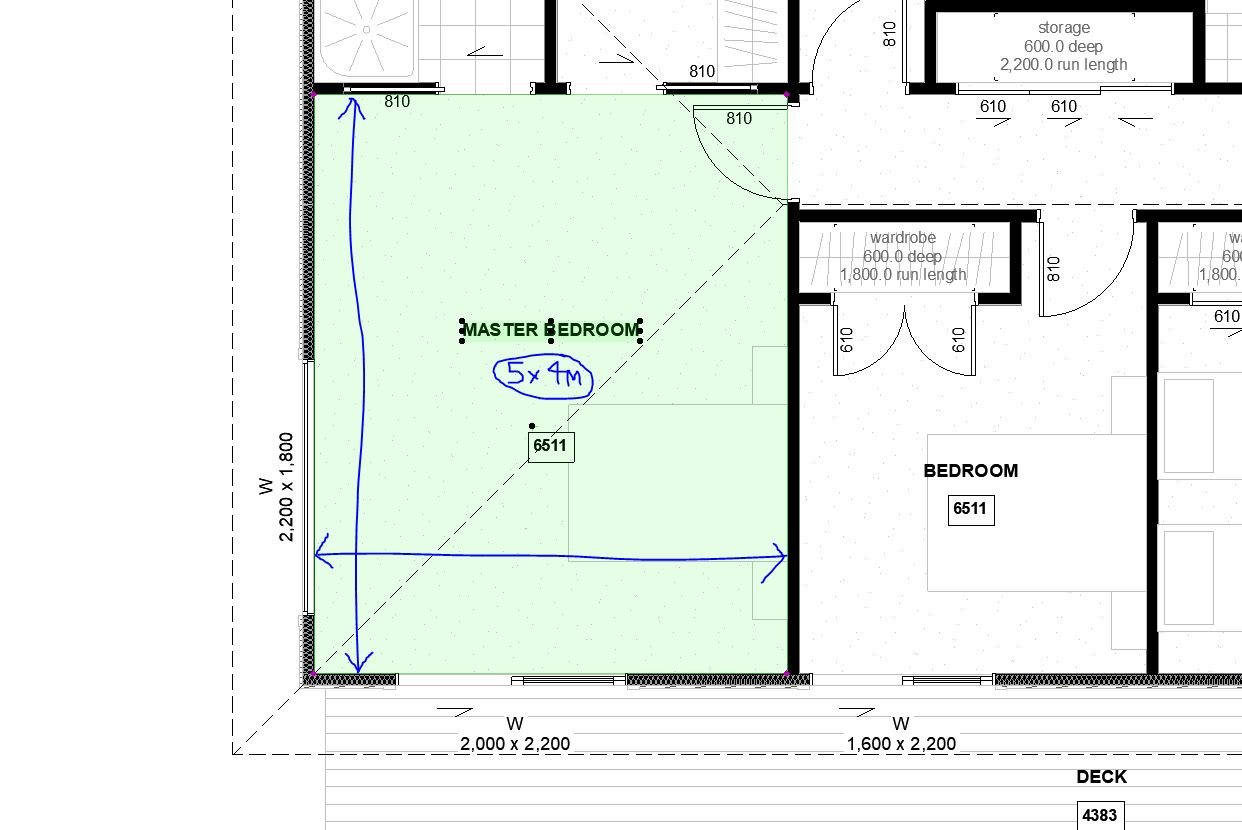
Barry.
One of the forum moderators.
Versions 6.5 to 27
i7-10700 @ 2.9Ghz, 32GB ram, GeForce RTX 2060 (6GB), Windows 10
Lenovo Thinkpad - i7-1270P 2.20 GHz, 32GB RAM, Nvidia T550, Windows 11
Versions 6.5 to 27
i7-10700 @ 2.9Ghz, 32GB ram, GeForce RTX 2060 (6GB), Windows 10
Lenovo Thinkpad - i7-1270P 2.20 GHz, 32GB RAM, Nvidia T550, Windows 11

Mathias Jonathan
Expert
Options
- Mark as New
- Bookmark
- Subscribe
- Mute
- Subscribe to RSS Feed
- Permalink
- Report Inappropriate Content
2026-01-15 10:56 AM
2026-01-15
10:56 AM
Thanks! I can't open the object in archicad 25, 27 or 29 (macOS). I'll try tonight at home on a windows computer.
Archicad 27 - GDL - PYTHON

Still looking?

Suggested topics
- Issues with 3Dconnexxion CadMouse Pro Wireless in Installation & update
- Detail marker as plan in Documentation
- Is there a way to hyperlink files in order to place their drawings into a common layout book? in Documentation
- Automatic mesh hatching on floorplan in Documentation
- Keynot labels and Quick Layers in Documentation
