
Turn on suggestions
Auto-suggest helps you quickly narrow down your search results by suggesting possible matches as you type.
Showing results for
EN
Turn on suggestions
Auto-suggest helps you quickly narrow down your search results by suggesting possible matches as you type.
Showing results for
- English
- :
- Forum
- :
- Documentation
- :
- Re: Show X & Y dimensions of zone tool in plan vie...
Options
- Subscribe to RSS Feed
- Mark Topic as New
- Mark Topic as Read
- Pin this post for me
- Bookmark
- Subscribe to Topic
- Mute
- Printer Friendly Page

fortyone
Participant
Options
- Mark as New
- Bookmark
- Subscribe
- Mute
- Subscribe to RSS Feed
- Permalink
- Report Inappropriate Content
2019-09-11
05:39 AM
- last edited on
2023-05-09
01:27 PM
by
 Gordana Radonic
Show X & Y dimensions of zone tool in plan view..
2019-09-11
05:39 AM
Good afternoon team,
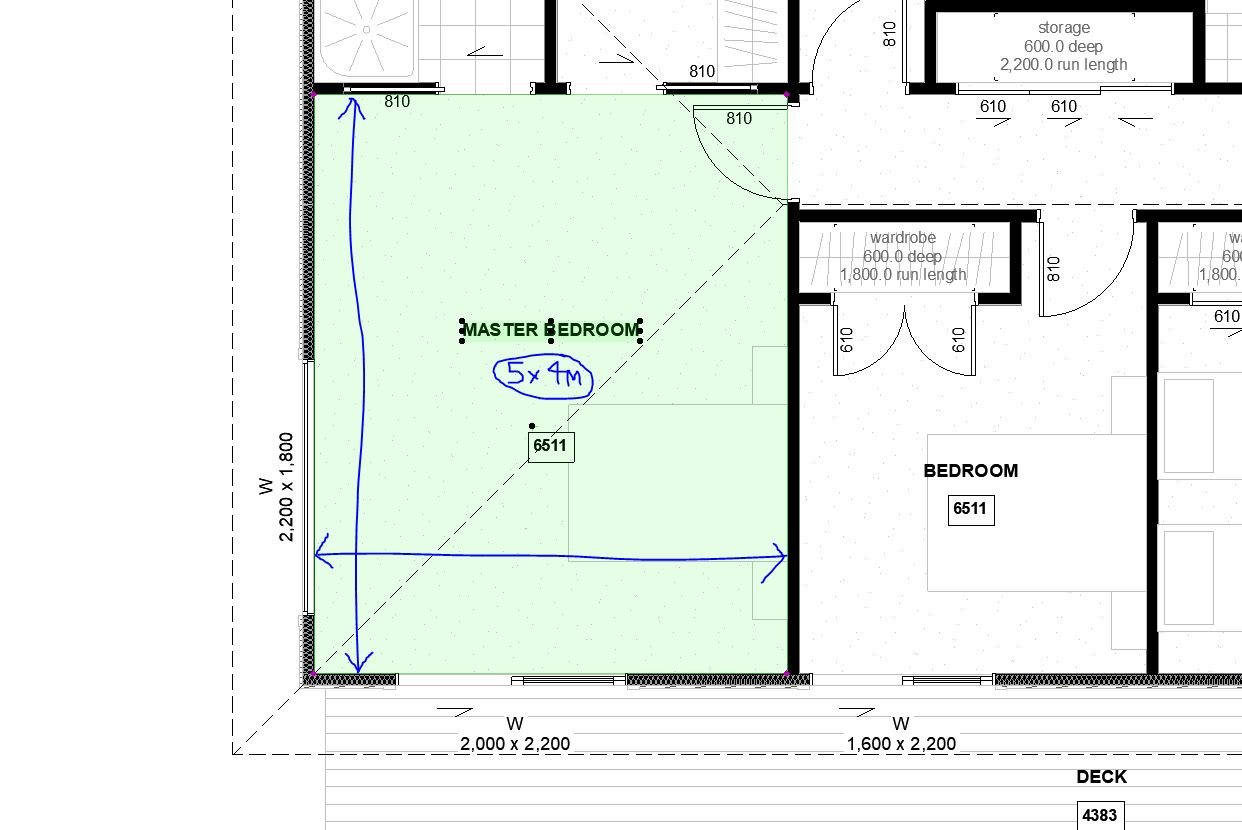
Is there a way of showing the X and Y dimensions of a zone? I cant seem to use associative text label in plan view and the zone stamp tool doesn't have this option. AC22
Do you know of a way of doing this?
Is there a way of showing the X and Y dimensions of a zone? I cant seem to use associative text label in plan view and the zone stamp tool doesn't have this option. AC22
Do you know of a way of doing this?
32 Replies 32

Shir_2025
Booster
Options
- Mark as New
- Bookmark
- Subscribe
- Mute
- Subscribe to RSS Feed
- Permalink
- Report Inappropriate Content
2026-01-23 04:11 AM - edited 2026-01-23 04:13 AM
2026-01-23
04:11 AM
Would it possible to convert the millimetres into metres and remove the last two decimal ?
and also have the text in mult row text? I am currently doing it manually.
Thank you


Barry Kelly
Moderator
Options
- Mark as New
- Bookmark
- Subscribe
- Mute
- Subscribe to RSS Feed
- Permalink
- Report Inappropriate Content
2026-01-23 04:46 AM
2026-01-23
04:46 AM
@Shir_2025 wrote:
Would it possible to convert the millimetres into metres and remove the last two decimal ?
and also have the text in mult row text? I am currently doing it manually.
Anything is possible if you know a little GDL.
This is a very old object and does not use the project preferences for units of measurement, but it could be made to do so.
This one is just millimeters or meters.
It simply converts the measured value and converts it to a text string.
You can alter the string for meters to show only one decimal place, in the 2D script....

IT also simply places the text with the TEXT2 command.
This will simply give you a single line of text.
That would need to be changed to use the PARAGRAPH and RICHTEXT2 commands that would allow for a specific width of text.
Then you could add a hotspot to control that width, creating new lines.
But this would also interfere with the text above and below, so their position would have to be adjusted to allow for the extra lines of text.
Or if you always want two lines for the room size, you could add extra TEXT2 commands to output the height and width on separate lines.
You would still have to adjust the position of the text above and below.
I am just sharing the object as it is, and I am happy for you to edit it or have someone else edit it.
Unfortunately I don't have the time to alter the object for specific needs.
If you reduce the decimal points, you may not need to add the second line anyway.
Barry.
One of the forum moderators.
Versions 6.5 to 27
i7-10700 @ 2.9Ghz, 32GB ram, GeForce RTX 2060 (6GB), Windows 10
Lenovo Thinkpad - i7-1270P 2.20 GHz, 32GB RAM, Nvidia T550, Windows 11
Versions 6.5 to 27
i7-10700 @ 2.9Ghz, 32GB ram, GeForce RTX 2060 (6GB), Windows 10
Lenovo Thinkpad - i7-1270P 2.20 GHz, 32GB RAM, Nvidia T550, Windows 11
Shir_2025
Booster
Options
- Mark as New
- Bookmark
- Subscribe
- Mute
- Subscribe to RSS Feed
- Permalink
- Report Inappropriate Content
2026-01-23 06:34 AM
2026-01-23
06:34 AM
That's great and I have managed to change it, Thank you

- « Previous
- Next »
- « Previous
- Next »
Still looking?
Suggested topics
- Automatic mesh hatching on floorplan in Documentation
- Keynot labels and Quick Layers in Documentation
- TIP: Visual Check for custom Dimension Texts in Documentation
- Section Views and Plan Views in Documentation
- Doors and Windows Schedule Automatic Dimension Button not Responding in Project data & BIM
