
Turn on suggestions
Auto-suggest helps you quickly narrow down your search results by suggesting possible matches as you type.
Showing results for
EN
Turn on suggestions
Auto-suggest helps you quickly narrow down your search results by suggesting possible matches as you type.
Showing results for
- English
- :
- Forum
- :
- Documentation
- :
- Sky effect in non-rendered Exterior Elevations
Options
- Subscribe to RSS Feed
- Mark Topic as New
- Mark Topic as Read
- Pin this post for me
- Bookmark
- Subscribe to Topic
- Mute
- Printer Friendly Page

Anonymous
Not applicable
Options
- Mark as New
- Bookmark
- Subscribe
- Mute
- Subscribe to RSS Feed
- Permalink
- Report Inappropriate Content
2016-12-23
06:43 PM
- last edited on
2023-05-23
03:07 AM
by
 Gordana Radonic
Sky effect in non-rendered Exterior Elevations
2016-12-23
06:43 PM
Thanks!
Read-Only
Labels:
- Labels:
-
Elevations
2 Replies 2

Eduardo Rolon
Moderator
Options
- Mark as New
- Bookmark
- Subscribe
- Mute
- Subscribe to RSS Feed
- Permalink
- Report Inappropriate Content
2016-12-23 09:27 PM
2016-12-23
09:27 PM
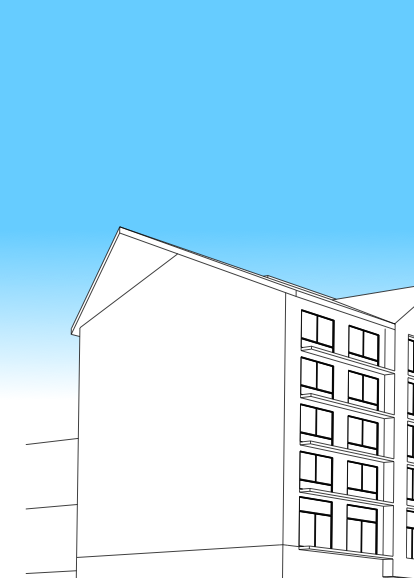
Try using a Gradient Fill behind the Section or Elevation. You can draw a rectangle around the S-E to define an area and then Magic Wand the fill.
Eduardo Rolón AIA NCARB
AC29 US/INT -> AC08
AC29 US/INT -> AC08
Mac Studio M4 Max 64GB ram, OS X 10.XX latest
Anonymous
Not applicable
Options
- Mark as New
- Bookmark
- Subscribe
- Mute
- Subscribe to RSS Feed
- Permalink
- Report Inappropriate Content
2017-01-09 12:04 AM
2017-01-09
12:04 AM
You can place an image using the Drawing tool or the Figure tool and send to back in display order. I have done this in the past with a percentage fill or gradient fill over it too, to fade it out a bit so its not too dominant, but the example below is just an image from the Archicad background images library.

Still looking?

Suggested topics
- PDF publishing in Documentation
- Number of Section Elevation and Detail Markers (Total Number of Viewpoints) in Documentation
- Surface texture in elevation won't publish to pdf in Documentation
- Want to Hire someone to Translate a large Microstation 3d Project in General discussions
- Walls visible in cross sections are disappearing in interior elevations in Modeling
