
Turn on suggestions
Auto-suggest helps you quickly narrow down your search results by suggesting possible matches as you type.
Showing results for
EN
Turn on suggestions
Auto-suggest helps you quickly narrow down your search results by suggesting possible matches as you type.
Showing results for
- English
- :
- Forum
- :
- Documentation
- :
- Re: Surface appears distroted
Options
- Subscribe to RSS Feed
- Mark Topic as New
- Mark Topic as Read
- Pin this post for me
- Bookmark
- Subscribe to Topic
- Mute
- Printer Friendly Page

HBM_ARQ
Participant
Options
- Mark as New
- Bookmark
- Subscribe
- Mute
- Subscribe to RSS Feed
- Permalink
- Report Inappropriate Content
2022-06-08 06:18 PM
Surface appears distroted
2022-06-08
06:18 PM
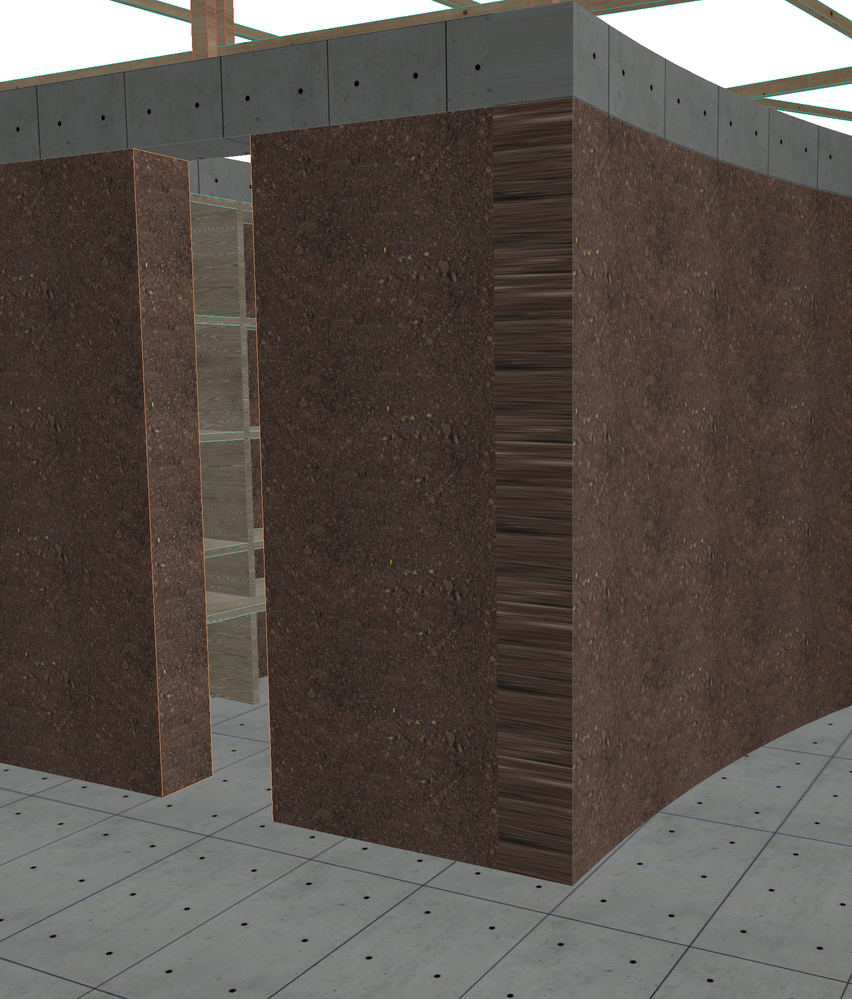
Hi, for some reason, given that the walls are correctly drawn, in some edges, the surface material appears distorted (As you can see in the image). Anyone knows how to fix this?
Solved! Go to Solution.
Solved
Read-Only
1 Solution
Accepted Solutions

Mahmoud Qenawi
Ace
Options
- Mark as New
- Bookmark
- Subscribe
- Mute
- Subscribe to RSS Feed
- Permalink
- Report Inappropriate Content
2022-06-08 08:02 PM
2022-06-08
08:02 PM
I see that’s because the intersection between the two walls ( straight one, curved one ) if you adjust the reference lines positions it may be fixed.
AC 29 INT 4006/WIN 11
AMD Ryzen 7 5800H with Radeon Graphics 3.20 GHz 16.0 GB
AMD Ryzen 7 5800H with Radeon Graphics 3.20 GHz 16.0 GB
3 Replies 3
Mahmoud Qenawi
Ace
Options
- Mark as New
- Bookmark
- Subscribe
- Mute
- Subscribe to RSS Feed
- Permalink
- Report Inappropriate Content
2022-06-08 08:02 PM
2022-06-08
08:02 PM
I see that’s because the intersection between the two walls ( straight one, curved one ) if you adjust the reference lines positions it may be fixed.
AC 29 INT 4006/WIN 11
AMD Ryzen 7 5800H with Radeon Graphics 3.20 GHz 16.0 GB
AMD Ryzen 7 5800H with Radeon Graphics 3.20 GHz 16.0 GB
HBM_ARQ
Participant
Options
- Mark as New
- Bookmark
- Subscribe
- Mute
- Subscribe to RSS Feed
- Permalink
- Report Inappropriate Content
2022-06-08 09:14 PM
2022-06-08
09:14 PM
Thank you
Mahmoud Qenawi
Ace
Options
- Mark as New
- Bookmark
- Subscribe
- Mute
- Subscribe to RSS Feed
- Permalink
- Report Inappropriate Content
2022-06-08 10:06 PM
2022-06-08
10:06 PM
Thx a lot, If it’s solved pls accept as a solution helping for finding the solution faster if anyone faced the same challenge.
AC 29 INT 4006/WIN 11
AMD Ryzen 7 5800H with Radeon Graphics 3.20 GHz 16.0 GB
AMD Ryzen 7 5800H with Radeon Graphics 3.20 GHz 16.0 GB

Still looking?

Suggested topics
- Why Does My Surface Appear Half Dark After Applying It to the Model? in Modeling
- Correct way to calculate Exposed Surfaces with convex wall angles? in Project data & BIM
- Rebuilding Detail Views not working if original Section is also not 'refreshed' in Documentation
- Hatches arent lining up in 3D or Elevation View in Modeling
- Custom Label Automatically Turns on Frame with Leader in Documentation
