
Turn on suggestions
Auto-suggest helps you quickly narrow down your search results by suggesting possible matches as you type.
Showing results for
EN
Turn on suggestions
Auto-suggest helps you quickly narrow down your search results by suggesting possible matches as you type.
Showing results for
- English
- :
- Forum
- :
- Project data & BIM
- :
- Correct way to calculate Exposed Surfaces with con...
Options
- Subscribe to RSS Feed
- Mark Topic as New
- Mark Topic as Read
- Pin this post for me
- Bookmark
- Subscribe to Topic
- Mute
- Printer Friendly Page

LucaLeo
Booster
Options
- Mark as New
- Bookmark
- Subscribe
- Mute
- Subscribe to RSS Feed
- Permalink
- Report Inappropriate Content
2026-02-15 10:24 AM - last edited on 2026-02-16 02:20 AM by Barry Kelly
Correct way to calculate Exposed Surfaces with convex wall angles?
2026-02-15
10:24 AM
Hello everyone,
I am trying to obtain a correct automatic calculation of Exposed Surfaces through a Schedule in Archicad, using the “Exposed Surface” field.
In the case of simple geometries, the calculation works correctly.
For example, I created a small room with four walls, each 2 m long and 2 m high (so the plan only contains concave corners).
I assigned a specific finish (white glossy) to the external surface and activated the “Connected Walls” option.
In this configuration, the total exposed surface is calculated correctly:
4 sides × 2 m × 2 m = 16 m²
I have attached images for this first case.
The issue appears when the geometry includes convex angles (generated when the perimeter steps inward).
In these situations, the exposed surface value becomes higher than expected.
From what I can understand, at the points where two walls form a convex angle, the calculation seems to include an additional strip equal to the wall composite thickness where the surface is applied.
It looks as if a portion related to the wall thickness in plan is also being counted, which results in an overestimation of the actual exposed surface.
I have attached images showing this second case as well.
My questions are:
Is there a correct method to calculate exposed surfaces in this situation?
Or am I doing something wrong in my setup?
Any clarification would be greatly appreciated.
Thank you in advance!


Operating system used: Windows 10
11 Replies 11

 Laszlo Nagy
Community Admin
Options
- Mark as New
- Bookmark
- Subscribe
- Mute
- Subscribe to RSS Feed
- Permalink
- Report Inappropriate Content
2026-02-15 05:30 PM - edited 2026-02-15 08:57 PM
2026-02-15
05:30 PM
Yes, interesting, it seems to incorrectly calculate areas in the second scenario. This may be a bug.
I don't know which Archicad version you used, but I tried Ac29 and it still does not report the correct values for some of the Walls.
Please report this to your local reseller.
Loving Archicad since 1995 - Find Archicad Tips at x.com/laszlonagy
AMD Ryzen9 5900X CPU, 64 GB RAM 3600 MHz, Nvidia GTX 1060 6GB, 500 GB NVMe SSD
2x28" (2560x1440), Windows 10 PRO ENG, Ac20-Ac29
AMD Ryzen9 5900X CPU, 64 GB RAM 3600 MHz, Nvidia GTX 1060 6GB, 500 GB NVMe SSD
2x28" (2560x1440), Windows 10 PRO ENG, Ac20-Ac29

Mathias Jonathan
Expert
Options
- Mark as New
- Bookmark
- Subscribe
- Mute
- Subscribe to RSS Feed
- Permalink
- Report Inappropriate Content
2026-02-16 10:36 AM
2026-02-16
10:36 AM
is it a surface schedule (different than expsoed surface from an element schedule)?
Archicad 27 - GDL - PYTHON
Mathias Jonathan
Expert
Options
- Mark as New
- Bookmark
- Subscribe
- Mute
- Subscribe to RSS Feed
- Permalink
- Report Inappropriate Content
2026-02-16 02:24 PM
2026-02-16
02:24 PM
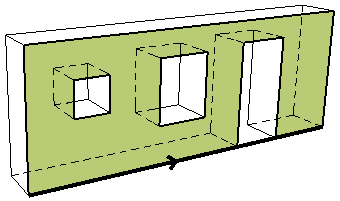
Surface Area of the Wall Outside Face in an element schedule:
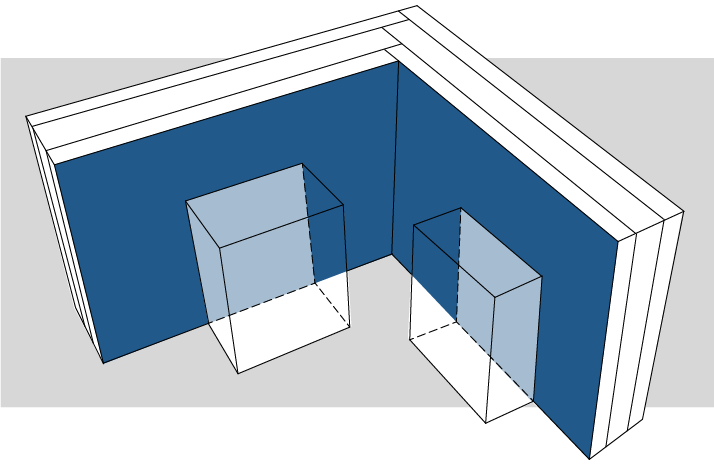
Exposed Area parameter in Surface Schedules:
Archicad 27 - GDL - PYTHON
Laszlo Nagy
Community Admin
Options
- Mark as New
- Bookmark
- Subscribe
- Mute
- Subscribe to RSS Feed
- Permalink
- Report Inappropriate Content
2026-02-16 03:33 PM
2026-02-16
03:33 PM
As for me, I tried the usual Surface Area parameters on the Outside/Inside, and those, too, gave incorrect results for some of the elements in the convex angles case detailed above.
Loving Archicad since 1995 - Find Archicad Tips at x.com/laszlonagy
AMD Ryzen9 5900X CPU, 64 GB RAM 3600 MHz, Nvidia GTX 1060 6GB, 500 GB NVMe SSD
2x28" (2560x1440), Windows 10 PRO ENG, Ac20-Ac29
AMD Ryzen9 5900X CPU, 64 GB RAM 3600 MHz, Nvidia GTX 1060 6GB, 500 GB NVMe SSD
2x28" (2560x1440), Windows 10 PRO ENG, Ac20-Ac29
Mathias Jonathan
Expert
Options
- Mark as New
- Bookmark
- Subscribe
- Mute
- Subscribe to RSS Feed
- Permalink
- Report Inappropriate Content
2026-02-16
03:48 PM
- last edited on
2026-02-16
04:29 PM
by
Laszlo Nagy
2026-02-16
03:48 PM


The subject emerged in archicad 17 with building materials (Link not online anymore): https://web.archive.org/web/20231202223150/https://community.graphisoft.com/t5/Project-data-BIM/Calc...
Issue and Cause
With Priority Based Connections in ARCHICAD 17, the calculation of wall areas has changed.
- Up to AC16, an L shaped connection created a 45 degree mitered joint at the corner. This resulted in the two outside surface areas to be equal.
- In AC17, in an L shaped connection one wall will be prioritized over the other (more similar to a real life building environment) and the edge of the wall is not counted into the areas. Thus the wall areas are unequal and seem erroneous.
Solution
- Through the development of a design, a thin layer of paint can be applied to the composite material, thus the area calculations will be accurate. As in the image above, the thin edge area is small and insignificant in the calculations.
There are 2 important points to consider:
- The decimals have to be set to 1 in the "Project Preferences"
- The minimum layer thickness for the calculations to work is 0.1mm.
Archicad 27 - GDL - PYTHON

marcoariveross
Enthusiast
Options
- Mark as New
- Bookmark
- Subscribe
- Mute
- Subscribe to RSS Feed
- Permalink
- Report Inappropriate Content
2026-02-16
03:50 PM
- last edited on
2026-02-16
04:30 PM
by
Laszlo Nagy
2026-02-16
03:50 PM
Hi, I just tried it in AC29 and it gives me the correct results.


BIM Manager Pavimaq
Lima-Perú
Archicad 29-Windows 11-64Gb RAM
Lima-Perú
Archicad 29-Windows 11-64Gb RAM

Fra
Enthusiast
Options
- Mark as New
- Bookmark
- Subscribe
- Mute
- Subscribe to RSS Feed
- Permalink
- Report Inappropriate Content
2026-02-16 05:38 PM - last edited on 2026-02-17 02:06 AM by Barry Kelly
2026-02-16
05:38 PM
Hello
I don't know if I'm doing something wrong.
The calculation seems correct to me, in ArchiCAD 28
Francesco

AC25 AC26 (Ita)
Mac Studio M1 Max 64 GB - OSX 12.4
Mac Studio M1 Max 64 GB - OSX 12.4
LucaLeo
Booster
Options
- Mark as New
- Bookmark
- Subscribe
- Mute
- Subscribe to RSS Feed
- Permalink
- Report Inappropriate Content
2026-02-17 10:03 PM
2026-02-17
10:03 PM
Thanks a lot for your reply, I am using Archicad 28.
LucaLeo
Booster
Options
- Mark as New
- Bookmark
- Subscribe
- Mute
- Subscribe to RSS Feed
- Permalink
- Report Inappropriate Content
2026-02-17 10:26 PM
2026-02-17
10:26 PM
Thank you very much for all your replies, for the links you shared, and for the explanation you provided, describing the issue and how it was solved in Archicad during the transition from Archicad 16 to 17. It could be a good compromise or a useful method to overcome this issue. After trying it, the dimensions actually appear to be correct. So thank you, and I will keep this as a possible solution to the problem.

Didn't find the answer?
Check other topics in this Forum
Back to ForumRead the latest accepted solutions!
Accepted SolutionsStart a new conversation!

Suggested topics
- Surface / Component Schedule Bug: Automatic Column Wrapping Ignores Folded Geometry and Returns Flat in Project data & BIM
- Finishes schedule in Project data & BIM
- Surface schedule - window with reveal in Documentation
- How to calculate in a schedule the external wall surface (for painting)? in Project data & BIM
