
Turn on suggestions
Auto-suggest helps you quickly narrow down your search results by suggesting possible matches as you type.
Showing results for
EN
Turn on suggestions
Auto-suggest helps you quickly narrow down your search results by suggesting possible matches as you type.
Showing results for
- English
- :
- Forum
- :
- Documentation
- :
- Vertical Label with Horizontal Text
Options
- Subscribe to RSS Feed
- Mark Topic as New
- Mark Topic as Read
- Pin this post for me
- Bookmark
- Subscribe to Topic
- Mute
- Printer Friendly Page

Rene Pahlavan
Advocate
Options
- Mark as New
- Bookmark
- Subscribe
- Mute
- Subscribe to RSS Feed
- Permalink
- Report Inappropriate Content
2022-07-08
07:44 AM
- last edited on
2023-05-09
03:16 PM
by
 Gordana Radonic
Vertical Label with Horizontal Text
2022-07-08
07:44 AM
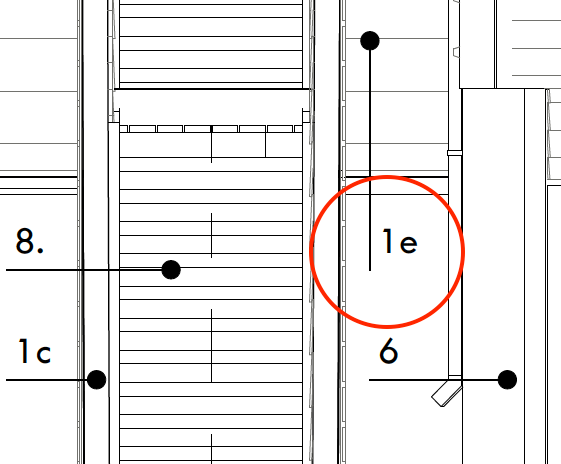
I am trying in vain to get a vertical leader for a label to show with horizontal text like in this screenshot. Everything I try keeps the text vertical also when placing the leader in vertical. Anyone know a solution? AC25
AC28 (Apple Silicon)
macOS Tahoe 26.5
MBP M3 Max (16-inch 2023)
macOS Tahoe 26.5
MBP M3 Max (16-inch 2023)
Solved! Go to Solution.
1 Solution
Accepted Solutions

Ricardo Lopez
Advisor
Options
- Mark as New
- Bookmark
- Subscribe
- Mute
- Subscribe to RSS Feed
- Permalink
- Report Inappropriate Content
2022-07-08 11:07 PM
2022-07-08
11:07 PM
Hi Rene
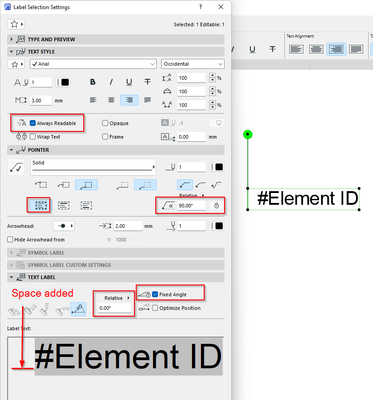
I know maybe this is not the best solution, but it gets the job done.
I added an extra space before the text label and fixed the angles for text and pointer.
Regards
Ricardo López, M. Arch.
BIM Consultant | Project Solutions and Services | Panama
AC17-29 SPA+INT | Windows 11 | MSI CreatorPro M16 HX C14VJG, 64GB, Nvidia Quadro RTX 2000 Ada Generation
BIM Consultant | Project Solutions and Services | Panama
AC17-29 SPA+INT | Windows 11 | MSI CreatorPro M16 HX C14VJG, 64GB, Nvidia Quadro RTX 2000 Ada Generation
2 Replies 2
Ricardo Lopez
Advisor
Options
- Mark as New
- Bookmark
- Subscribe
- Mute
- Subscribe to RSS Feed
- Permalink
- Report Inappropriate Content
2022-07-08 11:07 PM
2022-07-08
11:07 PM
Hi Rene
I know maybe this is not the best solution, but it gets the job done.
I added an extra space before the text label and fixed the angles for text and pointer.
Regards
Ricardo López, M. Arch.
BIM Consultant | Project Solutions and Services | Panama
AC17-29 SPA+INT | Windows 11 | MSI CreatorPro M16 HX C14VJG, 64GB, Nvidia Quadro RTX 2000 Ada Generation
BIM Consultant | Project Solutions and Services | Panama
AC17-29 SPA+INT | Windows 11 | MSI CreatorPro M16 HX C14VJG, 64GB, Nvidia Quadro RTX 2000 Ada Generation
Rene Pahlavan
Advocate
Options
- Mark as New
- Bookmark
- Subscribe
- Mute
- Subscribe to RSS Feed
- Permalink
- Report Inappropriate Content
2022-07-09 07:33 PM
2022-07-09
07:33 PM
I was endlessly messing around with the settings, but your method with the space added works. Thanks Ricardo!
AC28 (Apple Silicon)
macOS Tahoe 26.5
MBP M3 Max (16-inch 2023)
macOS Tahoe 26.5
MBP M3 Max (16-inch 2023)

Still looking?

Suggested topics
- Dimension Perpendicular to Angled Line in Documentation
- Archicad 29 regression - Complex Profile fill orientation bug has returned in Modeling
- Morph rotate - Editing plane in Modeling
- Change Marker Object Rotation in Libraries & objects
- 2D views of windows & doors in schedule have unwanted lines. in Documentation
