
Turn on suggestions
Auto-suggest helps you quickly narrow down your search results by suggesting possible matches as you type.
Showing results for
EN
Turn on suggestions
Auto-suggest helps you quickly narrow down your search results by suggesting possible matches as you type.
Showing results for
- English
- :
- Forum
- :
- Documentation
- :
- custom classification
Options
- Subscribe to RSS Feed
- Mark Topic as New
- Mark Topic as Read
- Pin this post for me
- Bookmark
- Subscribe to Topic
- Mute
- Printer Friendly Page

Bara3
Booster
Options
- Mark as New
- Bookmark
- Subscribe
- Mute
- Subscribe to RSS Feed
- Permalink
- Report Inappropriate Content
2022-02-09 02:53 PM
custom classification
2022-02-09
02:53 PM
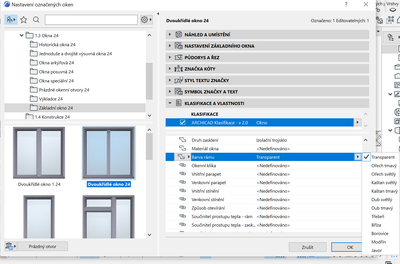
Hello, I would like to add a custom classification to my windows and custom-write f. g. colour of the frage, material and so on, but I Achicad always offers me only a choice from certain possibilities. Is there a way how to change the choice or how to type there my own custom text? I want to put it in there, so I see it correctly in my schedules.
Thank you.
Solved! Go to Solution.
Solved
Read-Only
1 Solution
Accepted Solutions

Miha_M
Advisor
Options
- Mark as New
- Bookmark
- Subscribe
- Mute
- Subscribe to RSS Feed
- Permalink
- Report Inappropriate Content
2022-02-09 03:49 PM - edited 2022-02-09 03:52 PM
2022-02-09
03:49 PM
Go to Options menu > Property manager and search for Barva ramu. It is probably on Option set type, where you can edit the pre-set options.
In the Property Manager you can also add new custom element properties. Just make sure they are mapped to correct Archicad Klasifikace -v.2 instancies.
| Archicad 4.5 - 29
| HP Z840 | 2× E5-2643 v4 | 64 GB RAM | Quadro M5000 | Windows 10 Pro x64
| HP Z4 G4 | W-2245 | 64 GB RAM | RTX A4000 | Windows 11
3 Replies 3
Miha_M
Advisor
Options
- Mark as New
- Bookmark
- Subscribe
- Mute
- Subscribe to RSS Feed
- Permalink
- Report Inappropriate Content
2022-02-09 03:49 PM - edited 2022-02-09 03:52 PM
2022-02-09
03:49 PM
Go to Options menu > Property manager and search for Barva ramu. It is probably on Option set type, where you can edit the pre-set options.
In the Property Manager you can also add new custom element properties. Just make sure they are mapped to correct Archicad Klasifikace -v.2 instancies.
| Archicad 4.5 - 29
| HP Z840 | 2× E5-2643 v4 | 64 GB RAM | Quadro M5000 | Windows 10 Pro x64
| HP Z4 G4 | W-2245 | 64 GB RAM | RTX A4000 | Windows 11

Patrick M
Virtuoso
Options
- Mark as New
- Bookmark
- Subscribe
- Mute
- Subscribe to RSS Feed
- Permalink
- Report Inappropriate Content
2022-02-09 07:51 PM
2022-02-09
07:51 PM
yes! properties are great for schedule fields... so much better than the "custom text" bit we used to have to use!
BIM solutions and trouble shooting (self proclaimed) expert. Using Archicad Version (all of them), on Mac OS (whatever is 1 version older than current)
Bara3
Booster
Options
- Mark as New
- Bookmark
- Subscribe
- Mute
- Subscribe to RSS Feed
- Permalink
- Report Inappropriate Content
2022-02-10 10:15 AM
2022-02-10
10:15 AM
Thank you, it worked perfectly.

Still looking?

