
Turn on suggestions
Auto-suggest helps you quickly narrow down your search results by suggesting possible matches as you type.
Showing results for
EN
Turn on suggestions
Auto-suggest helps you quickly narrow down your search results by suggesting possible matches as you type.
Showing results for
- English
- :
- Forum
- :
- Documentation
- :
- Re: dimensions and so forth
Options
- Subscribe to RSS Feed
- Mark Topic as New
- Mark Topic as Read
- Pin this post for me
- Bookmark
- Subscribe to Topic
- Mute
- Printer Friendly Page

Llian
Advocate
Options
- Mark as New
- Bookmark
- Subscribe
- Mute
- Subscribe to RSS Feed
- Permalink
- Report Inappropriate Content
2010-05-18
07:22 AM
- last edited on
2023-05-30
10:06 AM
by
 Rubia Torres
dimensions and so forth
2010-05-18
07:22 AM
1. level dimensions are showing as 0.00 for all my contour points. i've set z height to 1'-0 and sections shows contours slope of 1'-0".
2. i've used sea level and the mesh plane is set to 122.76' from sea level so the section is fairly thick. how do i adjust the view so the 3d is now showing the thick earth?
archicad 13...student version

Lilian Seow LEED AP | cSBA | CAPM | PMP
AC 29 USA FULL | Windows 11 Enterprise i5 3.10GHz | Archicad-user since 1994!
AC 29 USA FULL | Windows 11 Enterprise i5 3.10GHz | Archicad-user since 1994!
Read-Only
Labels:
- Labels:
-
Dimension Tools
3 Replies 3

Barry Kelly
Moderator
Options
- Mark as New
- Bookmark
- Subscribe
- Mute
- Subscribe to RSS Feed
- Permalink
- Report Inappropriate Content
2010-05-18 07:59 AM
2010-05-18
07:59 AM
Llian wrote:Make sure you use the "Gravity to mesh" button when placing your spot levels.
1. level dimensions are showing as 0.00 for all my contour points. i've set z height to 1'-0 and sections shows contours slope of 1'-0".
I use the gravity button in the co-ordinates palette - but it depends on your work environment settings as to where you might have it.
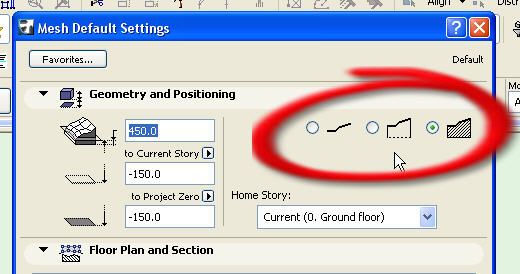
Llian wrote:The mesh tool has 3 options - surface only (they call it superficies), surface with skirt or solid body.
2. i've used sea level and the mesh plane is set to 122.76' from sea level so the section is fairly thick. how do i adjust the view so the 3d is now showing the thick earth?
You can change to any of these at any time in the mesh tool settings.
Barry.
One of the forum moderators.
Versions 6.5 to 27
i7-10700 @ 2.9Ghz, 32GB ram, GeForce RTX 2060 (6GB), Windows 10
Lenovo Thinkpad - i7-1270P 2.20 GHz, 32GB RAM, Nvidia T550, Windows 11
Versions 6.5 to 27
i7-10700 @ 2.9Ghz, 32GB ram, GeForce RTX 2060 (6GB), Windows 10
Lenovo Thinkpad - i7-1270P 2.20 GHz, 32GB RAM, Nvidia T550, Windows 11
Llian
Advocate
Options
- Mark as New
- Bookmark
- Subscribe
- Mute
- Subscribe to RSS Feed
- Permalink
- Report Inappropriate Content
2010-05-18 08:02 AM
2010-05-18
08:02 AM
thanks....so for answer [1]..do i need to redo the mesh ?
Lilian Seow LEED AP | cSBA | CAPM | PMP
AC 29 USA FULL | Windows 11 Enterprise i5 3.10GHz | Archicad-user since 1994!
AC 29 USA FULL | Windows 11 Enterprise i5 3.10GHz | Archicad-user since 1994!
Barry Kelly
Moderator
Options
- Mark as New
- Bookmark
- Subscribe
- Mute
- Subscribe to RSS Feed
- Permalink
- Report Inappropriate Content
2010-05-18 09:45 AM
2010-05-18
09:45 AM
Llian wrote:No you can just select the mesh and change the option in the propeties dialogue.
thanks....so for answer [1]..do i need to redo the mesh ?
Barry.
One of the forum moderators.
Versions 6.5 to 27
i7-10700 @ 2.9Ghz, 32GB ram, GeForce RTX 2060 (6GB), Windows 10
Lenovo Thinkpad - i7-1270P 2.20 GHz, 32GB RAM, Nvidia T550, Windows 11
Versions 6.5 to 27
i7-10700 @ 2.9Ghz, 32GB ram, GeForce RTX 2060 (6GB), Windows 10
Lenovo Thinkpad - i7-1270P 2.20 GHz, 32GB RAM, Nvidia T550, Windows 11

Still looking?

Suggested topics
