
Turn on suggestions
Auto-suggest helps you quickly narrow down your search results by suggesting possible matches as you type.
Showing results for
EN
Turn on suggestions
Auto-suggest helps you quickly narrow down your search results by suggesting possible matches as you type.
Showing results for
- English
- :
- Forum
- :
- Documentation
- :
- Re: interior elevation marker glitch
Options
- Subscribe to RSS Feed
- Mark Topic as New
- Mark Topic as Read
- Pin this post for me
- Bookmark
- Subscribe to Topic
- Mute
- Printer Friendly Page

Patrick M
Virtuoso
Options
- Mark as New
- Bookmark
- Subscribe
- Mute
- Subscribe to RSS Feed
- Permalink
- Report Inappropriate Content
2026-06-23 01:28 AM
interior elevation marker glitch
2026-06-23
01:28 AM
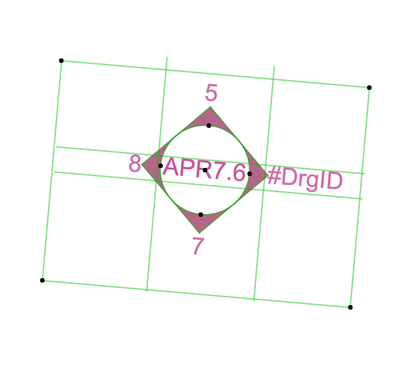
I've seen this several times, the I/E cut line extends beyond the boundary. There is no repair I've been able to find, but whenever it happens, you can no longer adjust the boundary of the elevation. The length of the cut can not be adjusted. I've tried jogging the elevation, I've tried removing the affected cut lines and restoring them... nothing.
the best 'fix' I can find is to place a new marker, copy over 2d/annotation from the broken elevation, then delete the old marker and link drawings to the new on. Anyone else seen this? have a better fix?
Operating system used: Mac Intel-based
BIM solutions and trouble shooting (self proclaimed) expert. Using Archicad Version (all of them), on Mac OS (whatever is 1 version older than current)
Labels:
- Labels:
-
Interior Elevations
2 Replies 2

 Laszlo Nagy
Community Admin
Options
- Mark as New
- Bookmark
- Subscribe
- Mute
- Subscribe to RSS Feed
- Permalink
- Report Inappropriate Content
2026-06-26 12:23 PM
2026-06-26
12:23 PM
If this issue keeps reoccurring in a way that you can reproduce, you might want to report it to support.
Loving Archicad since 1995 - Find Archicad Tips at x.com/laszlonagy
AMD Ryzen9 5900X CPU, 64 GB RAM 3600 MHz, Nvidia GTX 1060 6GB, 500 GB NVMe SSD
2x28" (2560x1440), Windows 10 PRO ENG, Ac20-Ac29
AMD Ryzen9 5900X CPU, 64 GB RAM 3600 MHz, Nvidia GTX 1060 6GB, 500 GB NVMe SSD
2x28" (2560x1440), Windows 10 PRO ENG, Ac20-Ac29
Patrick M
Virtuoso
Options
- Mark as New
- Bookmark
- Subscribe
- Mute
- Subscribe to RSS Feed
- Permalink
- Report Inappropriate Content
2026-06-26 06:32 PM
2026-06-26
06:32 PM
like so many bugs, they are basically impossible to reproduce. I have seen several glitches and bugs with the IE markers; and have spent way too much time trying to replicate them...
We had one project that had markers that were bugging out like this, and we couldn't even delete them... they had to be put on a hidden layer.
curious if anyone here has had similar issues, and has a way to reproduce, or a work-around to 'repair' them.
BIM solutions and trouble shooting (self proclaimed) expert. Using Archicad Version (all of them), on Mac OS (whatever is 1 version older than current)

Still looking?

Suggested topics
