
Turn on suggestions
Auto-suggest helps you quickly narrow down your search results by suggesting possible matches as you type.
Showing results for
EN
Turn on suggestions
Auto-suggest helps you quickly narrow down your search results by suggesting possible matches as you type.
Showing results for
- English
- :
- Forum
- :
- Documentation
- :
- "Project preferences / Dimension" not affecting au...
Options
- Subscribe to RSS Feed
- Mark Topic as New
- Mark Topic as Read
- Pin this post for me
- Bookmark
- Subscribe to Topic
- Mute
- Printer Friendly Page

ATS
Booster
Options
- Mark as New
- Bookmark
- Subscribe
- Mute
- Subscribe to RSS Feed
- Permalink
- Report Inappropriate Content
2023-07-28 03:53 PM
"Project preferences / Dimension" not affecting autotext
2023-07-28
03:53 PM

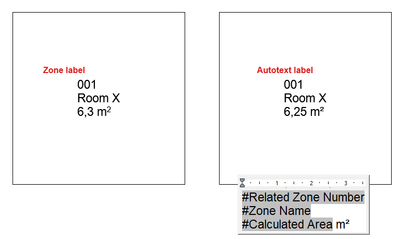
Project preferences / Dimension is set to 1 decimal, but autotext #Calculated Area return the area with 2 decimals anyways. Is this meant to work like that or is it a bug?
AC29.0.0 (3000) NOR FULL (WIN 11)
Labels:
- Labels:
-
Dimension Tools
-
Labels
-
Text
1 Reply 1

Barry Kelly
Moderator
Options
- Mark as New
- Bookmark
- Subscribe
- Mute
- Subscribe to RSS Feed
- Permalink
- Report Inappropriate Content
2023-07-31 04:08 AM
2023-07-31
04:08 AM
Project Preferences > Dimension is for when you use the dimension tool, or in the case of fills, when you turn on the 'Show Area' option.
Auto text is probably using 'calculation units'.
Barry.
One of the forum moderators.
Versions 6.5 to 27
i7-10700 @ 2.9Ghz, 32GB ram, GeForce RTX 2060 (6GB), Windows 10
Lenovo Thinkpad - i7-1270P 2.20 GHz, 32GB RAM, Nvidia T550, Windows 11
Versions 6.5 to 27
i7-10700 @ 2.9Ghz, 32GB ram, GeForce RTX 2060 (6GB), Windows 10
Lenovo Thinkpad - i7-1270P 2.20 GHz, 32GB RAM, Nvidia T550, Windows 11

Still looking?

Suggested topics
- Am I the only one to read “IGNITE” and think “bonzo” in General discussions
- Dimensions - reversed input in Modeling
- Print Dialog Box with Tiny Font in Installation & update
- Zone Label Units vs. Dimension Units: Displaying cm in labels without affecting dimensions in Documentation
- Zone Tool and Suspended Ceilings (Slab Tool) in Modeling
