
Turn on suggestions
Auto-suggest helps you quickly narrow down your search results by suggesting possible matches as you type.
Showing results for
EN
Turn on suggestions
Auto-suggest helps you quickly narrow down your search results by suggesting possible matches as you type.
Showing results for
- English
- :
- Developer Hub
- :
- GDL
- :
- Re: GDL Trigonometry question
Options
- Subscribe to RSS Feed
- Mark Topic as New
- Mark Topic as Read
- Pin this post for me
- Bookmark
- Subscribe to Topic
- Mute
- Printer Friendly Page

Mats_Knutsson
Mentor
Options
- Mark as New
- Bookmark
- Subscribe
- Mute
- Subscribe to RSS Feed
- Permalink
- Report Inappropriate Content
2022-01-12 02:11 PM
GDL Trigonometry question
2022-01-12
02:11 PM
Hi,
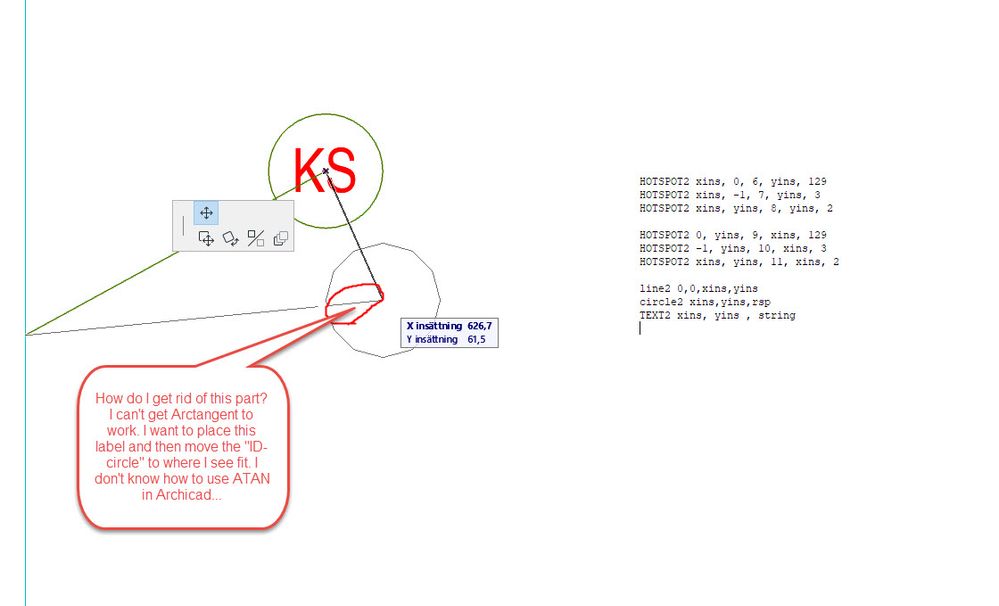
I have a label where i move the marker around freely through hotspots (xins and yins).
I don't understand how to code the line to stop at the perimeter of the circle. If I knew how ATAN works I could do this but i get an error when trying to use ATAN.
Br,
Mats
AC 25 SWE Full
HP Zbook Fury 15,6 G8. 32 GB RAM. Nvidia RTX A3000.
HP Zbook Fury 15,6 G8. 32 GB RAM. Nvidia RTX A3000.
Solved! Go to Solution.
1 Solution
Accepted Solutions

DGSketcher
Legend
Options
- Mark as New
- Bookmark
- Subscribe
- Mute
- Subscribe to RSS Feed
- Permalink
- Report Inappropriate Content
2022-01-12 05:07 PM
2022-01-12
05:07 PM
@Mats_Knutsson See if this works after your hotspots...
dLine = SQR(xIns^2 + yIns^2) - rsp
IF xIns > 0 THEN aLine = ATN(yIns / xIns) ELSE aLine = ATN(yIns / xIns) + 180
LINE2 0,0, dline * COS(aLine), dLine * SIN(aLine)
CIRCLE2 xIns, yIns, rsp
TEXT2 xIns, yIns, stName
Apple iMac Intel i9 / macOS Sonoma / AC27UKI (most recent builds.. if they work)
11 Replies 11

Jochen Suehlo
Moderator Emeritus
Options
- Mark as New
- Bookmark
- Subscribe
- Mute
- Subscribe to RSS Feed
- Permalink
- Report Inappropriate Content
2022-01-12 02:46 PM
2022-01-12
02:46 PM
Gegenkathete / Ankathete = TAN(alfa)
alfa = ATN(Gegenkathete / Ankathete)
Jochen Suehlo . AC12-29 . MAC OSX 26 . WIN11
GDL object creation: b-prisma.de
GDL object creation: b-prisma.de

 Zsuzsanna Bori
Graphisoft
Options
- Mark as New
- Bookmark
- Subscribe
- Mute
- Subscribe to RSS Feed
- Permalink
- Report Inappropriate Content
2022-01-12 02:52 PM
2022-01-12
02:52 PM
Hi!
If I understood correctly, you would like to get the arc tangent of x, but you get an error message, correct? The function uses the argument "ATN" instead of "ATAN", see if you get the desired outcome with that.
Mats_Knutsson
Mentor
Options
- Mark as New
- Bookmark
- Subscribe
- Mute
- Subscribe to RSS Feed
- Permalink
- Report Inappropriate Content
2022-01-12 04:06 PM
2022-01-12
04:06 PM
Ah...I read a doc where it was ATAN. Will try ATN instead. Thx
AC 25 SWE Full
HP Zbook Fury 15,6 G8. 32 GB RAM. Nvidia RTX A3000.
HP Zbook Fury 15,6 G8. 32 GB RAM. Nvidia RTX A3000.
DGSketcher
Legend
Options
- Mark as New
- Bookmark
- Subscribe
- Mute
- Subscribe to RSS Feed
- Permalink
- Report Inappropriate Content
2022-01-12 05:07 PM
2022-01-12
05:07 PM
@Mats_Knutsson See if this works after your hotspots...
dLine = SQR(xIns^2 + yIns^2) - rsp
IF xIns > 0 THEN aLine = ATN(yIns / xIns) ELSE aLine = ATN(yIns / xIns) + 180
LINE2 0,0, dline * COS(aLine), dLine * SIN(aLine)
CIRCLE2 xIns, yIns, rsp
TEXT2 xIns, yIns, stName
Apple iMac Intel i9 / macOS Sonoma / AC27UKI (most recent builds.. if they work)
Mats_Knutsson
Mentor
Options
- Mark as New
- Bookmark
- Subscribe
- Mute
- Subscribe to RSS Feed
- Permalink
- Report Inappropriate Content
2022-01-12 09:16 PM - edited 2022-01-12 09:17 PM
2022-01-12
09:16 PM
Gr8 thanks 🙂
AC 25 SWE Full
HP Zbook Fury 15,6 G8. 32 GB RAM. Nvidia RTX A3000.
HP Zbook Fury 15,6 G8. 32 GB RAM. Nvidia RTX A3000.
 Peter Baksa
Graphisoft
Options
- Mark as New
- Bookmark
- Subscribe
- Mute
- Subscribe to RSS Feed
- Permalink
- Report Inappropriate Content
2022-01-25 03:30 PM
2022-01-25
03:30 PM
Also be extra careful not to divide by 0.
Péter Baksa
Software Engineer, Library
Graphisoft SE, Budapest
Software Engineer, Library
Graphisoft SE, Budapest
Mats_Knutsson
Mentor
Options
- Mark as New
- Bookmark
- Subscribe
- Mute
- Subscribe to RSS Feed
- Permalink
- Report Inappropriate Content
2022-01-25 04:24 PM
2022-01-25
04:24 PM
Living on the edge...
AC 25 SWE Full
HP Zbook Fury 15,6 G8. 32 GB RAM. Nvidia RTX A3000.
HP Zbook Fury 15,6 G8. 32 GB RAM. Nvidia RTX A3000.
DGSketcher
Legend
Options
- Mark as New
- Bookmark
- Subscribe
- Mute
- Subscribe to RSS Feed
- Permalink
- Report Inappropriate Content
2022-01-26 12:15 AM
2022-01-26
12:15 AM
@Peter Baksa I did think about it & it only fails at exactly (?) 90 / 270 degrees. I know GDL has a problem with real numbers and zero comparison checks e.g. If A = B is replaced with ABS ( A - B ) < eps. What tolerance / formula would be relevant to
ATN ( A / B ) to error trap when B = 0.0?
Apple iMac Intel i9 / macOS Sonoma / AC27UKI (most recent builds.. if they work)
Peter Baksa
Graphisoft
Options
- Mark as New
- Bookmark
- Subscribe
- Mute
- Subscribe to RSS Feed
- Permalink
- Report Inappropriate Content
2022-01-26 09:11 AM
2022-01-26
09:11 AM
Yes, there are circumstances when you can be sure the input isn't on the Y axis because some parameters forbid that, and it wouldn't be sensible architecturally. But there could be circumstances where a draggable hotspot would be set to 90° deliberately.
Maybe this is where the ATN / ATAN confusion came from: most programming languages have a non-trigonometric ATAN2 function taking an x and an y coordinate and returning the points' polar coordinate, handling all the cases where ATN could go wrong. GDL doesn't have such, but it can be written as a short subroutine containing a few ifs.
EPS can be avoided by using > from the other way you would use <=.
A working example returning degrees in range (-180...180]:
if abs(_x) > 0 then
    _atan2 = atn(_y / _x) + 90 * (1 - sgn(_x)) * (1 - 2 * (sgn(_y) < 0))
else
    _atan2 = sgn(_y * (abs(_y) > 0)) * 90
endif
Péter Baksa
Software Engineer, Library
Graphisoft SE, Budapest
Software Engineer, Library
Graphisoft SE, Budapest

Didn't find the answer?
Check other topics in this Forum
Back to ForumRead the latest accepted solutions!
Accepted SolutionsStart a new conversation!

Suggested topics
- ACAPI_Licensing_GetProtectionMode does not return APIPROT_NFR_MASK for cloud license in Archicad C++ API
- Writing GDL AddPar values (e.g. material override) to Railing sub-elements (Post/Rail/Panel/etc.) — in Archicad C++ API
- ACAPI_LibraryPart_OpenParameters returns APIERR_GENERAL (-2130313215) for AC9-era GSM -what cause it in Archicad C++ API
- Array of questions in GDL
- How to run a macro's parameter script from a main object without code duplication? in GDL
