
Turn on suggestions
Auto-suggest helps you quickly narrow down your search results by suggesting possible matches as you type.
Showing results for
EN
Turn on suggestions
Auto-suggest helps you quickly narrow down your search results by suggesting possible matches as you type.
Showing results for
- English
- :
- Forum
- :
- General discussions
- :
- Re: Graphisoft Online test not working
Options
- Subscribe to RSS Feed
- Mark Topic as New
- Mark Topic as Read
- Pin this post for me
- Bookmark
- Subscribe to Topic
- Mute
- Printer Friendly Page

Sheyna Ma
Contributor
Options
- Mark as New
- Bookmark
- Subscribe
- Mute
- Subscribe to RSS Feed
- Permalink
- Report Inappropriate Content
2023-06-23 09:49 AM
Graphisoft Online test not working
2023-06-23
09:49 AM
Good day,
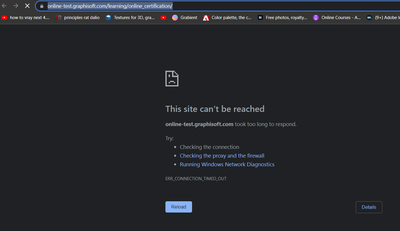
I was in the middle of answering the online test for company certification when the website froze https://online-test.graphisoft.com/learning/online_certification/
Anyone can help how to resolve this?
Solved! Go to Solution.
1 Solution

Algimantas Kuprenas
Expert
Options
- Mark as New
- Bookmark
- Subscribe
- Mute
- Subscribe to RSS Feed
- Permalink
- Report Inappropriate Content
2023-06-23 10:53 AM
2023-06-23
10:53 AM
We also having many sorts of issues about online services in Graphisoft platforms recent days (licenses invitations, graphisoft learn crashes). This could be caused by Browser Cookies. You need to try to clean up Browser Cookies.
Chorme:
1. Browser Settings;
2. In search field write "Clear" and find "Clear browsing data";
3. As in picture shown:
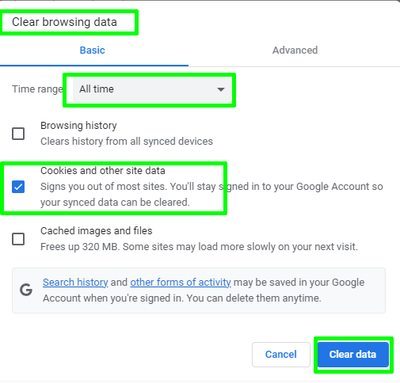
Restart browser and try again.
GRAPHISOFT BIM Manager Training Week attendee
ArchiCAD v9 - v29 INT / NOR
cpu i5-12600K @ 5.0Ghz, ram 32GB, gpu 1060 GTX
ssd NVMe, Windows 11
ArchiCAD Discord channel: https://discord.gg/QdWxSJ33
ArchiCAD v9 - v29 INT / NOR
cpu i5-12600K @ 5.0Ghz, ram 32GB, gpu 1060 GTX
ssd NVMe, Windows 11
ArchiCAD Discord channel: https://discord.gg/QdWxSJ33
Solution
3 Replies 3

Borshchyk
Booster
Options
- Mark as New
- Bookmark
- Subscribe
- Mute
- Subscribe to RSS Feed
- Permalink
- Report Inappropriate Content
2023-06-23 10:48 AM
2023-06-23
10:48 AM
What happens if you refresh the website after it freeze?
Algimantas Kuprenas
Expert
Options
- Mark as New
- Bookmark
- Subscribe
- Mute
- Subscribe to RSS Feed
- Permalink
- Report Inappropriate Content
2023-06-23 10:53 AM
2023-06-23
10:53 AM
We also having many sorts of issues about online services in Graphisoft platforms recent days (licenses invitations, graphisoft learn crashes). This could be caused by Browser Cookies. You need to try to clean up Browser Cookies.
Chorme:
1. Browser Settings;
2. In search field write "Clear" and find "Clear browsing data";
3. As in picture shown:
Restart browser and try again.
GRAPHISOFT BIM Manager Training Week attendee
ArchiCAD v9 - v29 INT / NOR
cpu i5-12600K @ 5.0Ghz, ram 32GB, gpu 1060 GTX
ssd NVMe, Windows 11
ArchiCAD Discord channel: https://discord.gg/QdWxSJ33
ArchiCAD v9 - v29 INT / NOR
cpu i5-12600K @ 5.0Ghz, ram 32GB, gpu 1060 GTX
ssd NVMe, Windows 11
ArchiCAD Discord channel: https://discord.gg/QdWxSJ33
Solution
Sheyna Ma
Contributor
Options
- Mark as New
- Bookmark
- Subscribe
- Mute
- Subscribe to RSS Feed
- Permalink
- Report Inappropriate Content
2023-06-27 04:33 PM
2023-06-27
04:33 PM
thank you

Still looking?
Suggested topics
- TIP: Visual Check for custom Dimension Texts in Documentation
- Archicad 29 AI Visualizer – Licence Issue in Installation & update
- No-GDL Easy Parametric Object Creation in Libraries & objects
- ArchiXML - Attribute editor in Project data & BIM
- Solved: Graphisoft MEP Elements Missing During DWG Export Due to Work Environment Profile in Collaboration with other software
