
Turn on suggestions
Auto-suggest helps you quickly narrow down your search results by suggesting possible matches as you type.
Showing results for
EN
Turn on suggestions
Auto-suggest helps you quickly narrow down your search results by suggesting possible matches as you type.
Showing results for
- English
- :
- Forum
- :
- Installation & update
- :
- Re: MEP Modeler - missing in add-ons at startup
Options
- Subscribe to RSS Feed
- Mark Topic as New
- Mark Topic as Read
- Pin this post for me
- Bookmark
- Subscribe to Topic
- Mute
- Printer Friendly Page

CarlM
Booster
Options
- Mark as New
- Bookmark
- Subscribe
- Mute
- Subscribe to RSS Feed
- Permalink
- Report Inappropriate Content
2011-02-11
09:40 AM
- last edited on
2024-04-10
12:49 PM
by
 Aruzhan Ilaikova
MEP Modeler - missing in add-ons at startup
2011-02-11
09:40 AM
Hello everyone!
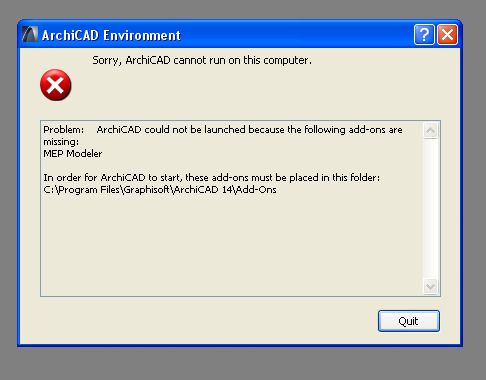
I get, after installing the latest hotfix (AC14-3477-HOTFIX2-WIN32.exe), the following error message:
Problem: ArchiCAD could not be launched because the following add-ons are
missing:
MEP Modeler
In order for ArchiCAD to start, these add-ons must be placed in this folder:
C:\Program Files\Graphisoft\ArchiCAD 14\Add-Ons
I have never added MEP-modeler to Archicad 14, but I had the trial version in AC13 but was never able to use it (no available license).
After getting the error message after the hotfix I downloaded and installed MEP-modeler for AC14 - same error message. I then uninstalled MEP-modeler but still get the same error message.
Please advice!
Thank you in advance!
--------
AC14 INT(SWE) • XP Pro SP3
I get, after installing the latest hotfix (AC14-3477-HOTFIX2-WIN32.exe), the following error message:
Problem: ArchiCAD could not be launched because the following add-ons are
missing:
MEP Modeler
In order for ArchiCAD to start, these add-ons must be placed in this folder:
C:\Program Files\Graphisoft\ArchiCAD 14\Add-Ons
I have never added MEP-modeler to Archicad 14, but I had the trial version in AC13 but was never able to use it (no available license).
After getting the error message after the hotfix I downloaded and installed MEP-modeler for AC14 - same error message. I then uninstalled MEP-modeler but still get the same error message.
Please advice!
Thank you in advance!
--------
AC14 INT(SWE) • XP Pro SP3
AC 27 SWE, 64-bit
Windows 10 PRO
HP ZBook Fury 16 G9 Mobile Workstation, i9-12950HX, Nvidia RTX A4500, 64GB ram
Windows 10 PRO
HP ZBook Fury 16 G9 Mobile Workstation, i9-12950HX, Nvidia RTX A4500, 64GB ram
Read-Only
Labels:
- Labels:
-
Add-on Installation
1 Reply 1
CarlM
Booster
Options
- Mark as New
- Bookmark
- Subscribe
- Mute
- Subscribe to RSS Feed
- Permalink
- Report Inappropriate Content
2011-02-11 01:17 PM
2011-02-11
01:17 PM
I finally got AC to start again!
I uninstalled the latest hotfix by using the repair function on the install DVD, and now AC is starting up again. I guess I'll stay away from the hotfix for now...
I uninstalled the latest hotfix by using the repair function on the install DVD, and now AC is starting up again. I guess I'll stay away from the hotfix for now...
AC 27 SWE, 64-bit
Windows 10 PRO
HP ZBook Fury 16 G9 Mobile Workstation, i9-12950HX, Nvidia RTX A4500, 64GB ram
Windows 10 PRO
HP ZBook Fury 16 G9 Mobile Workstation, i9-12950HX, Nvidia RTX A4500, 64GB ram

Still looking?

