
Turn on suggestions
Auto-suggest helps you quickly narrow down your search results by suggesting possible matches as you type.
Showing results for
EN
Turn on suggestions
Auto-suggest helps you quickly narrow down your search results by suggesting possible matches as you type.
Showing results for
- English
- :
- Forum
- :
- Installation & update
- :
- Re: Restoring the "Open File - What Do You Want to...
Options
- Subscribe to RSS Feed
- Mark Topic as New
- Mark Topic as Read
- Pin this post for me
- Bookmark
- Subscribe to Topic
- Mute
- Printer Friendly Page

Aaron Bourgoin
Rockstar
Options
- Mark as New
- Bookmark
- Subscribe
- Mute
- Subscribe to RSS Feed
- Permalink
- Report Inappropriate Content
2014-07-11 06:24 PM
Restoring the "Open File - What Do You Want to Do" dialog
2014-07-11
06:24 PM
I scoured the preferences for a button, but haven't found anything that is relevant. Thanks!
Think Like a Spec Writer
MacBook M4Pro - 24Gb RAM
AC4.55 through 29 / AC29.2.1 USA
Rhino 8.35 Mac
MacOS Tahoe 26.6.2
MacBook M4Pro - 24Gb RAM
AC4.55 through 29 / AC29.2.1 USA
Rhino 8.35 Mac
MacOS Tahoe 26.6.2
Read-Only
Labels:
- Labels:
-
Performance
4 Replies 4

Karl Ottenstein
Moderator Emeritus
Options
- Mark as New
- Bookmark
- Subscribe
- Mute
- Subscribe to RSS Feed
- Permalink
- Report Inappropriate Content
2014-07-11 07:25 PM
2014-07-11
07:25 PM
Hi Aaron,
http://helpcenter.graphisoft.com/guides/archicad-18-int-reference-guide/configuration/start-archicad...
Seems kind of brute force... would be nice to have a simple WE checkbox for it.
To enable it again, use the File > New & Reset All command.Have to press the Alt/Opt key for File > New & Reset All to show up.
Seems kind of brute force... would be nice to have a simple WE checkbox for it.
Vote for Wish: Copy/Paste in 3D
AC 29 USA and earlier • hardware key • macOS Tahoe 26.7 MacBook Pro M2 Max 12CPU/30GPU cores, 32GB
AC 29 USA and earlier • hardware key • macOS Tahoe 26.7 MacBook Pro M2 Max 12CPU/30GPU cores, 32GB
Karl Ottenstein
Moderator Emeritus
Options
- Mark as New
- Bookmark
- Subscribe
- Mute
- Subscribe to RSS Feed
- Permalink
- Report Inappropriate Content
2014-07-11 07:31 PM
2014-07-11
07:31 PM
If you want to get the dialog back without changing anything else that a New & Reset does (I'm not really sure of how many things that changes) ... there is a plist item you can change to 'YES' if you want to get down and dirty... see attached. For Windows folks, I assume there is a similar Registry setting...
The plist is in ~/Library/Preferences ... screenshot is the Xcode editor.
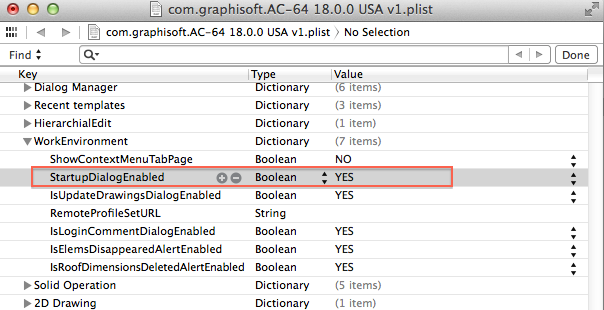
The plist is in ~/Library/Preferences ... screenshot is the Xcode editor.
Vote for Wish: Copy/Paste in 3D
AC 29 USA and earlier • hardware key • macOS Tahoe 26.7 MacBook Pro M2 Max 12CPU/30GPU cores, 32GB
AC 29 USA and earlier • hardware key • macOS Tahoe 26.7 MacBook Pro M2 Max 12CPU/30GPU cores, 32GB
Karl Ottenstein
Moderator Emeritus
Options
- Mark as New
- Bookmark
- Subscribe
- Mute
- Subscribe to RSS Feed
- Permalink
- Report Inappropriate Content
2014-07-11 07:36 PM
2014-07-11
07:36 PM
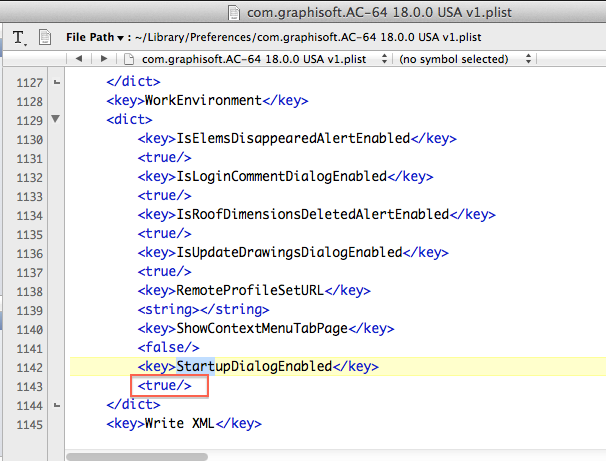
Here's a text editor view of the plist XML file, search for the word 'Startup'. Yours will show "<false/> where my screenshot shows <true/>. Just change it/save.
Vote for Wish: Copy/Paste in 3D
AC 29 USA and earlier • hardware key • macOS Tahoe 26.7 MacBook Pro M2 Max 12CPU/30GPU cores, 32GB
AC 29 USA and earlier • hardware key • macOS Tahoe 26.7 MacBook Pro M2 Max 12CPU/30GPU cores, 32GB

David Maudlin
Rockstar
Options
- Mark as New
- Bookmark
- Subscribe
- Mute
- Subscribe to RSS Feed
- Permalink
- Report Inappropriate Content
2014-07-12 02:15 PM
2014-07-12
02:15 PM
Aaron:
Go to your Work Environment and add the command Enable All Informational Messages..., this will bring back all the dialog boxes where you checked the "Do not show this again" box.
David

Go to your Work Environment and add the command Enable All Informational Messages..., this will bring back all the dialog boxes where you checked the "Do not show this again" box.
David
David Maudlin / Architect
www.davidmaudlin.com
Digital Architecture
AC29 USA Perpetual • Mac mini M4 Pro OSX15 | 64 gb ram • MacBook Pro M3 Pro OSX14 | 36 gb ram
www.davidmaudlin.com
Digital Architecture
AC29 USA Perpetual • Mac mini M4 Pro OSX15 | 64 gb ram • MacBook Pro M3 Pro OSX14 | 36 gb ram

Still looking?
Suggested topics
- interior elevation marker glitch in Documentation
- ArchiCAD 28 (and 29) crash when opening a specific .pln after updating to macOS 26.4 in Installation & update
- Restoring Lost Properties After Replacing Old Classifications in Archicad 26 in Project data & BIM
- restore the drawing to plan view / optimise hatches in Modeling
- Restoring Using Project.db files in Teamwork & BIMcloud
