
Turn on suggestions
Auto-suggest helps you quickly narrow down your search results by suggesting possible matches as you type.
Showing results for
EN
Turn on suggestions
Auto-suggest helps you quickly narrow down your search results by suggesting possible matches as you type.
Showing results for
- English
- :
- Forum
- :
- Libraries & objects
- :
- ArchiCAD 18 Toilet - Minimum Space
Options
- Subscribe to RSS Feed
- Mark Topic as New
- Mark Topic as Read
- Pin this post for me
- Bookmark
- Subscribe to Topic
- Mute
- Printer Friendly Page

sirduncan02
Booster
Options
- Mark as New
- Bookmark
- Subscribe
- Mute
- Subscribe to RSS Feed
- Permalink
- Report Inappropriate Content
2015-04-09 11:17 PM
ArchiCAD 18 Toilet - Minimum Space
2015-04-09
11:17 PM
Where is the setting to turn on the hotspots and/or minimum space fill?
Johnathan Duncan
www.CastleGateDesign.com
Working in AC 26 5002 USA FULL.
Dell 5820 Tower X-Series
Intel Core i9-10940x CPU @ 3.30GHz 3.31 GHz
64.0 GB Installed RAM
NVIDIA Quadro RTX 4000 video card.
www.CastleGateDesign.com
Working in AC 26 5002 USA FULL.
Dell 5820 Tower X-Series
Intel Core i9-10940x CPU @ 3.30GHz 3.31 GHz
64.0 GB Installed RAM
NVIDIA Quadro RTX 4000 video card.
2 Replies 2

Anonymous
Not applicable
Options
- Mark as New
- Bookmark
- Subscribe
- Mute
- Subscribe to RSS Feed
- Permalink
- Report Inappropriate Content
2015-04-10 12:57 AM
2015-04-10
12:57 AM
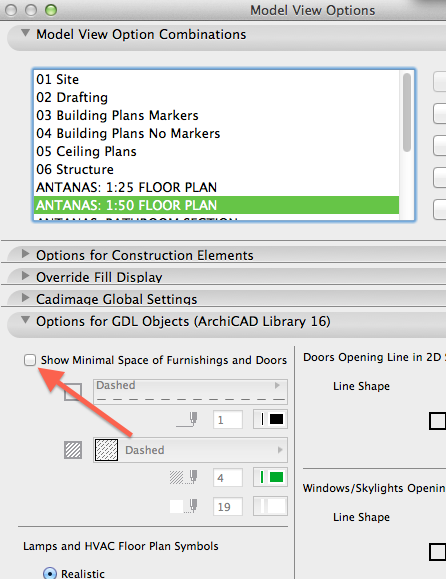
Have a look in Model View Options. You may have to turn on "Show minimal space" here for it to become active.
sirduncan02
Booster
Options
- Mark as New
- Bookmark
- Subscribe
- Mute
- Subscribe to RSS Feed
- Permalink
- Report Inappropriate Content
2015-04-10 06:13 PM
2015-04-10
06:13 PM
Thank you! That checkbox, combined with the line color makes the hotspots appear, and the fill/outline of the minimum space go away.
Thank you.
Thank you.
Johnathan Duncan
www.CastleGateDesign.com
Working in AC 26 5002 USA FULL.
Dell 5820 Tower X-Series
Intel Core i9-10940x CPU @ 3.30GHz 3.31 GHz
64.0 GB Installed RAM
NVIDIA Quadro RTX 4000 video card.
www.CastleGateDesign.com
Working in AC 26 5002 USA FULL.
Dell 5820 Tower X-Series
Intel Core i9-10940x CPU @ 3.30GHz 3.31 GHz
64.0 GB Installed RAM
NVIDIA Quadro RTX 4000 video card.
Didn't find the answer?
Check other topics in this Forum
Back to ForumRead the latest accepted solutions!
Accepted SolutionsStart a new conversation!

Suggested topics
- Schedule values rounding on beams and columns in Modeling
- Starting new projects and looking for history of elements like a bathroom fixtures or any models in Project data & BIM
- ArchiTurn (beta) — swept path analysis directly in Archicad: does the vehicle fit or not? in General discussions
- Archicad 29 MEP – How can I add 2", 4", 6" and Fire Riser pipe sizes? in Modeling
- Where is a commercial toilet - NO TANK in Libraries & objects
