
Turn on suggestions
Auto-suggest helps you quickly narrow down your search results by suggesting possible matches as you type.
Showing results for
EN
Turn on suggestions
Auto-suggest helps you quickly narrow down your search results by suggesting possible matches as you type.
Showing results for
- English
- :
- Forum
- :
- Libraries & objects
- :
- Re: Bi Fold Windows
Options
- Subscribe to RSS Feed
- Mark Topic as New
- Mark Topic as Read
- Pin this post for me
- Bookmark
- Subscribe to Topic
- Mute
- Printer Friendly Page

S A Harrison
Newcomer
Options
- Mark as New
- Bookmark
- Subscribe
- Mute
- Subscribe to RSS Feed
- Permalink
- Report Inappropriate Content
2016-02-04
11:38 PM
- last edited on
2023-05-24
12:30 PM
by
 Rubia Torres
Bi Fold Windows
2016-02-04
11:38 PM
Sean Harrison
ArchiCad 18, Windows 10
Sean Harrison
AC18, Windows 10
AC18, Windows 10
5 Replies 5

Dave Seabury
Expert
Options
- Mark as New
- Bookmark
- Subscribe
- Mute
- Subscribe to RSS Feed
- Permalink
- Report Inappropriate Content
2016-02-05 01:01 AM
2016-02-05
01:01 AM
Sean
If you can get the bifold door to look like the window you want, you could convert it to a morph and then create a window object from the morph. You would have to add a wallhole to the gdl script to cut the wall, but it should work.
David
If you can get the bifold door to look like the window you want, you could convert it to a morph and then create a window object from the morph. You would have to add a wallhole to the gdl script to cut the wall, but it should work.
David
AC 19-26 Windows 10 64 bit, Dell Prercision 7820, Xeon Silver 2414R ( 12 Cores), 64 GB Ram, Quadro RTX 4000 8GB

Anonymous
Not applicable
Options
- Mark as New
- Bookmark
- Subscribe
- Mute
- Subscribe to RSS Feed
- Permalink
- Report Inappropriate Content
2016-02-05 01:17 AM
2016-02-05
01:17 AM
Can you not schedule both doors and windows as windows based on ID numbers? You can with Cadimage doors and windows.
S A Harrison
Newcomer
Options
- Mark as New
- Bookmark
- Subscribe
- Mute
- Subscribe to RSS Feed
- Permalink
- Report Inappropriate Content
2016-02-05 02:26 AM
2016-02-05
02:26 AM
Thanks for the help. I've never used the morph tool but I'll give it a go. Using the bi-fold door & adjusting the schedules is also an option. Wouldn't it just be easier if ArchiCad had a bi-fold window object?
Sean Harrison
AC18, Windows 10
AC18, Windows 10
Anonymous
Not applicable
Options
- Mark as New
- Bookmark
- Subscribe
- Mute
- Subscribe to RSS Feed
- Permalink
- Report Inappropriate Content
2016-02-05 04:06 AM
2016-02-05
04:06 AM
These are the options you have for any panel in a Cadimage window…
Jealous much?
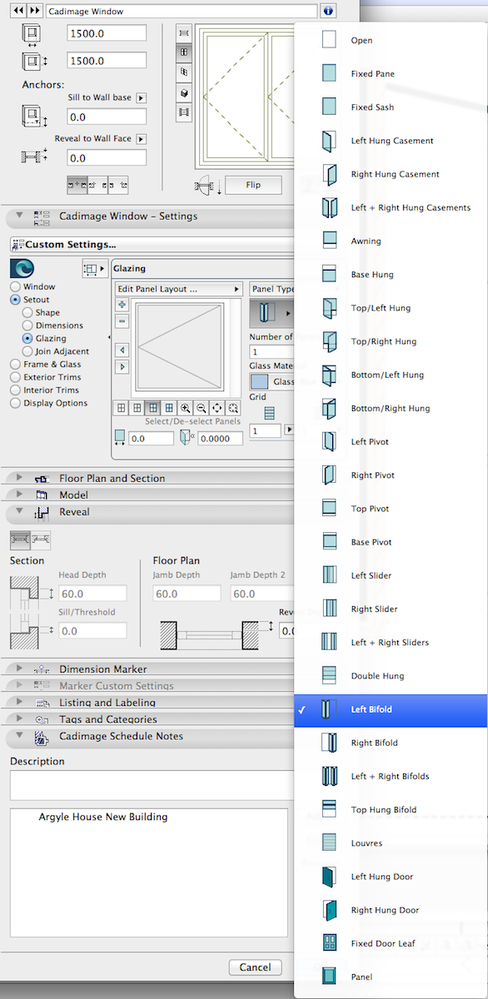
Jealous much?

nitizz
Booster
Options
- Mark as New
- Bookmark
- Subscribe
- Mute
- Subscribe to RSS Feed
- Permalink
- Report Inappropriate Content
2016-02-18 12:52 PM
2016-02-18
12:52 PM
You can use a bi-fold door to present a bi-fold window.
In the tags & categories
Choose your ID to read window reference
Choose element classifications to window
In window list scheme setting add element type is a door reading the ID you choose
In the tags & categories
Choose your ID to read window reference
Choose element classifications to window
In window list scheme setting add element type is a door reading the ID you choose
AC27 INT FULL
27-inch 2019 iMac Retina 5K 10.14.6 macOS Mojave
3.6 GHz Core I9 Radeon Pro 580X 8GB
www.rethinkstudio.mu
27-inch 2019 iMac Retina 5K 10.14.6 macOS Mojave
3.6 GHz Core I9 Radeon Pro 580X 8GB
www.rethinkstudio.mu
Didn't find the answer?
Check other topics in this Forum
Back to ForumRead the latest accepted solutions!
Accepted SolutionsStart a new conversation!

Suggested topics
- automatic sill line in window schedule in Modeling
- Curved wall bug...any way to fix? in Modeling
- MEP AC29 Incorrect behavior of the Z mark in the tracking display when editing the Z mark of a pipe in Modeling
- Roof custom layers in/out in Modeling
- BIMcloud Basic 2026.1 – Activate button does not open Graphisoft ID activation in Teamwork & BIMcloud
