
Turn on suggestions
Auto-suggest helps you quickly narrow down your search results by suggesting possible matches as you type.
Showing results for
EN
Turn on suggestions
Auto-suggest helps you quickly narrow down your search results by suggesting possible matches as you type.
Showing results for
- English
- :
- Forum
- :
- Libraries & objects
- :
- Re: Center objects (Basic)
Options
- Subscribe to RSS Feed
- Mark Topic as New
- Mark Topic as Read
- Pin this post for me
- Bookmark
- Subscribe to Topic
- Mute
- Printer Friendly Page

Tz
Participant
Options
- Mark as New
- Bookmark
- Subscribe
- Mute
- Subscribe to RSS Feed
- Permalink
- Report Inappropriate Content
2022-08-19
09:56 AM
- last edited on
2023-05-24
09:42 AM
by
 Rubia Torres
Center objects (Basic)
2022-08-19
09:56 AM
How can I centre a door in the most simple fastest way
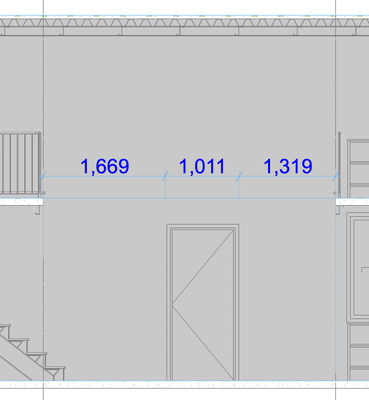
Thank you
4 Replies 4

Barry Kelly
Moderator
Options
- Mark as New
- Bookmark
- Subscribe
- Mute
- Subscribe to RSS Feed
- Permalink
- Report Inappropriate Content
2022-08-19 10:16 AM
2022-08-19
10:16 AM
Make sure you have guide lines and snap points turned on.
Then ...

The guide lines will disappear after the drag.
Otherwise you can draw a line, activate the snap points, drag the door, then delete the line.
Barry.
One of the forum moderators.
Versions 6.5 to 27
i7-10700 @ 2.9Ghz, 32GB ram, GeForce RTX 2060 (6GB), Windows 10
Lenovo Thinkpad - i7-1270P 2.20 GHz, 32GB RAM, Nvidia T550, Windows 11
Versions 6.5 to 27
i7-10700 @ 2.9Ghz, 32GB ram, GeForce RTX 2060 (6GB), Windows 10
Lenovo Thinkpad - i7-1270P 2.20 GHz, 32GB RAM, Nvidia T550, Windows 11
Tz
Participant
Options
- Mark as New
- Bookmark
- Subscribe
- Mute
- Subscribe to RSS Feed
- Permalink
- Report Inappropriate Content
2022-08-19 10:53 AM
2022-08-19
10:53 AM
Thank you

Lee Hankins
Virtuoso
Options
- Mark as New
- Bookmark
- Subscribe
- Mute
- Subscribe to RSS Feed
- Permalink
- Report Inappropriate Content
2022-08-19 12:40 PM
2022-08-19
12:40 PM
You can use special snap. I have assigned a keyboard shortcut for this if ‘s’. You will then be able to activate special snap and depending on the settings you have whether it be half, number of segments of percentage split you will draw a line between two point and the object will snap to the middle or whatever setting you have chosen.
Lee Hankins
ArchiCAD 4.5 - Archicad 29
macOS Tahoe (26.0)
ArchiCAD 4.5 - Archicad 29
macOS Tahoe (26.0)

JeffH
Expert
Options
- Mark as New
- Bookmark
- Subscribe
- Mute
- Subscribe to RSS Feed
- Permalink
- Report Inappropriate Content
2022-08-19 09:48 PM
2022-08-19
09:48 PM
That is my method as well.
AC24 / AC26 / AC27
Win10
Win10

Didn't find the answer?
Check other topics in this Forum
Back to ForumRead the latest accepted solutions!
Accepted SolutionsStart a new conversation!

Suggested topics
- Linking and Managing Office Custom Libraries in Libraries & objects
- Custom objects become invalid when downgraded from AC29 to 27 in Libraries & objects
- Drafting aid object for geometry layouts in Modeling
- Project origin error, intangible second project origin in 3D view in Modeling
- Archicad 29 Library organized two different ways in Archicad template vs. custom template? in Libraries & objects
