
Turn on suggestions
Auto-suggest helps you quickly narrow down your search results by suggesting possible matches as you type.
Showing results for
EN
Turn on suggestions
Auto-suggest helps you quickly narrow down your search results by suggesting possible matches as you type.
Showing results for
- English
- :
- Forum
- :
- Libraries & objects
- :
- Re: Changing wall preview type in favorite window ...
Options
- Subscribe to RSS Feed
- Mark Topic as New
- Mark Topic as Read
- Pin this post for me
- Bookmark
- Subscribe to Topic
- Mute
- Printer Friendly Page

abode_bon
Participant
Options
- Mark as New
- Bookmark
- Subscribe
- Mute
- Subscribe to RSS Feed
- Permalink
- Report Inappropriate Content
a week ago
- last edited
a week ago
by
 Laszlo Nagy
Changing wall preview type in favorite window library
a week ago
Hey guys. I have a library of favorite windows I like to use. In the preview window, they are all set into a generic wall, which is concrete. Is there any way to change the wall type of one specific window to another wall type, like brick or siding?
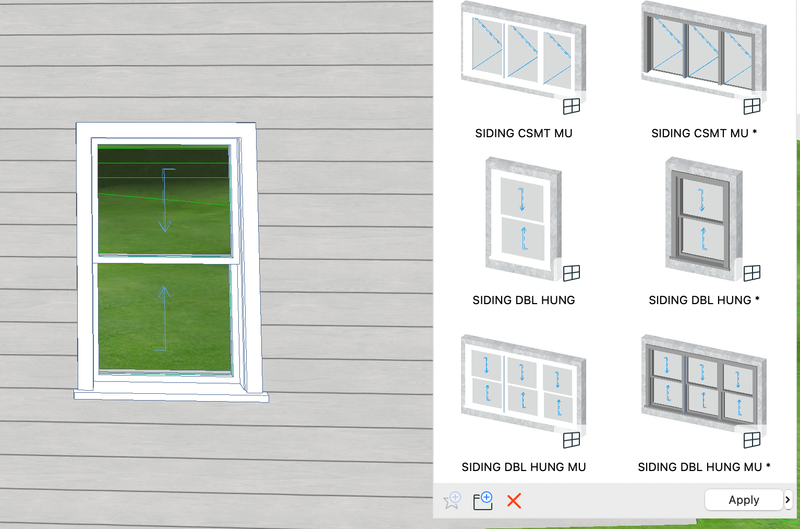
I want the wall type of the previewed favorites to be siding in this case, but I see no option to change it, nor have I found one in my internet searching. I know I can just change the generic building material surface, but I have multiple windows that are supposed to be set into multiple different walls.
Thanks for reading.
Operating system used: Mac Apple Silicon
4 Replies 4

Barry Kelly
Moderator
Options
- Mark as New
- Bookmark
- Subscribe
- Mute
- Subscribe to RSS Feed
- Permalink
- Report Inappropriate Content
a week ago
a week ago
My window favourites don't show any walls at all.

I wonder if there is a window setting here that is showing, like reveals or casements?
If you double click to activate a favourite and then look at the window settings 3D preview, what do you see?
Barry.
One of the forum moderators.
Versions 6.5 to 27
i7-10700 @ 2.9Ghz, 32GB ram, GeForce RTX 2060 (6GB), Windows 10
Lenovo Thinkpad - i7-1270P 2.20 GHz, 32GB RAM, Nvidia T550, Windows 11
Versions 6.5 to 27
i7-10700 @ 2.9Ghz, 32GB ram, GeForce RTX 2060 (6GB), Windows 10
Lenovo Thinkpad - i7-1270P 2.20 GHz, 32GB RAM, Nvidia T550, Windows 11
abode_bon
Participant
Options
- Mark as New
- Bookmark
- Subscribe
- Mute
- Subscribe to RSS Feed
- Permalink
- Report Inappropriate Content
yesterday
yesterday

This is what shows in the settings 3D preview. All I can think of is the wall closure setting is set to brick veneer, so maybe it is just a setting used to differentiate the wall closure settings.
I just tried changing the wall closure settings and saving it as a new favorite, but there is still a generic brick wall surrounding the window.
To clarify: Since last week, we have been changing some settings in our template, and the wall type the favorite windows are projected as being set in is no longer concrete but brick.

JeffH
Expert
Options
- Mark as New
- Bookmark
- Subscribe
- Mute
- Subscribe to RSS Feed
- Permalink
- Report Inappropriate Content
yesterday
yesterday
I think it depends on which door/window object you are using, and which macro is being called.
In the US Library, Using a Favorite for W Double Hung 27, shows some additional wall in the favorite preview.
While
Using Storefront Window 27 does not show anything beyond the frame.
Storefront Window calls for "gs_general_storefront_door_macro"
W Double Hung calls for "gs_general_w_macro_USA"
AC24 / AC26 / AC27
Win10
Win10
abode_bon
Participant
Options
- Mark as New
- Bookmark
- Subscribe
- Mute
- Subscribe to RSS Feed
- Permalink
- Report Inappropriate Content
5 hours ago - last edited 5 hours ago
5 hours ago
Yes, that is true and it helps, but that isn't my problem. I need the wall types the windows are set in to be different than what they are now.
Really, I just to know if it's even possible for specific windows to be set into specific wall types in the Favorites Palette.
In other news: All the wall types were changed to a generic wooden texture as of today. I don't know how this happened. I haven't changed any materials in the MVT or changed any surfaces or anything. It's better than CMU or brick, but it doesn't make sense why it even happened in the first place. I'm wondering if it has something to do with the fact that I selected a complex profile made of wood, but I don't think the wood texture in the complex profile was the same as the wood texture in the palette.
Screenshot attached for more info.


Didn't find the answer?
Check other topics in this Forum
Back to ForumRead the latest accepted solutions!
Accepted SolutionsStart a new conversation!
Suggested topics
- Changing wall preview type in favorite window library in Libraries & objects
- Enscape - Saving asset favorites as an office? in Visualization
- Zone Favorite Missing in Libraries & objects
- NCS Drawing Title - AC29 Transition - Legacy Parts & Saving Favorites in Documentation
- Global Library Object Dimension Defaults in Libraries & objects
