Turn on suggestions
Auto-suggest helps you quickly narrow down your search results by suggesting possible matches as you type.
Showing results for
EN
Turn on suggestions
Auto-suggest helps you quickly narrow down your search results by suggesting possible matches as you type.
Showing results for
- English
- :
- Forum
- :
- Libraries & objects
- :
- Re: Custom Markers!
Options
- Subscribe to RSS Feed
- Mark Topic as New
- Mark Topic as Read
- Pin this post for me
- Bookmark
- Subscribe to Topic
- Mute
- Printer Friendly Page

Anonymous
Not applicable
Options
- Mark as New
- Bookmark
- Subscribe
- Mute
- Subscribe to RSS Feed
- Permalink
- Report Inappropriate Content
2009-07-06
10:45 AM
- last edited on
2023-05-24
11:57 AM
by
 Rubia Torres
Custom Markers!
2009-07-06
10:45 AM
I need to create some custom markers for sections, elevations, door and window markers etc. See attached pic!
Any of you GDL Experts have the time to assist me?

16 Replies 16

Nando Mogollon
Expert
Options
- Mark as New
- Bookmark
- Subscribe
- Mute
- Subscribe to RSS Feed
- Permalink
- Report Inappropriate Content
2009-07-06 01:24 PM
2009-07-06
01:24 PM
Hi Cecilia,
I'm not an expert at all, but I'm trying to do the same...
this is what I have found...
Cheers
Nando
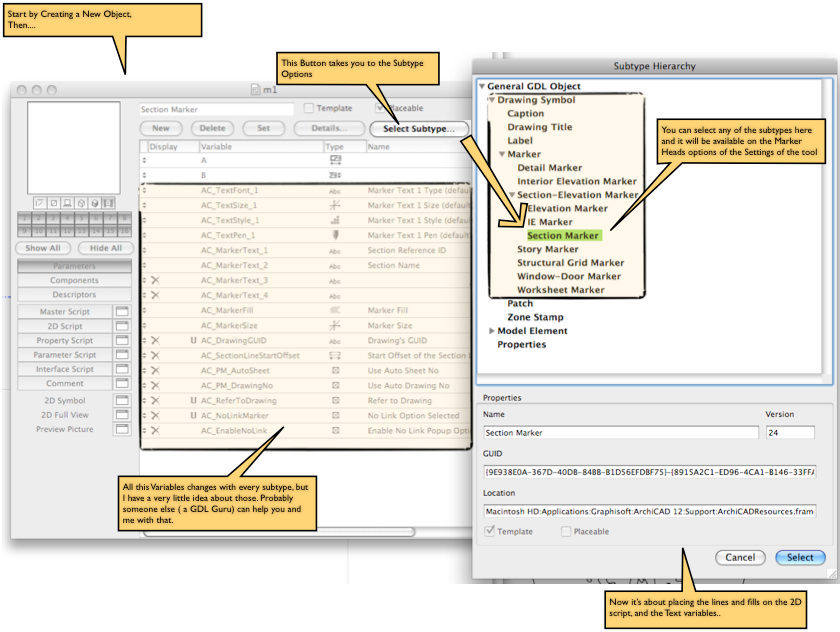
I'm not an expert at all, but I'm trying to do the same...
this is what I have found...
Cheers
Nando
Nando Mogollon
Director @ BuilDigital
[email protected]
Using, Archicad Latest AU and INT. Revit Latest (have to keep comparing notes)
More and more... IFC.js, IFCOpenShell
All things Solibri and BIMCollab
Director @ BuilDigital
[email protected]
Using, Archicad Latest AU and INT. Revit Latest (have to keep comparing notes)
More and more... IFC.js, IFCOpenShell
All things Solibri and BIMCollab

David Maudlin
Rockstar
Options
- Mark as New
- Bookmark
- Subscribe
- Mute
- Subscribe to RSS Feed
- Permalink
- Report Inappropriate Content
2009-07-06 02:55 PM
2009-07-06
02:55 PM
Cecilia:
1. The Level Dimension is built into the application and cannot be modified, although I think someone has written a Label that might look similar (search the forum).
2. For the Section/Elevation Marker, I would start by making a copy of the Built-In Section Marker and modifying it rather than starting from scratch, the referencing is complicated, and it looks like all you need to modify is the anchor point of the longer text element. Taking a quick look, this object uses the Section-Elevation Marker Macro, so this is the code you should be looking at. Changing the anchor point should not be too hard, making it behave as the part is rotated and/or mirrored will be more challenging.
3. For the Door/Window Marker, I would take a similar approach to the Section/Elevation Marker: start with a copy of the Door Marker 12 (like the Section Marker, it is using the gs_DW_Marker macro) and modify the anchor point of the text.
The text anchor point is illustrated on page 175 of the AC 12 GDL Reference Guide.
HTH
David
1. The Level Dimension is built into the application and cannot be modified, although I think someone has written a Label that might look similar (search the forum).
2. For the Section/Elevation Marker, I would start by making a copy of the Built-In Section Marker and modifying it rather than starting from scratch, the referencing is complicated, and it looks like all you need to modify is the anchor point of the longer text element. Taking a quick look, this object uses the Section-Elevation Marker Macro, so this is the code you should be looking at. Changing the anchor point should not be too hard, making it behave as the part is rotated and/or mirrored will be more challenging.
3. For the Door/Window Marker, I would take a similar approach to the Section/Elevation Marker: start with a copy of the Door Marker 12 (like the Section Marker, it is using the gs_DW_Marker macro) and modify the anchor point of the text.
The text anchor point is illustrated on page 175 of the AC 12 GDL Reference Guide.
HTH
David
David Maudlin / Architect
www.davidmaudlin.com
Digital Architecture
AC29 USA Perpetual • Mac mini M4 Pro OSX15 | 64 gb ram • MacBook Pro M3 Pro OSX14 | 36 gb ram
www.davidmaudlin.com
Digital Architecture
AC29 USA Perpetual • Mac mini M4 Pro OSX15 | 64 gb ram • MacBook Pro M3 Pro OSX14 | 36 gb ram
Nando Mogollon
Expert
Options
- Mark as New
- Bookmark
- Subscribe
- Mute
- Subscribe to RSS Feed
- Permalink
- Report Inappropriate Content
2009-07-07 07:57 AM
2009-07-07
07:57 AM
David wrote:Hi David, thanks for your help.
....... the Section-Elevation Marker Macro, so this is the code you should be looking at. Changing the anchor point should not be too hard, making it behave as the part is rotated and/or mirrored will be more challenging...
I can't find the "Section-Elevation Marker Macro".gsm or the script anywhere...
I really don't want to get into a very complicated scripting, not for what I want which is just a custom
Have somebody successfully done this before?
I'm still trying...
Nando
Nando Mogollon
Director @ BuilDigital
[email protected]
Using, Archicad Latest AU and INT. Revit Latest (have to keep comparing notes)
More and more... IFC.js, IFCOpenShell
All things Solibri and BIMCollab
Director @ BuilDigital
[email protected]
Using, Archicad Latest AU and INT. Revit Latest (have to keep comparing notes)
More and more... IFC.js, IFCOpenShell
All things Solibri and BIMCollab

Rod Jurich
Contributor
Options
- Mark as New
- Bookmark
- Subscribe
- Mute
- Subscribe to RSS Feed
- Permalink
- Report Inappropriate Content
2009-07-07 01:19 PM
2009-07-07
01:19 PM
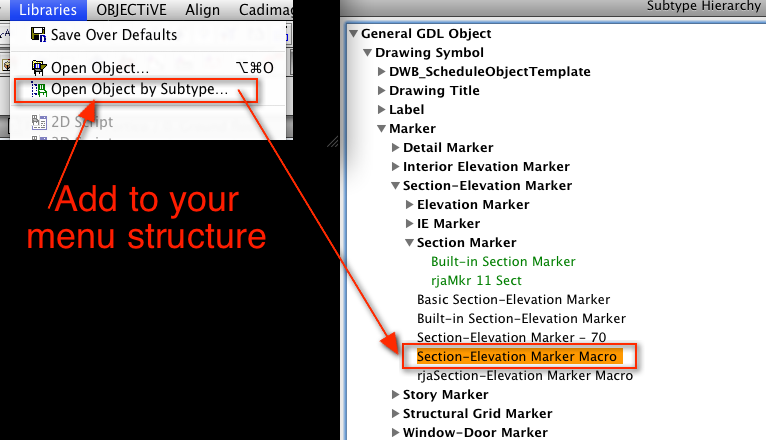
NandoMogollon wrote:Nando, you will need to add an item to your menu to enable the selection of a Sub Type.
/....
I can't find the "Section-Elevation Marker Macro".gsm or the script anywhere.../...
See attached, you will need to do this via your WE.
Then you will be able to select the sub type of choice.
Sounds complicated, but you can do it quite easily.
Not sure you will achieve what you want, but now you know how to find sub types.
Rod Jurich
AC4.55 - AC14 INT (4204) | | OBJECTiVE |
AC4.55 - AC14 INT (4204) | | OBJECTiVE |
Nando Mogollon
Expert
Options
- Mark as New
- Bookmark
- Subscribe
- Mute
- Subscribe to RSS Feed
- Permalink
- Report Inappropriate Content
2009-07-07 02:34 PM
2009-07-07
02:34 PM
Rod wrote:Thanks Rod.
Not sure you will achieve what you want, but now you know how to find sub types.
Just right... I have no Idea about what to do with it.... I was trying to follow David's advice.
Anyway I was thinking more something more like the way I make a Drawing Title. Drawing the symbol with Lines and Fills, and then add "autotexts".
It's not that easy, but I have a vague Idea...., it requires some scripting: something to make the Symbol Scale independent, Add the text for the Drawing number or the view number, and the Layout reference, which should be some kind of Global Variables.. something like AC_PM_Autosheet, and AC_PM_DrawingNo or something like it. I just don't know which Variables to use, and You don't find any instruction or reference to another book on the AC-and GDL-Reference guide ...
I'll keep trying, but I really can't believe no-one has done this before.
If I find an easy procedure to do it, I will make it public here.
Regards
Nando
Nando Mogollon
Director @ BuilDigital
[email protected]
Using, Archicad Latest AU and INT. Revit Latest (have to keep comparing notes)
More and more... IFC.js, IFCOpenShell
All things Solibri and BIMCollab
Director @ BuilDigital
[email protected]
Using, Archicad Latest AU and INT. Revit Latest (have to keep comparing notes)
More and more... IFC.js, IFCOpenShell
All things Solibri and BIMCollab
David Maudlin
Rockstar
Options
- Mark as New
- Bookmark
- Subscribe
- Mute
- Subscribe to RSS Feed
- Permalink
- Report Inappropriate Content
2009-07-07 05:55 PM
2009-07-07
05:55 PM
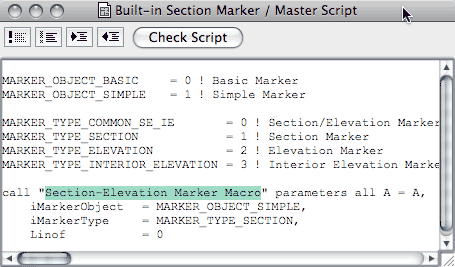
NandoMogollon wrote:A macro can also be opened by selecting the macro name in the Call statement and using the Open Object... menu command or shortcut key.
I can't find the "Section-Elevation Marker Macro".gsm or the script anywhere...
David
David Maudlin / Architect
www.davidmaudlin.com
Digital Architecture
AC29 USA Perpetual • Mac mini M4 Pro OSX15 | 64 gb ram • MacBook Pro M3 Pro OSX14 | 36 gb ram
www.davidmaudlin.com
Digital Architecture
AC29 USA Perpetual • Mac mini M4 Pro OSX15 | 64 gb ram • MacBook Pro M3 Pro OSX14 | 36 gb ram
Rod Jurich
Contributor
Options
- Mark as New
- Bookmark
- Subscribe
- Mute
- Subscribe to RSS Feed
- Permalink
- Report Inappropriate Content
2009-07-08 01:28 AM
2009-07-08
01:28 AM
David wrote:Thanks David, something new learned.
/....A macro can also be opened by selecting the
macro name in the Call statement and using the Open Object... menu command or shortcut key.
Rod Jurich
AC4.55 - AC14 INT (4204) | | OBJECTiVE |
AC4.55 - AC14 INT (4204) | | OBJECTiVE |
Anonymous
Not applicable
Options
- Mark as New
- Bookmark
- Subscribe
- Mute
- Subscribe to RSS Feed
- Permalink
- Report Inappropriate Content
2009-07-08 01:58 PM
2009-07-08
01:58 PM
on the elevation marker -
it seems to me that you can nearly achieve this marker by adjusting the settings - see attached file.
you could complete the look by going through the section macro code and adding the following functionality
1. solid coverbackground on text block to cover element of circle that you have omited
- probably just requires a parameter to controll text background fill
2. Position of second text line should be independant to the first one or else
have a parameter controlling the alignment of the text
3. there seems to be an option to include the layout number in the standard marker but it is "greyed out" im not sure how this could be enabled
-Could you not just use the name of the section to match layout name? and have use id for other number?
it seems to me that you can nearly achieve this marker by adjusting the settings - see attached file.
you could complete the look by going through the section macro code and adding the following functionality
1. solid coverbackground on text block to cover element of circle that you have omited
- probably just requires a parameter to controll text background fill
2. Position of second text line should be independant to the first one or else
have a parameter controlling the alignment of the text
3. there seems to be an option to include the layout number in the standard marker but it is "greyed out" im not sure how this could be enabled
-Could you not just use the name of the section to match layout name? and have use id for other number?
Anonymous
Not applicable
Options
- Mark as New
- Bookmark
- Subscribe
- Mute
- Subscribe to RSS Feed
- Permalink
- Report Inappropriate Content
2009-07-08 02:05 PM
2009-07-08
02:05 PM
looking in the section marker macro there is a subrouteen at the bottom to place the text - you could play around with this - change simple text2 input to a textblock and controll parameters etc.
! ==============================================================================
! Marker text definition
! ==============================================================================
2000:
pen AC_TextPen_1
if text_readable & text_rotangle > 90 & text_rotangle <= 270 then
! switch style
if text_anchor = 7 then style leftstyle
if text_anchor = 9 then style rightstyle
rot2 180
add2 0, -AC_TextSize_1
text2 0, -dsc, text_cont
del 2
else
text2 0, -dsc, text_cont
endif
return
! ==============================================================================
! Marker text definition
! ==============================================================================
2000:
pen AC_TextPen_1
if text_readable & text_rotangle > 90 & text_rotangle <= 270 then
! switch style
if text_anchor = 7 then style leftstyle
if text_anchor = 9 then style rightstyle
rot2 180
add2 0, -AC_TextSize_1
text2 0, -dsc, text_cont
del 2
else
text2 0, -dsc, text_cont
endif
return
Didn't find the answer?
Check other topics in this Forum
Back to ForumRead the latest accepted solutions!
Accepted SolutionsStart a new conversation!