
Turn on suggestions
Auto-suggest helps you quickly narrow down your search results by suggesting possible matches as you type.
Showing results for
EN
Turn on suggestions
Auto-suggest helps you quickly narrow down your search results by suggesting possible matches as you type.
Showing results for
- English
- :
- Forum
- :
- Libraries & objects
- :
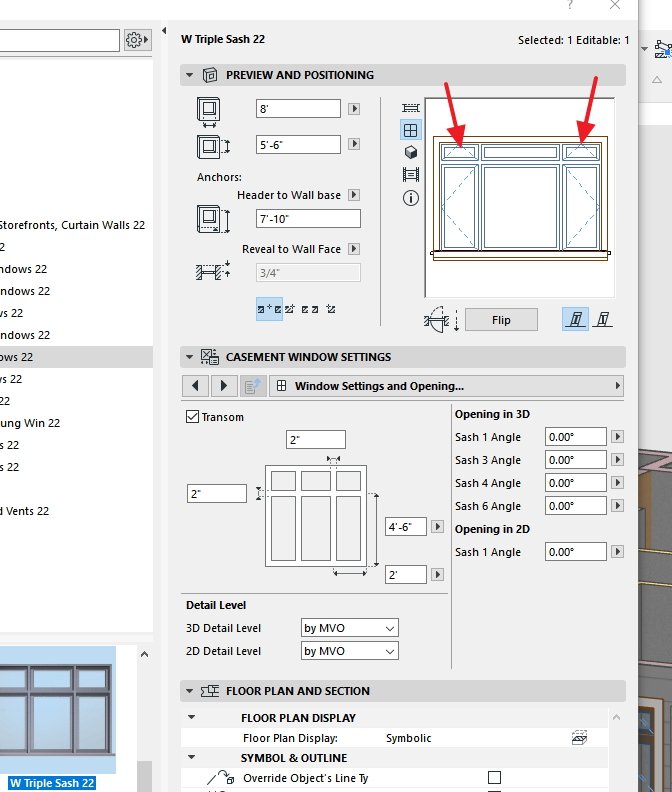
- Edit Triple sash Window
Options
- Subscribe to RSS Feed
- Mark Topic as New
- Mark Topic as Read
- Pin this post for me
- Bookmark
- Subscribe to Topic
- Mute
- Printer Friendly Page

Anonymous
Not applicable
Options
- Mark as New
- Bookmark
- Subscribe
- Mute
- Subscribe to RSS Feed
- Permalink
- Report Inappropriate Content
2018-09-13
07:39 PM
- last edited on
2023-05-24
12:27 PM
by
 Rubia Torres
Edit Triple sash Window
2018-09-13
07:39 PM
Kris
Solved! Go to Solution.
1 Solution
Accepted Solutions

Lingwisyer
Guru
Options
- Mark as New
- Bookmark
- Subscribe
- Mute
- Subscribe to RSS Feed
- Permalink
- Report Inappropriate Content
2018-09-14 04:01 AM
2018-09-14
04:01 AM
My library does not include a
Ling.
Ling.
| AC22-29 AUS 3200 | Help Those Help You - Add a Signature |
| Self-taught, bend it till it breaks | Creating a Thread |
| Win11 | i9 10850K | 64GB | RX6600 | Win11 | 7800X3D | 32GB | RTX5070TI |

Solution
2 Replies 2
Lingwisyer
Guru
Options
- Mark as New
- Bookmark
- Subscribe
- Mute
- Subscribe to RSS Feed
- Permalink
- Report Inappropriate Content
2018-09-14 04:01 AM
2018-09-14
04:01 AM
My library does not include a
Ling.
Ling.
| AC22-29 AUS 3200 | Help Those Help You - Add a Signature |
| Self-taught, bend it till it breaks | Creating a Thread |
| Win11 | i9 10850K | 64GB | RX6600 | Win11 | 7800X3D | 32GB | RTX5070TI |
Solution
Anonymous
Not applicable
Options
- Mark as New
- Bookmark
- Subscribe
- Mute
- Subscribe to RSS Feed
- Permalink
- Report Inappropriate Content
2018-09-14 05:13 AM
2018-09-14
05:13 AM
Perfect. Thanks for that. That window isn't in the US version but doing a search pulls it up (as well as some other interesting things). I have to remember to use the search function. Lots of good things are out there which aren't in the US version.
Didn't find the answer?
Check other topics in this Forum
Back to ForumRead the latest accepted solutions!
Accepted SolutionsStart a new conversation!

Suggested topics
- door and window libraries continue to come up short in Libraries & objects
- Window with sidelight sash width in Libraries & objects
- specific type of window in Archicad in Libraries & objects
- In Archicad, when I double-click a window object to open its settings dialog, the UI appears bla in Libraries & objects
- (Variable) Window Problem - fixed glass in Libraries & objects
