
Turn on suggestions
Auto-suggest helps you quickly narrow down your search results by suggesting possible matches as you type.
Showing results for
EN
Turn on suggestions
Auto-suggest helps you quickly narrow down your search results by suggesting possible matches as you type.
Showing results for
- English
- :
- Forum
- :
- Libraries & objects
- :
- Re: I want the opening window to look like this in...
Options
- Subscribe to RSS Feed
- Mark Topic as New
- Mark Topic as Read
- Pin this post for me
- Bookmark
- Subscribe to Topic
- Mute
- Printer Friendly Page

LeeJaeYoung
Virtuoso
Options
- Mark as New
- Bookmark
- Subscribe
- Mute
- Subscribe to RSS Feed
- Permalink
- Report Inappropriate Content
2022-11-06
07:53 AM
- last edited on
2023-05-24
09:46 AM
by
 Rubia Torres
I want the opening window to look like this in core only.
2022-11-06
07:53 AM
wall is this
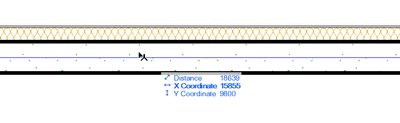
it is "Rectangular Window Opening 25"
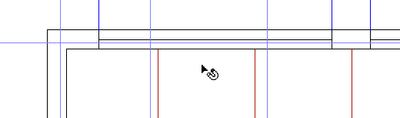
in core only
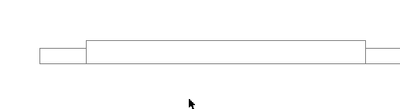
I want it to be expressed like this. (in core only)

AC27 on window 11
3 Replies 3

DGSketcher
Legend
Options
- Mark as New
- Bookmark
- Subscribe
- Mute
- Subscribe to RSS Feed
- Permalink
- Report Inappropriate Content
2022-11-06 02:19 PM
2022-11-06
02:19 PM
See if the MVO settings for Construction Element Options and Detail Level of Door, Window... can deliver what you need. You may get it just by changing the CEO > Window to Show opening only. You may also need to create and save the settings to a new MVO.
Apple iMac Intel i9 / macOS Sonoma / AC27UKI (most recent builds.. if they work)
LeeJaeYoung
Virtuoso
Options
- Mark as New
- Bookmark
- Subscribe
- Mute
- Subscribe to RSS Feed
- Permalink
- Report Inappropriate Content
2022-11-06 03:52 PM
2022-11-06
03:52 PM
In the Entire Model, it is correct to express even the finish.
In core only, it should be displayed only on the structure, but I am telling you that it is expressed until the invisible finish.
AC27 on window 11
LeeJaeYoung
Virtuoso
Options
- Mark as New
- Bookmark
- Subscribe
- Mute
- Subscribe to RSS Feed
- Permalink
- Report Inappropriate Content
2022-11-08 01:50 AM - edited 2022-11-08 02:52 AM
2022-11-08
01:50 AM
The problem here is that the wall is designated as Outline in order to avoid the cut plan of the wall.
Raising the height of the cut plane has the same problem.
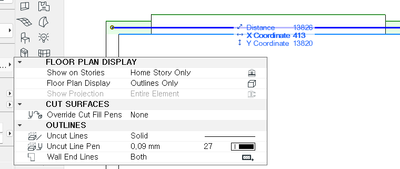
In my opinion, it is not.
If this wall is not expressed as an elevation line on the plane, there is no problem.
I used window opening to wrap the finish on the opening part of the wall...
The whole has to be the facade, so it seems like this part should be cut as
AC27 on window 11

Didn't find the answer?
Check other topics in this Forum
Back to ForumRead the latest accepted solutions!
Accepted SolutionsStart a new conversation!

Suggested topics
- Issues with 3Dconnexxion CadMouse Pro Wireless in Installation & update
- BIMcloud Basic 2026.1 – Activate button does not open Graphisoft ID activation in Teamwork & BIMcloud
- Wall surface offset in Modeling
- Detail marker as plan in Documentation
- Door getting offset from complex wall on 3D preview in Modeling
