
Turn on suggestions
Auto-suggest helps you quickly narrow down your search results by suggesting possible matches as you type.
Showing results for
EN
Turn on suggestions
Auto-suggest helps you quickly narrow down your search results by suggesting possible matches as you type.
Showing results for
- English
- :
- Forum
- :
- Libraries & objects
- :
- Missing surfaces
Options
- Subscribe to RSS Feed
- Mark Topic as New
- Mark Topic as Read
- Pin this post for me
- Bookmark
- Subscribe to Topic
- Mute
- Printer Friendly Page

Llian
Advocate
Options
- Mark as New
- Bookmark
- Subscribe
- Mute
- Subscribe to RSS Feed
- Permalink
- Report Inappropriate Content
2018-03-13 09:51 AM
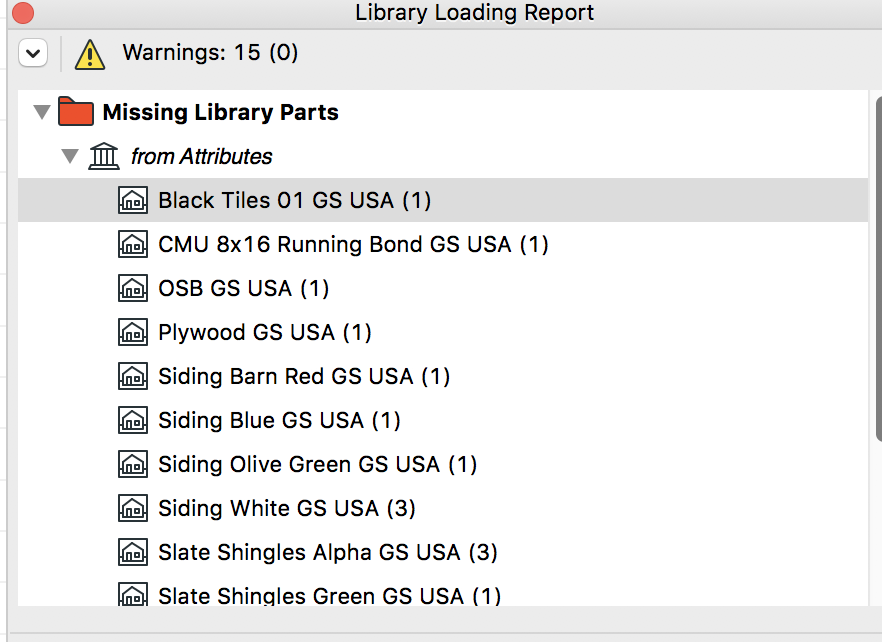
Missing surfaces
2018-03-13
09:51 AM
Lilian Seow LEED AP | cSBA | CAPM | PMP
AC 29 USA FULL | Windows 11 Enterprise i5 3.10GHz | Archicad-user since 1994!
AC 29 USA FULL | Windows 11 Enterprise i5 3.10GHz | Archicad-user since 1994!
1 Reply 1

Erwin Edel
Rockstar
Options
- Mark as New
- Bookmark
- Subscribe
- Mute
- Subscribe to RSS Feed
- Permalink
- Report Inappropriate Content
2018-03-13 01:22 PM
2018-03-13
01:22 PM
Looks like you've unloaded a library that had these surfaces, or perhaps migrated an older project to a new version and these textures are no longer in the library. You should be able to select the missing textures in the loading report and get info to see which surface in the project has them missing. You could remove the textures there or replace them with something else if you did migrate to a newer version.
Erwin Edel, Project Lead, Leloup Architecten
www.leloup.nl
ArchiCAD 9-29NED FULL
Windows 11 Pro for Workstations
Adobe Design Premium CS5
www.leloup.nl
ArchiCAD 9-29NED FULL
Windows 11 Pro for Workstations
Adobe Design Premium CS5

Didn't find the answer?
Check other topics in this Forum
Back to ForumRead the latest accepted solutions!
Accepted SolutionsStart a new conversation!

Suggested topics
- Concrete column not subtracted from brick wall in Component Volume (Net) Schedule in Project data & BIM
- ProKit Coverings Library missing / not loading in Libraries & objects
- Spaces in AI Assistant + MCP: what would you check your model against? in AI solutions
- Which Archicad 30 MCP tool group will you use most? in AI solutions
- Stairs disappear in the Layout Book in Documentation
