
Turn on suggestions
Auto-suggest helps you quickly narrow down your search results by suggesting possible matches as you type.
Showing results for
EN
Turn on suggestions
Auto-suggest helps you quickly narrow down your search results by suggesting possible matches as you type.
Showing results for
- English
- :
- Forum
- :
- Libraries & objects
- :
- Railing Post Ends
Options
- Subscribe to RSS Feed
- Mark Topic as New
- Mark Topic as Read
- Pin this post for me
- Bookmark
- Subscribe to Topic
- Mute
- Printer Friendly Page

ksjhawk
Enthusiast
Options
- Mark as New
- Bookmark
- Subscribe
- Mute
- Subscribe to RSS Feed
- Permalink
- Report Inappropriate Content
2017-12-19 03:11 PM
Railing Post Ends
2017-12-19
03:11 PM
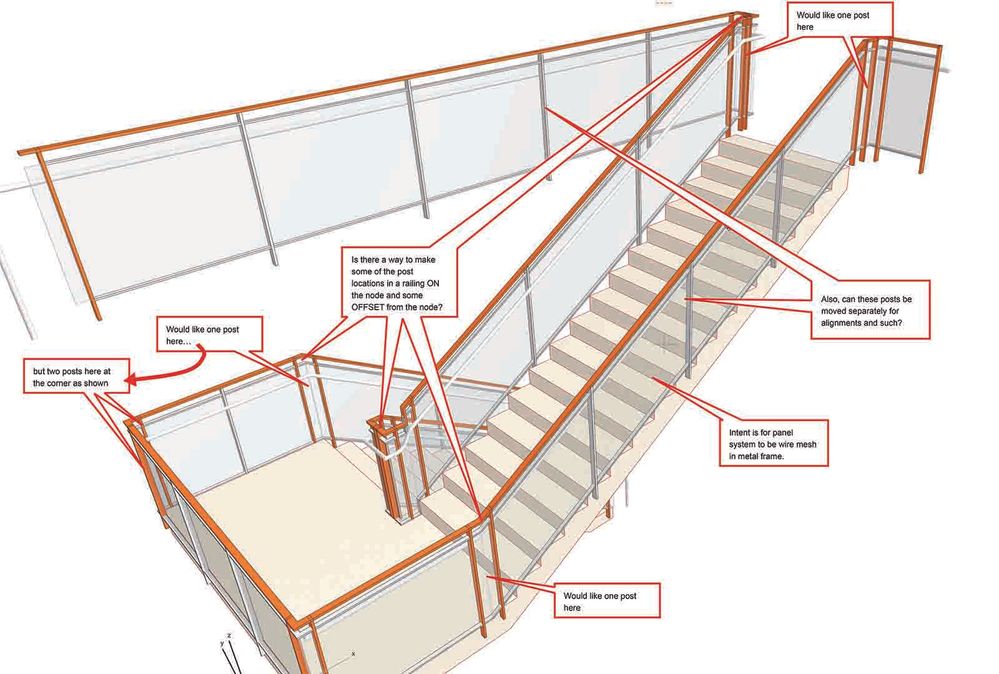
Is there an easier way to do this or should I go back to columns for rail posts so I can put them right where I want them? Also, is there a way to adjust the inner posts (to line up with treads for instance)?
Thanks...
MacBook Pro Apple M4 Max 128GB ram
OS X 15.7.2
AC29 - AC6.5
OS X 15.7.2
AC29 - AC6.5
5 Replies 5

Bruce
Advisor
Options
- Mark as New
- Bookmark
- Subscribe
- Mute
- Subscribe to RSS Feed
- Permalink
- Report Inappropriate Content
2017-12-19 10:09 PM
2017-12-19
10:09 PM
I'm new to figuring out this railing stuff too, so apologies if I tell you stuff you've already tried. However, play with the settings in the following three areas to see if it achieves what you want:
1. Segment > Railings on associated stairs
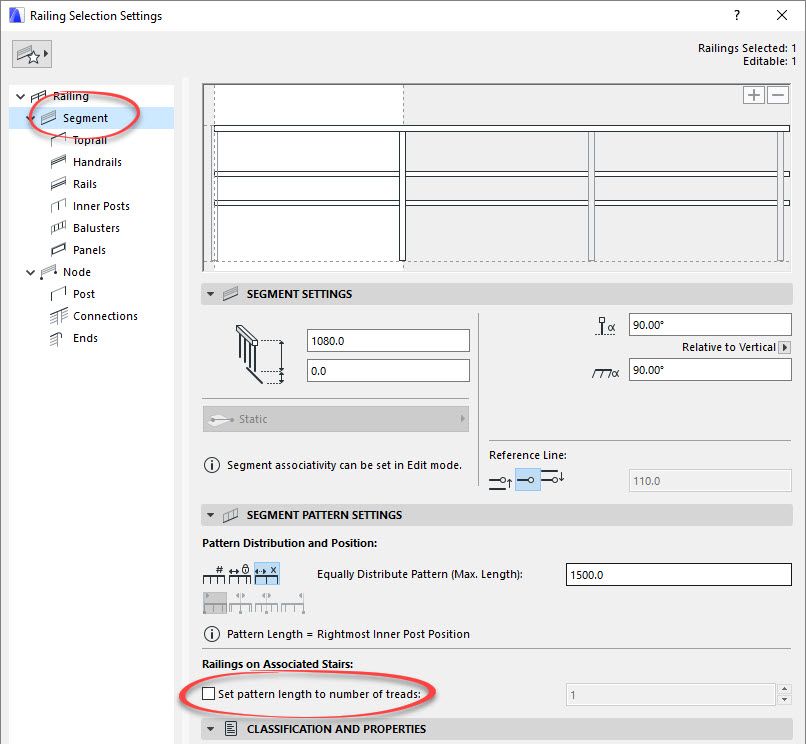
1. Segment > Railings on associated stairs
Bruce Walker
Barking Dog BIM YouTube
Mindmeister Mindmap
-- since v8.1 --
AC27 5060 INT Full | Windows 11 64 Pro | 12th Gen Intel i7-12700H 2.30 GHz | 64 Gb RAM | NVIDIA GeForce RTX 3060 32 Gb
Barking Dog BIM YouTube
Mindmeister Mindmap
-- since v8.1 --
AC27 5060 INT Full | Windows 11 64 Pro | 12th Gen Intel i7-12700H 2.30 GHz | 64 Gb RAM | NVIDIA GeForce RTX 3060 32 Gb
Bruce
Advisor
Options
- Mark as New
- Bookmark
- Subscribe
- Mute
- Subscribe to RSS Feed
- Permalink
- Report Inappropriate Content
2017-12-19 10:13 PM
2017-12-19
10:13 PM
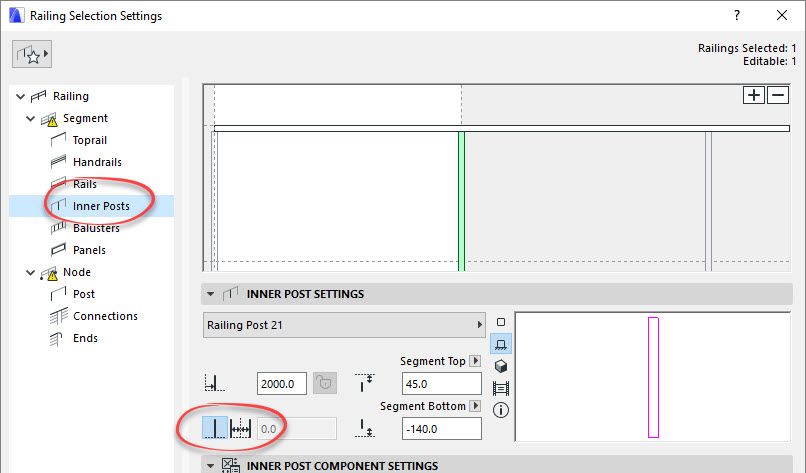
2. Inner Posts > Single or duplicate inner posts
Bruce Walker
Barking Dog BIM YouTube
Mindmeister Mindmap
-- since v8.1 --
AC27 5060 INT Full | Windows 11 64 Pro | 12th Gen Intel i7-12700H 2.30 GHz | 64 Gb RAM | NVIDIA GeForce RTX 3060 32 Gb
Barking Dog BIM YouTube
Mindmeister Mindmap
-- since v8.1 --
AC27 5060 INT Full | Windows 11 64 Pro | 12th Gen Intel i7-12700H 2.30 GHz | 64 Gb RAM | NVIDIA GeForce RTX 3060 32 Gb
Bruce
Advisor
Options
- Mark as New
- Bookmark
- Subscribe
- Mute
- Subscribe to RSS Feed
- Permalink
- Report Inappropriate Content
2017-12-19 10:15 PM
2017-12-19
10:15 PM
3a. Nodes > Number of posts and offset
3b. Nodes > Pattern continuity
3b. Nodes > Pattern continuity
Bruce Walker
Barking Dog BIM YouTube
Mindmeister Mindmap
-- since v8.1 --
AC27 5060 INT Full | Windows 11 64 Pro | 12th Gen Intel i7-12700H 2.30 GHz | 64 Gb RAM | NVIDIA GeForce RTX 3060 32 Gb
Barking Dog BIM YouTube
Mindmeister Mindmap
-- since v8.1 --
AC27 5060 INT Full | Windows 11 64 Pro | 12th Gen Intel i7-12700H 2.30 GHz | 64 Gb RAM | NVIDIA GeForce RTX 3060 32 Gb


 Laszlo Nagy
Community Admin
Options
- Mark as New
- Bookmark
- Subscribe
- Mute
- Subscribe to RSS Feed
- Permalink
- Report Inappropriate Content
2017-12-21 08:44 PM
2017-12-21
08:44 PM
ksjhawk,
In Railing Editing Mode, select any Post of the Railing, then right-click and use the "Convert Pattern to Segment Length" option. This way each Post will be treated individually and you can select one Post, and set it to a single post, then select another Post and set it to Double Post.
In Railing Editing Mode, select any Post of the Railing, then right-click and use the "Convert Pattern to Segment Length" option. This way each Post will be treated individually and you can select one Post, and set it to a single post, then select another Post and set it to Double Post.
Loving Archicad since 1995 - Find Archicad Tips at x.com/laszlonagy
AMD Ryzen9 5900X CPU, 64 GB RAM 3600 MHz, Nvidia GTX 1060 6GB, 500 GB NVMe SSD
2x28" (2560x1440), Windows 10 PRO ENG, Ac20-Ac29
AMD Ryzen9 5900X CPU, 64 GB RAM 3600 MHz, Nvidia GTX 1060 6GB, 500 GB NVMe SSD
2x28" (2560x1440), Windows 10 PRO ENG, Ac20-Ac29

2raarchitecture
Booster
Options
- Mark as New
- Bookmark
- Subscribe
- Mute
- Subscribe to RSS Feed
- Permalink
- Report Inappropriate Content
2022-09-11 03:38 AM
2022-09-11
03:38 AM
It looks like most things have to be edited on edit mode for them to work...stating the obvious. I have tried to edit objects on the settings, but it was better to move things around on edit mode.
2RA Building Workshop
www.2rabldgworkshop.com
11th Gen Intel(R) Core(TM) i7-11800H @ 2.30GHz. 16.0 GB. NVIDIA GeForce RTX 3060 Laptop GPU.
ArchiCAD 25. 5002 USA Full
www.2rabldgworkshop.com
11th Gen Intel(R) Core(TM) i7-11800H @ 2.30GHz. 16.0 GB. NVIDIA GeForce RTX 3060 Laptop GPU.
ArchiCAD 25. 5002 USA Full

Didn't find the answer?
Check other topics in this Forum
Back to ForumRead the latest accepted solutions!
Accepted SolutionsStart a new conversation!

Suggested topics
- Railing - Post view settings with project2... fragment2 - background foreground in Libraries & objects
- Railing and Curtain Wall in Modeling
- Railing ends disappear when perpendicular to elevation in Modeling
- custom rail issue in Modeling
- Railing Tool - Custom Railing Post not showing on Floor Plan in Modeling
