
Turn on suggestions
Auto-suggest helps you quickly narrow down your search results by suggesting possible matches as you type.
Showing results for
EN
Turn on suggestions
Auto-suggest helps you quickly narrow down your search results by suggesting possible matches as you type.
Showing results for
- English
- :
- Forum
- :
- Libraries & objects
- :
- Re: Using custom image for shrub object
Options
- Subscribe to RSS Feed
- Mark Topic as New
- Mark Topic as Read
- Pin this post for me
- Bookmark
- Subscribe to Topic
- Mute
- Printer Friendly Page

brittsax
Booster
Options
- Mark as New
- Bookmark
- Subscribe
- Mute
- Subscribe to RSS Feed
- Permalink
- Report Inappropriate Content
2022-06-27
05:02 PM
- last edited on
2025-07-16
03:25 PM
by
 Aruzhan Ilaikova
Using custom image for shrub object
2022-06-27
05:02 PM
I am trying to use a custom image for the built in shrub object and the image I have loaded is not showing up on the object in 3D. The object just appears white. It even appears white if I don't use a custom image.
The goal is to place a logo on the building and I am using the shrub object to place a custom image like Shoegnome Architects tutorial.
AC29 USA • Apple M3 ultra | 96 GB • OS Sequoia 15.7.4
Solved! Go to Solution.
2 Solutions
Accepted Solutions

BrunoH
Expert
Options
- Mark as New
- Bookmark
- Subscribe
- Mute
- Subscribe to RSS Feed
- Permalink
- Report Inappropriate Content
2022-06-27 05:28 PM
2022-06-27
05:28 PM
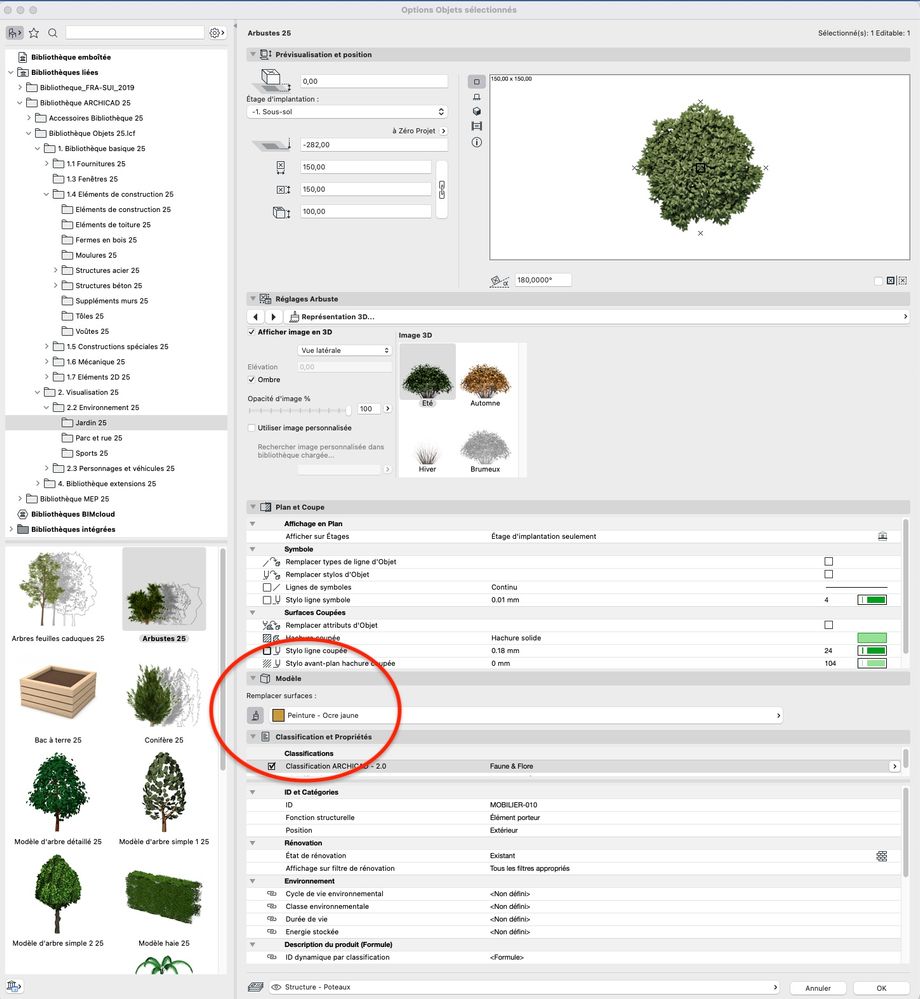
Did you set the Replace Surface Option for your Object (see attach) ?
ArchiCad 3.43 to 28
MacOS Monterey
MacOS Monterey
BrunoH
Expert
Options
- Mark as New
- Bookmark
- Subscribe
- Mute
- Subscribe to RSS Feed
- Permalink
- Report Inappropriate Content
2022-06-28 10:41 AM
2022-06-28
10:41 AM
Hi,
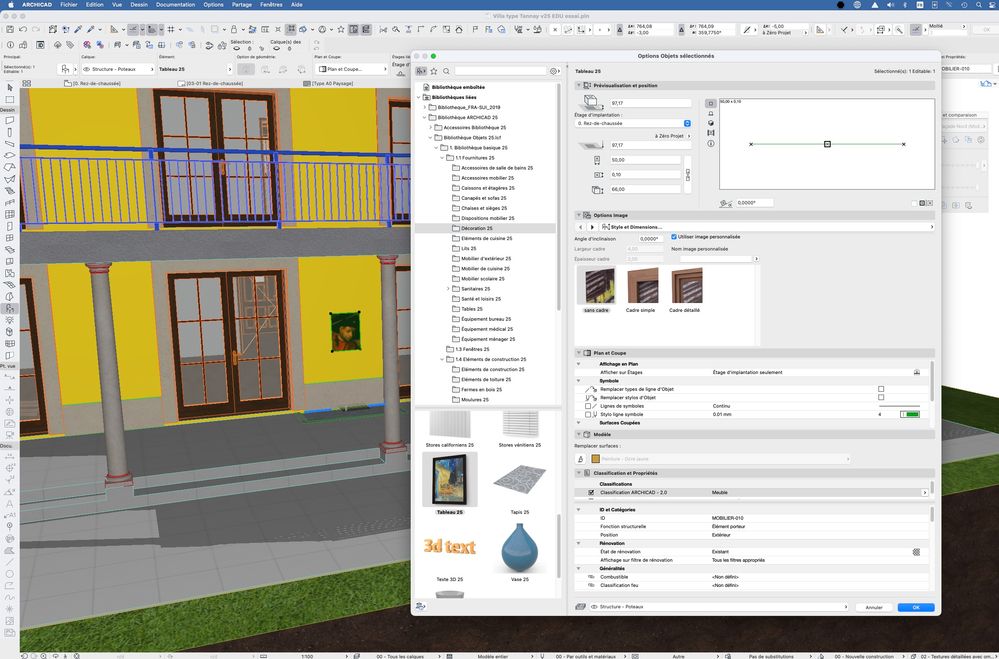
If your goal is to place an image on a wall you'd better used the "Picture 25" object.
ArchiCad 3.43 to 28
MacOS Monterey
MacOS Monterey
12 Replies 12
BrunoH
Expert
Options
- Mark as New
- Bookmark
- Subscribe
- Mute
- Subscribe to RSS Feed
- Permalink
- Report Inappropriate Content
2022-06-27 05:11 PM
2022-06-27
05:11 PM
Hi,
In the 3D Window Images will only appears in Textured styles not in White model styles.
ArchiCad 3.43 to 28
MacOS Monterey
MacOS Monterey
brittsax
Booster
Options
- Mark as New
- Bookmark
- Subscribe
- Mute
- Subscribe to RSS Feed
- Permalink
- Report Inappropriate Content
2022-06-27 05:14 PM
2022-06-27
05:14 PM
Hi, the 3D isn't in white model style, I've tried multiple styles and the rest of the model has the correct colors etc. but the image still shows white. Actually now its showing brown and I don't know why
AC29 USA • Apple M3 ultra | 96 GB • OS Sequoia 15.7.4
BrunoH
Expert
Options
- Mark as New
- Bookmark
- Subscribe
- Mute
- Subscribe to RSS Feed
- Permalink
- Report Inappropriate Content
2022-06-27 05:28 PM
2022-06-27
05:28 PM
Did you set the Replace Surface Option for your Object (see attach) ?
ArchiCad 3.43 to 28
MacOS Monterey
MacOS Monterey
brittsax
Booster
Options
- Mark as New
- Bookmark
- Subscribe
- Mute
- Subscribe to RSS Feed
- Permalink
- Report Inappropriate Content
2022-06-27 05:59 PM
2022-06-27
05:59 PM
Got it to work thanks! I had to override that option. Is there a way to rotate the object to be parallel with the wall?
AC29 USA • Apple M3 ultra | 96 GB • OS Sequoia 15.7.4
BrunoH
Expert
Options
- Mark as New
- Bookmark
- Subscribe
- Mute
- Subscribe to RSS Feed
- Permalink
- Report Inappropriate Content
2022-06-27 06:18 PM
2022-06-27
06:18 PM
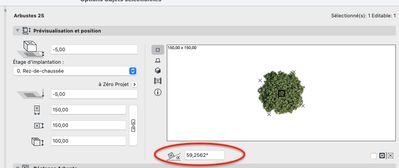
You can set a rotation angle in the object's parameters or you can use the rotation command.
ArchiCad 3.43 to 28
MacOS Monterey
MacOS Monterey
brittsax
Booster
Options
- Mark as New
- Bookmark
- Subscribe
- Mute
- Subscribe to RSS Feed
- Permalink
- Report Inappropriate Content
2022-06-27 09:17 PM
2022-06-27
09:17 PM
Thanks, I did that but in 3D view the image changes automatically. Maybe because it's supposed to look 3D like a shrub but in this case I don't want it to
AC29 USA • Apple M3 ultra | 96 GB • OS Sequoia 15.7.4

Barry Kelly
Moderator
Options
- Mark as New
- Bookmark
- Subscribe
- Mute
- Subscribe to RSS Feed
- Permalink
- Report Inappropriate Content
2022-06-28 03:44 AM
2022-06-28
03:44 AM
If it is a 'billboard' style object (a flat board in 3D), then it will rotate automatically to face the camera in 3D (upon re-build of view in perspective).
Barry.
One of the forum moderators.
Versions 6.5 to 27
i7-10700 @ 2.9Ghz, 32GB ram, GeForce RTX 2060 (6GB), Windows 10
Lenovo Thinkpad - i7-1270P 2.20 GHz, 32GB RAM, Nvidia T550, Windows 11
Versions 6.5 to 27
i7-10700 @ 2.9Ghz, 32GB ram, GeForce RTX 2060 (6GB), Windows 10
Lenovo Thinkpad - i7-1270P 2.20 GHz, 32GB RAM, Nvidia T550, Windows 11
BrunoH
Expert
Options
- Mark as New
- Bookmark
- Subscribe
- Mute
- Subscribe to RSS Feed
- Permalink
- Report Inappropriate Content
2022-06-28 10:41 AM
2022-06-28
10:41 AM
Hi,
If your goal is to place an image on a wall you'd better used the "Picture 25" object.
ArchiCad 3.43 to 28
MacOS Monterey
MacOS Monterey

JaredBanks
Ace
Options
- Mark as New
- Bookmark
- Subscribe
- Mute
- Subscribe to RSS Feed
- Permalink
- Report Inappropriate Content
2022-06-28 08:02 PM
2022-06-28
08:02 PM
Three comments:
1) I love that my video inspired you to try this.
2) for anyone curious, here's the video the OP is referencing: http://www.shoegnome.com/2022/06/23/image-based-objects-in-Archicad/
3) I agree with @BrunoH: you want to use the Picture object for this so that the element stays in a static facing rather than always re-orientating to face the camera. With the Picture object you can also turn off the frame or set it to be very thin if that's of value to your sign.
Jared Banks, AIA
Shoegnome Architects
Archicad Blog: www.shoegnome.com
Archicad Template: www.shoegnome.com/template/
Archicad Work Environment: www.shoegnome.com/work-environment/
Archicad Tutorial Videos: www.youtube.com/shoegnome
Shoegnome Architects
Archicad Blog: www.shoegnome.com
Archicad Template: www.shoegnome.com/template/
Archicad Work Environment: www.shoegnome.com/work-environment/
Archicad Tutorial Videos: www.youtube.com/shoegnome

Didn't find the answer?
Check other topics in this Forum
Back to ForumRead the latest accepted solutions!
Accepted SolutionsStart a new conversation!

Suggested topics
- Climate and sunpath objects for analysis presentation in Libraries & objects
- Custom objects become invalid when downgraded from AC29 to 27 in Libraries & objects
- gdl custom object snaps back to older version upon opening the file in Libraries & objects
- Drag and Drop from Plan Window to Library Object Script Window Not Working in Libraries & objects
- Window with adjustable frame extensions (jamb) and automatic insulation return – AC29 / GDL in Modeling
