
Turn on suggestions
Auto-suggest helps you quickly narrow down your search results by suggesting possible matches as you type.
Showing results for
EN
Turn on suggestions
Auto-suggest helps you quickly narrow down your search results by suggesting possible matches as you type.
Showing results for
- English
- :
- Forum
- :
- Libraries & objects
- :
- WOOD FENCE 17??...WHY ONLY 6'-0" MAX
Options
- Subscribe to RSS Feed
- Mark Topic as New
- Mark Topic as Read
- Pin this post for me
- Bookmark
- Subscribe to Topic
- Mute
- Printer Friendly Page
rob2218
Enthusiast
Options
- Mark as New
- Bookmark
- Subscribe
- Mute
- Subscribe to RSS Feed
- Permalink
- Report Inappropriate Content
2014-08-02 02:00 AM
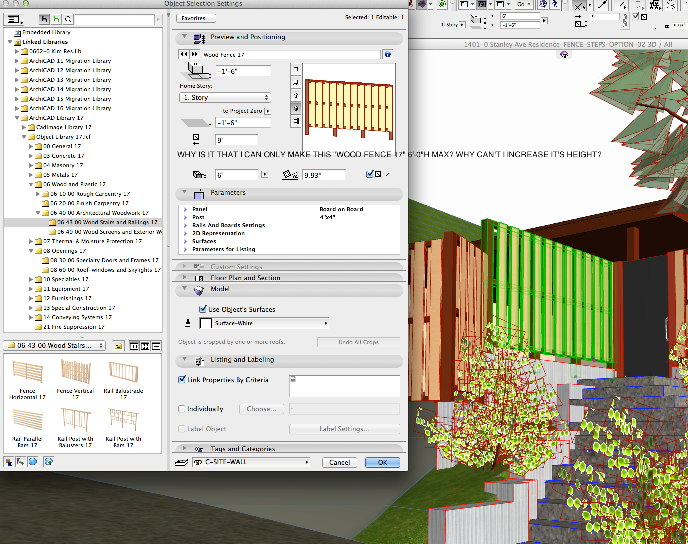
WOOD FENCE 17??...WHY ONLY 6'-0" MAX
2014-08-02
02:00 AM
...Bobby Hollywood live from...
i>u
Edgewater, FL!
SOFTWARE VERSION:
Archicad 22, Archicad 23
Windows7 -OS, MAC Maverick OS
i>u
Edgewater, FL!
SOFTWARE VERSION:
Archicad 22, Archicad 23
Windows7 -OS, MAC Maverick OS
9 Replies 9
rob2218
Enthusiast
Options
- Mark as New
- Bookmark
- Subscribe
- Mute
- Subscribe to RSS Feed
- Permalink
- Report Inappropriate Content
2014-08-02 02:01 AM
2014-08-02
02:01 AM
this wood fence object is a great tool.....but...if I can't make it a height I need..then what good is it?
...Bobby Hollywood live from...
i>u
Edgewater, FL!
SOFTWARE VERSION:
Archicad 22, Archicad 23
Windows7 -OS, MAC Maverick OS
i>u
Edgewater, FL!
SOFTWARE VERSION:
Archicad 22, Archicad 23
Windows7 -OS, MAC Maverick OS
rob2218
Enthusiast
Options
- Mark as New
- Bookmark
- Subscribe
- Mute
- Subscribe to RSS Feed
- Permalink
- Report Inappropriate Content
2014-08-02 10:32 PM
2014-08-02
10:32 PM
have any others tried this object? Can anyone else get it to get taller than 6'-0"? if so, please.....how did you do it?
...Bobby Hollywood live from...
i>u
Edgewater, FL!
SOFTWARE VERSION:
Archicad 22, Archicad 23
Windows7 -OS, MAC Maverick OS
i>u
Edgewater, FL!
SOFTWARE VERSION:
Archicad 22, Archicad 23
Windows7 -OS, MAC Maverick OS

Karl Ottenstein
Moderator Emeritus
Options
- Mark as New
- Bookmark
- Subscribe
- Mute
- Subscribe to RSS Feed
- Permalink
- Report Inappropriate Content
2014-08-02 11:46 PM
2014-08-02
11:46 PM
Interesting object. I hadn't noticed it before.
For some reason, the parameters are explicitly limited to 6' in height. You can edit the Parameter script by selecting a placed object, doing an Open Object and editing as shown in the attached. (Or similar - I just put a 1 in front of the 6 to make the height limit be 16'.] Save with a new name in your embedded library.
For the board on board that you show, this seems to still work fine. Get a few weird results with some other panel types after the above quickie mod, but probably good enough for what you want.
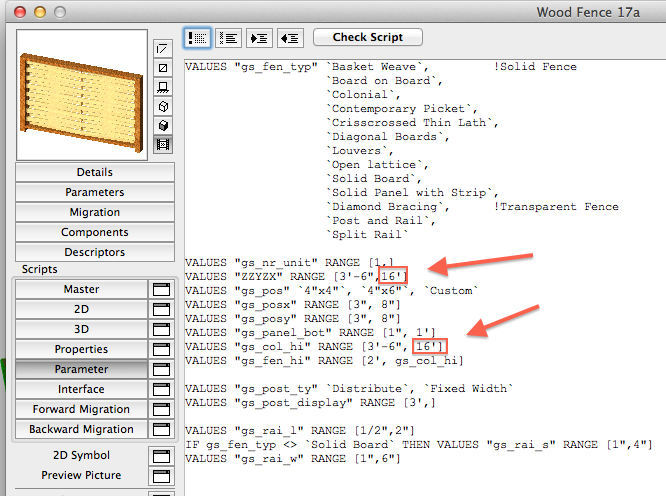
For some reason, the parameters are explicitly limited to 6' in height. You can edit the Parameter script by selecting a placed object, doing an Open Object and editing as shown in the attached. (Or similar - I just put a 1 in front of the 6 to make the height limit be 16'.] Save with a new name in your embedded library.
For the board on board that you show, this seems to still work fine. Get a few weird results with some other panel types after the above quickie mod, but probably good enough for what you want.
Vote for Wish: Copy/Paste in 3D
AC 29 USA and earlier • hardware key • macOS Tahoe 26.7 MacBook Pro M2 Max 12CPU/30GPU cores, 32GB
AC 29 USA and earlier • hardware key • macOS Tahoe 26.7 MacBook Pro M2 Max 12CPU/30GPU cores, 32GB
rob2218
Enthusiast
Options
- Mark as New
- Bookmark
- Subscribe
- Mute
- Subscribe to RSS Feed
- Permalink
- Report Inappropriate Content
2014-08-04 06:28 PM
2014-08-04
06:28 PM
Karl,
anyway I can get you to send/email or post up that new "fence" file?
I can't seem to make mine work.
I change the settings you show...then say "save" as an embedded object and it doesn't allow me to alter the parameters to the taller fence....
thanks
anyway I can get you to send/email or post up that new "fence" file?
I can't seem to make mine work.
I change the settings you show...then say "save" as an embedded object and it doesn't allow me to alter the parameters to the taller fence....
thanks
...Bobby Hollywood live from...
i>u
Edgewater, FL!
SOFTWARE VERSION:
Archicad 22, Archicad 23
Windows7 -OS, MAC Maverick OS
i>u
Edgewater, FL!
SOFTWARE VERSION:
Archicad 22, Archicad 23
Windows7 -OS, MAC Maverick OS
rob2218
Enthusiast
Options
- Mark as New
- Bookmark
- Subscribe
- Mute
- Subscribe to RSS Feed
- Permalink
- Report Inappropriate Content
2014-08-04 06:31 PM
2014-08-04
06:31 PM
nevermind...I'm an idiot.
didn't follow your diagram and only changed one parameter and not the other...but now changed the other so now it works...thank you.
didn't follow your diagram and only changed one parameter and not the other...but now changed the other so now it works...thank you.
...Bobby Hollywood live from...
i>u
Edgewater, FL!
SOFTWARE VERSION:
Archicad 22, Archicad 23
Windows7 -OS, MAC Maverick OS
i>u
Edgewater, FL!
SOFTWARE VERSION:
Archicad 22, Archicad 23
Windows7 -OS, MAC Maverick OS

Stress Co_
Advisor
Options
- Mark as New
- Bookmark
- Subscribe
- Mute
- Subscribe to RSS Feed
- Permalink
- Report Inappropriate Content
2014-08-12 06:26 AM
2014-08-12
06:26 AM
Are you sure it's not being limited by your H.O.A. ?

Marc Corney, Architect
Red Canoe Architecture, P. A.
Mac OS 10.15.7 (Catalina) //// Mac OS 14.5 (Sonoma)
Processor: 3.6 GHz 8-Core Intel Core i9 //// Apple M2 Max
Memory: 48 GB 2667 MHz DDR4 //// 32 GB
Graphics: Radeon Pro 580X 8GB //// 12C CPU, 30C GPU
ArchiCAD 25 (5010 USA Full) //// ArchiCAD 27 (4030 USA Full)
Red Canoe Architecture, P. A.
Mac OS 10.15.7 (Catalina) //// Mac OS 14.5 (Sonoma)
Processor: 3.6 GHz 8-Core Intel Core i9 //// Apple M2 Max
Memory: 48 GB 2667 MHz DDR4 //// 32 GB
Graphics: Radeon Pro 580X 8GB //// 12C CPU, 30C GPU
ArchiCAD 25 (5010 USA Full) //// ArchiCAD 27 (4030 USA Full)
rob2218
Enthusiast
Options
- Mark as New
- Bookmark
- Subscribe
- Mute
- Subscribe to RSS Feed
- Permalink
- Report Inappropriate Content
2014-08-12 03:20 PM
2014-08-12
03:20 PM
humm.....you may have stumbled on to something sir..............Now I get it...that's the cause of all of AC's crazy programming...the dreaded H.O.A.
And we thought the NSA was bad......sheesh.....
Look out neighbors of the world...........H.O.A. is a comin' to get YOU!
And we thought the NSA was bad......sheesh.....
Look out neighbors of the world...........H.O.A. is a comin' to get YOU!
...Bobby Hollywood live from...
i>u
Edgewater, FL!
SOFTWARE VERSION:
Archicad 22, Archicad 23
Windows7 -OS, MAC Maverick OS
i>u
Edgewater, FL!
SOFTWARE VERSION:
Archicad 22, Archicad 23
Windows7 -OS, MAC Maverick OS

jbArch
Newcomer
Options
- Mark as New
- Bookmark
- Subscribe
- Mute
- Subscribe to RSS Feed
- Permalink
- Report Inappropriate Content
2016-01-20 05:54 AM
2016-01-20
05:54 AM
Found this thread because I'm having same problem with the AC19 part. Except mine will only go to 4'-10" height.
I tried editing the part as Karl suggested (the parameters in the object actually show 6' as upper end of height range), but this seems to have no effect.
Any tips?
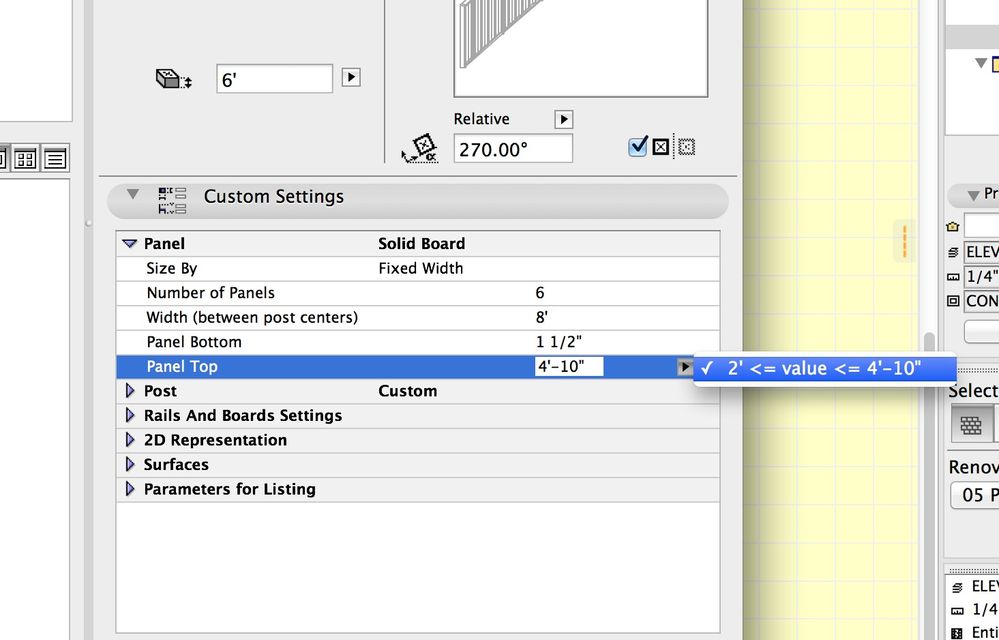
I tried editing the part as Karl suggested (the parameters in the object actually show 6' as upper end of height range), but this seems to have no effect.
Any tips?
AC 21 (8002) & 22 USA
Mac OSX 10.14.5 on MacBook Pro 2.3GHz Intel i7, 16GB Ram, NVIDIA GeForce GT 750M 2GB VRAM, 500GB SSD
Mac OSX 10.14.5 on MacBook Pro 2.3GHz Intel i7, 16GB Ram, NVIDIA GeForce GT 750M 2GB VRAM, 500GB SSD

Aaron Bourgoin
Rockstar
Options
- Mark as New
- Bookmark
- Subscribe
- Mute
- Subscribe to RSS Feed
- Permalink
- Report Inappropriate Content
2016-01-20 06:20 PM
2016-01-20
06:20 PM
evidently, there are some bugs that didn't all get fixed during the AC19 beta testing.
Think Like a Spec Writer
MacBook M4Pro - 24Gb RAM
AC4.55 through 29 / AC29.2.1 USA
Rhino 8.35 Mac
MacOS Tahoe 26.6.2
MacBook M4Pro - 24Gb RAM
AC4.55 through 29 / AC29.2.1 USA
Rhino 8.35 Mac
MacOS Tahoe 26.6.2

Didn't find the answer?
Check other topics in this Forum
Back to ForumRead the latest accepted solutions!
Accepted SolutionsStart a new conversation!

