
Turn on suggestions
Auto-suggest helps you quickly narrow down your search results by suggesting possible matches as you type.
Showing results for
EN
Turn on suggestions
Auto-suggest helps you quickly narrow down your search results by suggesting possible matches as you type.
Showing results for
Options
- Subscribe to RSS Feed
- Mark Topic as New
- Mark Topic as Read
- Pin this post for me
- Bookmark
- Subscribe to Topic
- Mute
- Printer Friendly Page

cadsph
Enthusiast
Options
- Mark as New
- Bookmark
- Subscribe
- Mute
- Subscribe to RSS Feed
- Permalink
- Report Inappropriate Content
2022-06-29 01:22 PM
45 deg Earth Hatch
2022-06-29
01:22 PM
Hi,
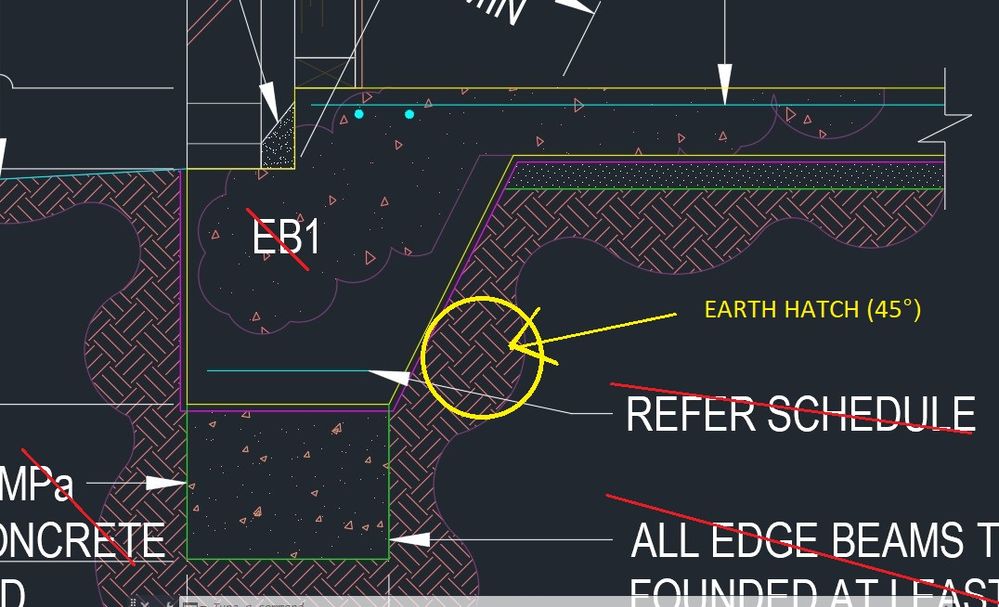
Does anyone know how to create or download 45 deg alternating Earth Hatch, to represent cut through natural ground/earth?
Please find attached. (The image is of a Structural Footing - AutoCAD)
Regards,
Solved! Go to Solution.
Solved
Read-Only
1 Solution
Accepted Solutions

Eduardo Rolon
Moderator
Options
- Mark as New
- Bookmark
- Subscribe
- Mute
- Subscribe to RSS Feed
- Permalink
- Report Inappropriate Content
2022-06-29 01:30 PM
2022-06-29
01:30 PM
It is easy to create new "Hatches" in AC, they are called "Fills".
Read:
https://community.graphisoft.com/t5/Document-articles/How-to-create-a-custom-Fill/ta-p/303913
and
https://community.graphisoft.com/t5/Document-articles/About-Fills/ta-p/303850
Eduardo Rolón AIA NCARB
AC29 US/INT -> AC08
AC29 US/INT -> AC08
Mac Studio M4 Max 64GB ram, OS X 10.XX latest
11 Replies 11
Eduardo Rolon
Moderator
Options
- Mark as New
- Bookmark
- Subscribe
- Mute
- Subscribe to RSS Feed
- Permalink
- Report Inappropriate Content
2022-06-29 01:30 PM
2022-06-29
01:30 PM
It is easy to create new "Hatches" in AC, they are called "Fills".
Read:
https://community.graphisoft.com/t5/Document-articles/How-to-create-a-custom-Fill/ta-p/303913
and
https://community.graphisoft.com/t5/Document-articles/About-Fills/ta-p/303850
Eduardo Rolón AIA NCARB
AC29 US/INT -> AC08
AC29 US/INT -> AC08
Mac Studio M4 Max 64GB ram, OS X 10.XX latest

Erwin Edel
Rockstar
Options
- Mark as New
- Bookmark
- Subscribe
- Mute
- Subscribe to RSS Feed
- Permalink
- Report Inappropriate Content
2022-06-29 01:56 PM
2022-06-29
01:56 PM
Attached the ground fill that is part of our standard template. I'd assume you have something similar in the template that ships with your version of Archicad.
Erwin Edel, Project Lead, Leloup Architecten
www.leloup.nl
ArchiCAD 9-29NED FULL
Windows 11 Pro for Workstations
Adobe Design Premium CS5
www.leloup.nl
ArchiCAD 9-29NED FULL
Windows 11 Pro for Workstations
Adobe Design Premium CS5

Lingwisyer
Guru
Options
- Mark as New
- Bookmark
- Subscribe
- Mute
- Subscribe to RSS Feed
- Permalink
- Report Inappropriate Content
2022-06-30 04:58 AM
2022-06-30
04:58 AM
The problem with the default on is that it is a two tile texture instead of a four tile, which means you get one set of checks creating continuous lines instead of it alternating in both directions...
| AC22-29 AUS 3200 | Help Those Help You - Add a Signature |
| Self-taught, bend it till it breaks | Creating a Thread |
| Win11 | i9 10850K | 64GB | RX6600 | Win11 | 7800X3D | 32GB | RTX5070TI |
cadsph
Enthusiast
Options
- Mark as New
- Bookmark
- Subscribe
- Mute
- Subscribe to RSS Feed
- Permalink
- Report Inappropriate Content
2022-06-30 05:39 AM
2022-06-30
05:39 AM
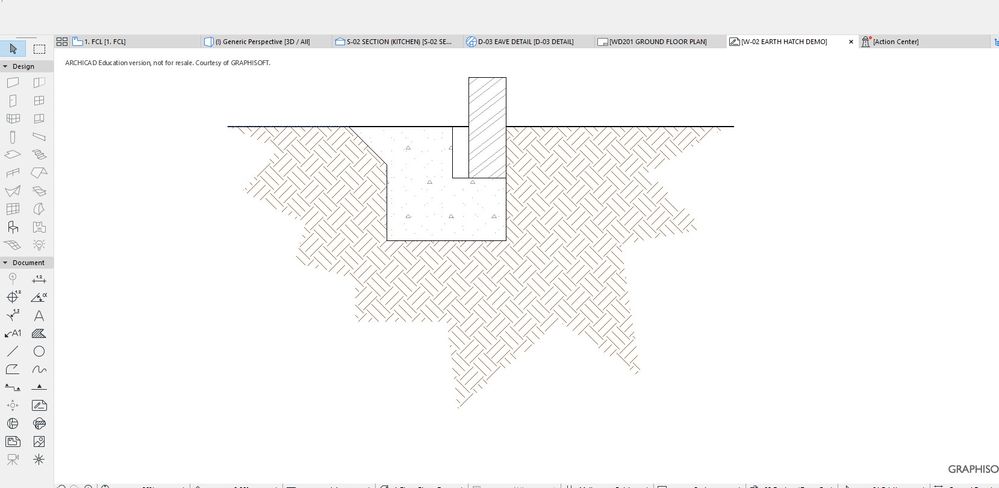
Thanks, After many iterations - I manged to get the repeating pattern. (See attached)
cadsph
Enthusiast
Options
- Mark as New
- Bookmark
- Subscribe
- Mute
- Subscribe to RSS Feed
- Permalink
- Report Inappropriate Content
2022-06-30 05:44 AM
2022-06-30
05:44 AM
Thanks for the download, but it's an .XML extension, which is used in Web/ website applications?
Also, how can I uploaded the file into Archicad and use it as a fill?
cadsph
Enthusiast
Options
- Mark as New
- Bookmark
- Subscribe
- Mute
- Subscribe to RSS Feed
- Permalink
- Report Inappropriate Content
2022-06-30 05:50 AM
2022-06-30
05:50 AM
Another question:
Now I've created the hatch, how can I export/ download the fill and install into new projects?

Barry Kelly
Moderator
Options
- Mark as New
- Bookmark
- Subscribe
- Mute
- Subscribe to RSS Feed
- Permalink
- Report Inappropriate Content
2022-06-30 05:51 AM
2022-06-30
05:51 AM
@cadsph wrote:
Thanks for the download, but it's an .XML extension, which is used in Web/ website applications?
Also, how can I uploaded the file into Archicad and use it as a fill?
With 'Attribute Manager'.
Barry.
One of the forum moderators.
Versions 6.5 to 27
i7-10700 @ 2.9Ghz, 32GB ram, GeForce RTX 2060 (6GB), Windows 10
Lenovo Thinkpad - i7-1270P 2.20 GHz, 32GB RAM, Nvidia T550, Windows 11
Versions 6.5 to 27
i7-10700 @ 2.9Ghz, 32GB ram, GeForce RTX 2060 (6GB), Windows 10
Lenovo Thinkpad - i7-1270P 2.20 GHz, 32GB RAM, Nvidia T550, Windows 11
Erwin Edel
Rockstar
Options
- Mark as New
- Bookmark
- Subscribe
- Mute
- Subscribe to RSS Feed
- Permalink
- Report Inappropriate Content
2022-06-30 02:21 PM
2022-06-30
02:21 PM
Apologies, I assume too much familiarity with the software. It is with Attribute Manager.
Options > Element Attributes > Attribute Manager
Click on the tab with the Fill icon, on the right side you can 'import' the XML file. If you then select the fill type on the right side you can either append (add it to the bottom of the list in terms of index number) or add by index or by name, which might overwrite an existing fill type in your project.
Erwin Edel, Project Lead, Leloup Architecten
www.leloup.nl
ArchiCAD 9-29NED FULL
Windows 11 Pro for Workstations
Adobe Design Premium CS5
www.leloup.nl
ArchiCAD 9-29NED FULL
Windows 11 Pro for Workstations
Adobe Design Premium CS5
Eduardo Rolon
Moderator
Options
- Mark as New
- Bookmark
- Subscribe
- Mute
- Subscribe to RSS Feed
- Permalink
- Report Inappropriate Content
2022-06-30 03:20 PM
2022-06-30
03:20 PM
Also the exchange format for Archicad Attributes is XML which is not only used for web apps.
Eduardo Rolón AIA NCARB
AC29 US/INT -> AC08
AC29 US/INT -> AC08
Mac Studio M4 Max 64GB ram, OS X 10.XX latest

Still looking?

