
Turn on suggestions
Auto-suggest helps you quickly narrow down your search results by suggesting possible matches as you type.
Showing results for
EN
Turn on suggestions
Auto-suggest helps you quickly narrow down your search results by suggesting possible matches as you type.
Showing results for
Options
- Subscribe to RSS Feed
- Mark Topic as New
- Mark Topic as Read
- Pin this post for me
- Bookmark
- Subscribe to Topic
- Mute
- Printer Friendly Page

Too Long
Advocate
Options
- Mark as New
- Bookmark
- Subscribe
- Mute
- Subscribe to RSS Feed
- Permalink
- Report Inappropriate Content
2022-09-02 01:09 AM
Archicad 26 Layers
2022-09-02
01:09 AM
How do I select all layers, lock/unlock and hide/show all layers in the new layers window?
AC26 AUS Full
Solved! Go to Solution.
Solved
1 Solution
Accepted Solutions

joelsdg
Advocate
Options
- Mark as New
- Bookmark
- Subscribe
- Mute
- Subscribe to RSS Feed
- Permalink
- Report Inappropriate Content
2022-09-02 01:37 AM
2022-09-02
01:37 AM
I've found that if you click/select one layer name in the Layers window and then on your keyboard press the "Command-A" (MacOS) keys at the same time, you'll select all the layers. Then click the eyeball on any of your layers and it will affect all of the layers. Click on a layer name to deselect all of the layers.
AC 6.5-29; macOS Tahoe 26.5.1; 2021 MacBook Pro M4 Max
26 Replies 26
joelsdg
Advocate
Options
- Mark as New
- Bookmark
- Subscribe
- Mute
- Subscribe to RSS Feed
- Permalink
- Report Inappropriate Content
2022-09-02 01:37 AM
2022-09-02
01:37 AM
I've found that if you click/select one layer name in the Layers window and then on your keyboard press the "Command-A" (MacOS) keys at the same time, you'll select all the layers. Then click the eyeball on any of your layers and it will affect all of the layers. Click on a layer name to deselect all of the layers.
AC 6.5-29; macOS Tahoe 26.5.1; 2021 MacBook Pro M4 Max

ryejuan
Advisor
Options
- Mark as New
- Bookmark
- Subscribe
- Mute
- Subscribe to RSS Feed
- Permalink
- Report Inappropriate Content
2022-09-02 03:28 AM
2022-09-02
03:28 AM
yeah they remove the assigned buttons to it.
In the end what is your Objective? ArchiCAD 9 onwards
CPU: i9-14900K @ 3.2Ghz; GPU: GeForce RTX 5080 super (16GB); SSD: XPG GAMMIX S70 1TB; RAM: 64GB @ 4200MT/s.
WINDOWS 11 PRO
CPU: i9-14900K @ 3.2Ghz; GPU: GeForce RTX 5080 super (16GB); SSD: XPG GAMMIX S70 1TB; RAM: 64GB @ 4200MT/s.
WINDOWS 11 PRO
Too Long
Advocate
Options
- Mark as New
- Bookmark
- Subscribe
- Mute
- Subscribe to RSS Feed
- Permalink
- Report Inappropriate Content
2022-09-02 04:05 AM
2022-09-02
04:05 AM
hmmmm....unfortunate...
AC26 AUS Full
Too Long
Advocate
Options
- Mark as New
- Bookmark
- Subscribe
- Mute
- Subscribe to RSS Feed
- Permalink
- Report Inappropriate Content
2022-09-02 04:05 AM
2022-09-02
04:05 AM
thank you
AC26 AUS Full

Chopper
Contributor
Options
- Mark as New
- Bookmark
- Subscribe
- Mute
- Subscribe to RSS Feed
- Permalink
- Report Inappropriate Content
2022-09-07 01:31 AM
2022-09-07
01:31 AM
ok thankyou. How functional is this when setting up new layer combinations?

Barry Kelly
Moderator
Options
- Mark as New
- Bookmark
- Subscribe
- Mute
- Subscribe to RSS Feed
- Permalink
- Report Inappropriate Content
2022-09-07 03:23 AM
2022-09-07
03:23 AM
@Chopper wrote:
ok thankyou. How functional is this when setting up new layer combinations?
I'm not sure what you mean by this.
New layer combinations automatically contain all of the layers.
It is only when you want to select all of the layers at once that you CMD+A (Mac) or CTRL+A (PC) to select them.
Barry.
One of the forum moderators.
Versions 6.5 to 27
i7-10700 @ 2.9Ghz, 32GB ram, GeForce RTX 2060 (6GB), Windows 10
Lenovo Thinkpad - i7-1270P 2.20 GHz, 32GB RAM, Nvidia T550, Windows 11
Versions 6.5 to 27
i7-10700 @ 2.9Ghz, 32GB ram, GeForce RTX 2060 (6GB), Windows 10
Lenovo Thinkpad - i7-1270P 2.20 GHz, 32GB RAM, Nvidia T550, Windows 11

kenliem
Contributor
Options
- Mark as New
- Bookmark
- Subscribe
- Mute
- Subscribe to RSS Feed
- Permalink
- Report Inappropriate Content
2022-09-14 07:45 PM
2022-09-14
07:45 PM
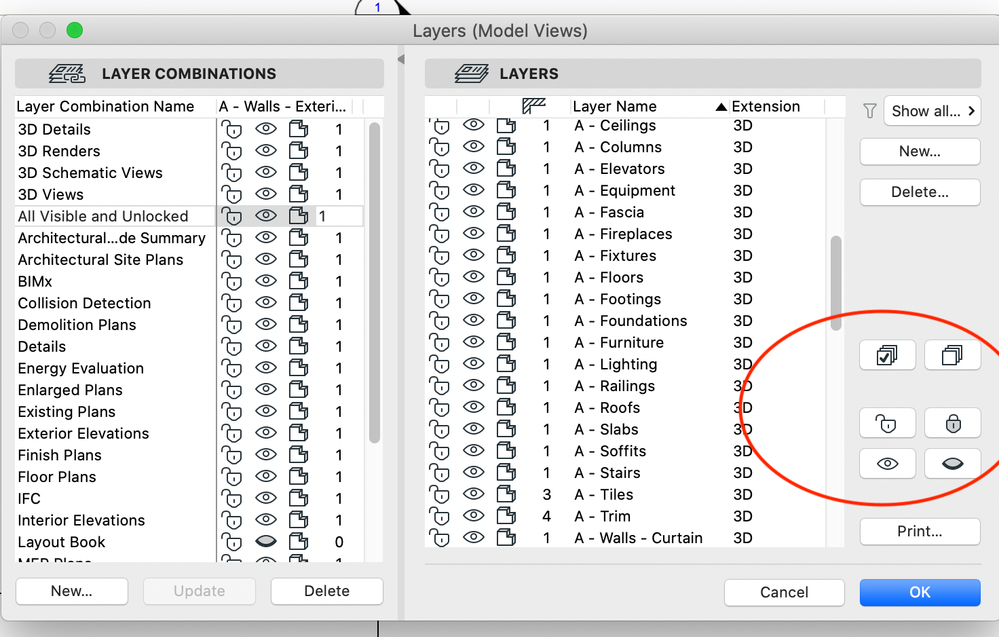
Thanks for the suggestions, but aren't we going backward, I have been working with many versions behind, this V26 is definitely loosing it, instead of just clicking the provided icons to turn all off, turns all on, select all, just with a click of a mouse (see v25 the latest below) now you what, command-A, and eyeball on any of your layers, etc, this task time 100 times during work in a day, you now doing it twice as much work, this is definately a step backwards. Thanks Graphisoft. Don't change it if ain't broke.
Barry Kelly
Moderator
Options
- Mark as New
- Bookmark
- Subscribe
- Mute
- Subscribe to RSS Feed
- Permalink
- Report Inappropriate Content
2022-09-15 03:28 AM
2022-09-15
03:28 AM
Just set up a new layer combination that turns all layers on.
This is even easier than the old way with the buttons.
You then just swap the layer combination.
Barry.
One of the forum moderators.
Versions 6.5 to 27
i7-10700 @ 2.9Ghz, 32GB ram, GeForce RTX 2060 (6GB), Windows 10
Lenovo Thinkpad - i7-1270P 2.20 GHz, 32GB RAM, Nvidia T550, Windows 11
Versions 6.5 to 27
i7-10700 @ 2.9Ghz, 32GB ram, GeForce RTX 2060 (6GB), Windows 10
Lenovo Thinkpad - i7-1270P 2.20 GHz, 32GB RAM, Nvidia T550, Windows 11

Daniel Pataki
Booster
Options
- Mark as New
- Bookmark
- Subscribe
- Mute
- Subscribe to RSS Feed
- Permalink
- Report Inappropriate Content
2022-09-15 09:50 AM
2022-09-15
09:50 AM
If you only want to see temporarily all layers, there is anyway a better method:
Menu/Documentation/Layers/"Show all layers" - I can strongly recommend to make an icon for it, so it will be a way faster way to see everything alltogether.
If you want to unlock/lock layers temporarily, you should always use the "quick layers" palette.
Personally I never used this feature, what you are missing, as I found the methods mentioned above much more intuitive.
Archicad BIM-Expert
https://www.a-null.com/
https://www.a-null.com/

Still looking?
