
Turn on suggestions
Auto-suggest helps you quickly narrow down your search results by suggesting possible matches as you type.
Showing results for
EN
Turn on suggestions
Auto-suggest helps you quickly narrow down your search results by suggesting possible matches as you type.
Showing results for
Options
- Subscribe to RSS Feed
- Mark Topic as New
- Mark Topic as Read
- Pin this post for me
- Bookmark
- Subscribe to Topic
- Mute
- Printer Friendly Page

Jakob_Floyd
Booster
Options
- Mark as New
- Bookmark
- Subscribe
- Mute
- Subscribe to RSS Feed
- Permalink
- Report Inappropriate Content
2023-11-29 03:05 PM
Archicad 27 MEP ungroup option
2023-11-29
03:05 PM
Hey,
In AC26 I used to draw cable carriers using MEP tool and if it automatically grouped all the separate elements. If I needed to make changes or delete a single element from the group, I would select the group and click ctrl+shift+G (shortcut for ungroup) and then I would be able to edit any element from that group.
In AC27 clicking ctrl+shift+G does nothing.
On the same note, how to change length of the already placed element? I must be blind, because I cannot find an option for that...
Thank you!
AC26
i9-12900 | 64GB RAM | 1TB NVME | RTX 3070 | WIN 11
Solved! Go to Solution.
1 Solution
Accepted Solutions

hevi
Ace
Options
- Mark as New
- Bookmark
- Subscribe
- Mute
- Subscribe to RSS Feed
- Permalink
- Report Inappropriate Content
2023-11-30 08:38 AM
2023-11-30
08:38 AM
I think dragging one node to another node is your best bet at the moment.
Solution
3 Replies 3
Jakob_Floyd
Booster
Options
- Mark as New
- Bookmark
- Subscribe
- Mute
- Subscribe to RSS Feed
- Permalink
- Report Inappropriate Content
2023-11-30
08:31 AM
- last edited on
2023-12-03
10:07 PM
by
 Laszlo Nagy
2023-11-30
08:31 AM
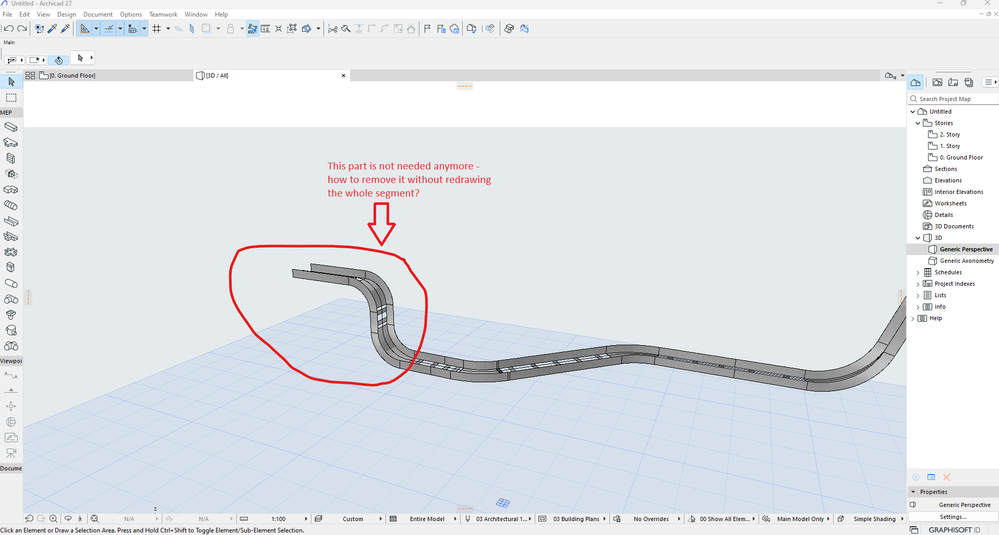
I have spent more time on this and still have not found a solution. Please, can someone tell me how to remove just a part of the cable tray run without redrawing the whole run? Just a reminder - this is on AC27.
AC26
i9-12900 | 64GB RAM | 1TB NVME | RTX 3070 | WIN 11
hevi
Ace
Options
- Mark as New
- Bookmark
- Subscribe
- Mute
- Subscribe to RSS Feed
- Permalink
- Report Inappropriate Content
2023-11-30 08:38 AM
2023-11-30
08:38 AM
I think dragging one node to another node is your best bet at the moment.
Solution
Jakob_Floyd
Booster
Options
- Mark as New
- Bookmark
- Subscribe
- Mute
- Subscribe to RSS Feed
- Permalink
- Report Inappropriate Content
2023-11-30 08:41 AM
2023-11-30
08:41 AM
It works - thank you! But jesus christ...
AC26
i9-12900 | 64GB RAM | 1TB NVME | RTX 3070 | WIN 11

Still looking?

Suggested topics
- Should I be using Archicad 28 instead of 29? in Teamwork & BIMcloud
- Enscape 4.3 Not Showing in Archicad 29 – Missing Enscape Plugin in Installation & update
- Surface / Component Schedule Bug: Automatic Column Wrapping Ignores Folded Geometry and Returns Flat in Project data & BIM
- Ci Tools Keynotes | Archicad Keynotes | Properties | Attributes in Project data & BIM
- pdf are to LARGE I can't print or present in Documentation
