
Turn on suggestions
Auto-suggest helps you quickly narrow down your search results by suggesting possible matches as you type.
Showing results for
EN
Turn on suggestions
Auto-suggest helps you quickly narrow down your search results by suggesting possible matches as you type.
Showing results for
Options
- Subscribe to RSS Feed
- Mark Topic as New
- Mark Topic as Read
- Pin this post for me
- Bookmark
- Subscribe to Topic
- Mute
- Printer Friendly Page

Miner
Booster
Options
- Mark as New
- Bookmark
- Subscribe
- Mute
- Subscribe to RSS Feed
- Permalink
- Report Inappropriate Content
2022-02-08 07:50 PM
Cabinet Color
2022-02-08
07:50 PM
I can't figure out how to change the cabinet "box" color to something other than white. Does anyone know how to do that?
Archicad 28 Solo
iMac 27" 3.8GHz i7
8GB RAM
iMac 27" 3.8GHz i7
8GB RAM
Read-Only
4 Replies 4

hevi
Ace
Options
- Mark as New
- Bookmark
- Subscribe
- Mute
- Subscribe to RSS Feed
- Permalink
- Report Inappropriate Content
2022-02-08 08:26 PM
2022-02-08
08:26 PM
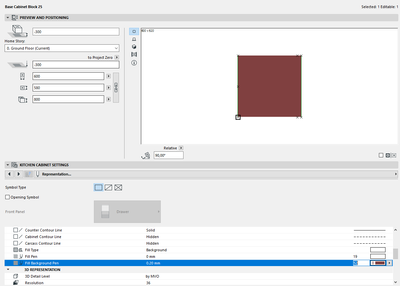
Guess you mean the 2D fill? It's set to window background by default.
Object Setting > Kitchen Cabinet Setting > Representation > 2D Representation > Fill Type / Fill Pen / Fill Background Pen
Miner
Booster
Options
- Mark as New
- Bookmark
- Subscribe
- Mute
- Subscribe to RSS Feed
- Permalink
- Report Inappropriate Content
2022-02-08 09:23 PM
2022-02-08
09:23 PM
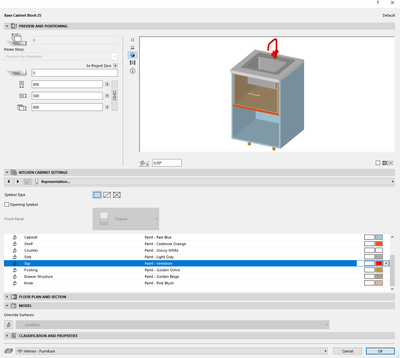
Actually, I'm trying to change the 3D appearance. I can't figure out how to change the model color of the cabinet from white. I can change the doors and panels but not the cabinet color (or the toe color).
Archicad 28 Solo
iMac 27" 3.8GHz i7
8GB RAM
iMac 27" 3.8GHz i7
8GB RAM
hevi
Ace
Options
- Mark as New
- Bookmark
- Subscribe
- Mute
- Subscribe to RSS Feed
- Permalink
- Report Inappropriate Content
2022-02-08 09:37 PM - edited 2022-02-08 09:38 PM
2022-02-08
09:37 PM
Every surface apart from the front panels are controlled under Object Setting > Kitchen Cabinet Setting > Representation > Surfaces
Miner
Booster
Options
- Mark as New
- Bookmark
- Subscribe
- Mute
- Subscribe to RSS Feed
- Permalink
- Report Inappropriate Content
2022-02-08 11:38 PM
2022-02-08
11:38 PM
Thank you! I figured it was something simple like that. I didn't scroll down far enough in the "FLOOR PLAN AND SECTION" section.
Archicad 28 Solo
iMac 27" 3.8GHz i7
8GB RAM
iMac 27" 3.8GHz i7
8GB RAM

Still looking?
Suggested topics
- Custome Cabinet design in Modeling
- TIP: Visual Check for custom Dimension Texts in Documentation
- Renovation filter changing surface colors of walls in Modeling
- Making shelves in the base cabinet object show as dashed hidden lines in Modeling
- How to edit the opening lines for BAse Cabinet Block in Modeling
