
Turn on suggestions
Auto-suggest helps you quickly narrow down your search results by suggesting possible matches as you type.
Showing results for
EN
Turn on suggestions
Auto-suggest helps you quickly narrow down your search results by suggesting possible matches as you type.
Showing results for
Options
- Subscribe to RSS Feed
- Mark Topic as New
- Mark Topic as Read
- Pin this post for me
- Bookmark
- Subscribe to Topic
- Mute
- Printer Friendly Page

martin-b
Enthusiast
Options
- Mark as New
- Bookmark
- Subscribe
- Mute
- Subscribe to RSS Feed
- Permalink
- Report Inappropriate Content
2023-01-19
10:03 AM
- last edited on
2023-05-09
03:11 PM
by
 Rubia Torres
Flip Railing on Reference Line
2023-01-19
10:03 AM
I have a question about the "Flip Railing on Reference Line" command. I need to edit Railings in a project where there is a large number of railings already modelled.
I can inject parameters or apply Favourite on these existing Railings, but they were modelled in different directions and I need to "flip" about half of them.
The problem is, that the "Flip" command works only on -one- Railing object at the time, which is quite time consuming if you have many railings to edit... Is it a bug that you can edit only one at the time or am I missing something?
2 Replies 2

Barry Kelly
Moderator
Options
- Mark as New
- Bookmark
- Subscribe
- Mute
- Subscribe to RSS Feed
- Permalink
- Report Inappropriate Content
2023-01-19 10:11 AM
2023-01-19
10:11 AM
Interesting.
If you use the command in the menu, then only the last selected rail flips as you said.
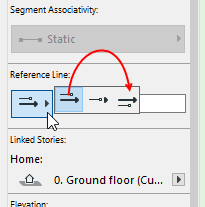
But if you use the reference line position button in the info box, all selected rails will flip.
Barry.
One of the forum moderators.
Versions 6.5 to 27
i7-10700 @ 2.9Ghz, 32GB ram, GeForce RTX 2060 (6GB), Windows 10
Lenovo Thinkpad - i7-1270P 2.20 GHz, 32GB RAM, Nvidia T550, Windows 11
Versions 6.5 to 27
i7-10700 @ 2.9Ghz, 32GB ram, GeForce RTX 2060 (6GB), Windows 10
Lenovo Thinkpad - i7-1270P 2.20 GHz, 32GB RAM, Nvidia T550, Windows 11
martin-b
Enthusiast
Options
- Mark as New
- Bookmark
- Subscribe
- Mute
- Subscribe to RSS Feed
- Permalink
- Report Inappropriate Content
2023-01-19 10:27 AM
2023-01-19
10:27 AM
Thanks Barry. The problem is that I have some Rails offset in the X-direction in my new railing, so I need the "Flip" command. Changing the Reference line position keeps these "offset" rails on the wrong side.

Still looking?

Suggested topics
- Door getting offset from complex wall on 3D preview in Modeling
- Dimension Perpendicular to Angled Line in Documentation
- Railing and Curtain Wall in Modeling
- Profile wall issue in Modeling
- Archicad to Revit for MEP: the workaround Graphisoft's own method couldn't give me in Collaboration with other software
