
Turn on suggestions
Auto-suggest helps you quickly narrow down your search results by suggesting possible matches as you type.
Showing results for
EN
Turn on suggestions
Auto-suggest helps you quickly narrow down your search results by suggesting possible matches as you type.
Showing results for
Options
- Subscribe to RSS Feed
- Mark Topic as New
- Mark Topic as Read
- Pin this post for me
- Bookmark
- Subscribe to Topic
- Mute
- Printer Friendly Page

keily
Contributor
Options
- Mark as New
- Bookmark
- Subscribe
- Mute
- Subscribe to RSS Feed
- Permalink
- Report Inappropriate Content
2022-08-30 01:25 PM
HIDE Part of elevation??
2022-08-30
01:25 PM
hey does anyone know how to hide part of elevation?? in the photo below there's a lot of ugliness below in the grounds as you can see stuff behind, but was wanting to know if you can hide or get rid of it but still keep the dimensions
Solved! Go to Solution.
Solved
Read-Only
1 Solution
Accepted Solutions

Lee Hankins
Virtuoso
Options
- Mark as New
- Bookmark
- Subscribe
- Mute
- Subscribe to RSS Feed
- Permalink
- Report Inappropriate Content
2022-08-30 01:31 PM
2022-08-30
01:31 PM
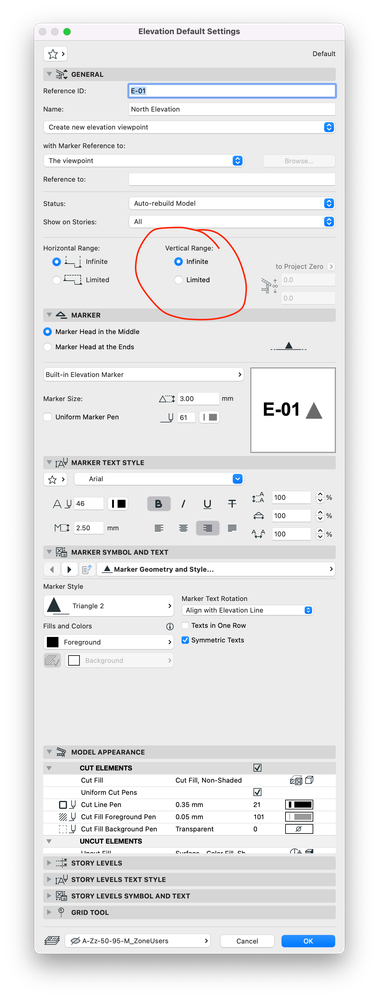
If the dimensions have been added to the View, you may be able to change the vertical range of the elevation in the elevation settings to start at or just below floor level and the dimensions still be visible.
Lee Hankins
ArchiCAD 4.5 - Archicad 29
macOS Tahoe (26.0)
ArchiCAD 4.5 - Archicad 29
macOS Tahoe (26.0)
Solution
3 Replies 3
Lee Hankins
Virtuoso
Options
- Mark as New
- Bookmark
- Subscribe
- Mute
- Subscribe to RSS Feed
- Permalink
- Report Inappropriate Content
2022-08-30 01:31 PM
2022-08-30
01:31 PM
If the dimensions have been added to the View, you may be able to change the vertical range of the elevation in the elevation settings to start at or just below floor level and the dimensions still be visible.
Lee Hankins
ArchiCAD 4.5 - Archicad 29
macOS Tahoe (26.0)
ArchiCAD 4.5 - Archicad 29
macOS Tahoe (26.0)
Solution
keily
Contributor
Options
- Mark as New
- Bookmark
- Subscribe
- Mute
- Subscribe to RSS Feed
- Permalink
- Report Inappropriate Content
2022-08-30 01:36 PM
2022-08-30
01:36 PM
amazing thankyou!

PVBergkrantz
Expert
Options
- Mark as New
- Bookmark
- Subscribe
- Mute
- Subscribe to RSS Feed
- Permalink
- Report Inappropriate Content
2022-08-30 04:59 PM - edited 2022-08-30 04:59 PM
2022-08-30
04:59 PM
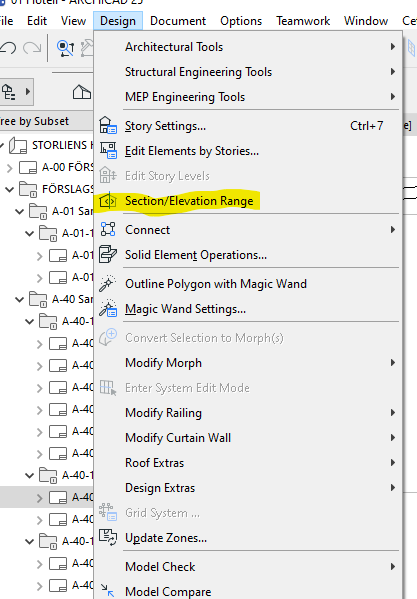
There is also this option (section/elevation range) which is available if you are currently viewing a section/elevation. It shows the limits graphically so you can adjust them exactly from within the view itself.
| AC 29 Int | Win11 | i7-7800X | 32 GB | GeForce RTX 2060 6GB |

Still looking?
Suggested topics
- Window with adjustable frame extensions (jamb) and automatic insulation return – AC29 / GDL in Modeling
- new windows - existing wall - show dashed in elevations in Documentation
- Custom Window in Libraries & objects
- Viewport with open Tab turning items red in Documentation
- Send to Back in General discussions
