
Turn on suggestions
Auto-suggest helps you quickly narrow down your search results by suggesting possible matches as you type.
Showing results for
EN
Turn on suggestions
Auto-suggest helps you quickly narrow down your search results by suggesting possible matches as you type.
Showing results for
Options
- Subscribe to RSS Feed
- Mark Topic as New
- Mark Topic as Read
- Pin this post for me
- Bookmark
- Subscribe to Topic
- Mute
- Printer Friendly Page

Anonymous
Not applicable
Options
- Mark as New
- Bookmark
- Subscribe
- Mute
- Subscribe to RSS Feed
- Permalink
- Report Inappropriate Content
2010-02-06
08:18 PM
- last edited on
2023-05-25
05:07 PM
by
 Rubia Torres
Help with creating complicated wall
2010-02-06
08:18 PM

2 Replies 2
Anonymous
Not applicable
Options
- Mark as New
- Bookmark
- Subscribe
- Mute
- Subscribe to RSS Feed
- Permalink
- Report Inappropriate Content
2010-02-07 02:59 PM
2010-02-07
02:59 PM
Of course, but you can't place windows, doors or modify like a wall. It is a wall that is more like a static piece of sculpture than a virtual wall.
The attached image is a very coarse terrain, duplicated, and then use Solid Element Operation (SEO) to subtract one mesh from the other to get uniform thickness.
Then Save As a library part, place in model view. The more points you add to the mesh the smoother it will look.
Snap
AC is not the program for walls like that if you are going to do this often or need "real" walls in that configuration.
Other threads in this Forum have discussed programs that do that sort of thing very well.
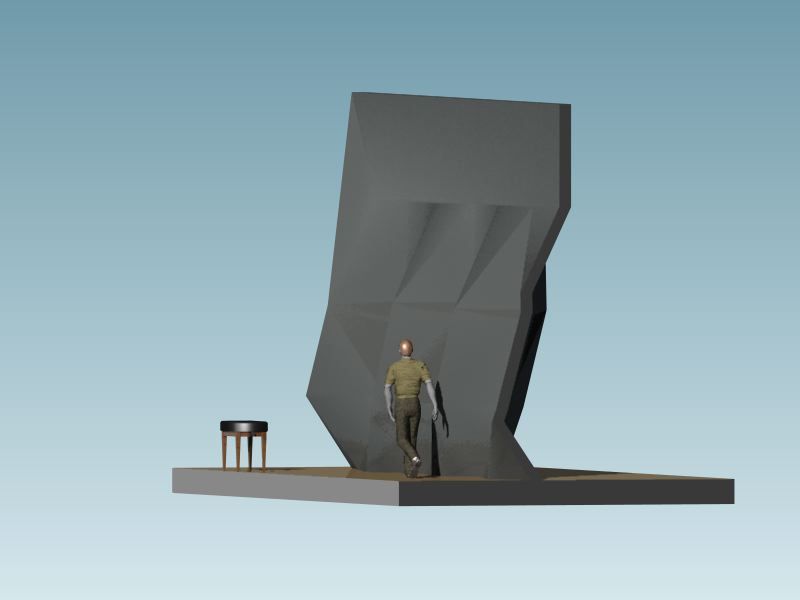
The attached image is a very coarse terrain, duplicated, and then use Solid Element Operation (SEO) to subtract one mesh from the other to get uniform thickness.
Then Save As a library part, place in model view. The more points you add to the mesh the smoother it will look.
Snap
AC is not the program for walls like that if you are going to do this often or need "real" walls in that configuration.
Other threads in this Forum have discussed programs that do that sort of thing very well.
Anonymous
Not applicable
Options
- Mark as New
- Bookmark
- Subscribe
- Mute
- Subscribe to RSS Feed
- Permalink
- Report Inappropriate Content
2010-02-07 04:20 PM
2010-02-07
04:20 PM
You can put openings in using SEOs.
Still looking?
Suggested topics
