
Turn on suggestions
Auto-suggest helps you quickly narrow down your search results by suggesting possible matches as you type.
Showing results for
EN
Turn on suggestions
Auto-suggest helps you quickly narrow down your search results by suggesting possible matches as you type.
Showing results for
Options
- Subscribe to RSS Feed
- Mark Topic as New
- Mark Topic as Read
- Pin this post for me
- Bookmark
- Subscribe to Topic
- Mute
- Printer Friendly Page

PHIL7
Contributor
Options
- Mark as New
- Bookmark
- Subscribe
- Mute
- Subscribe to RSS Feed
- Permalink
- Report Inappropriate Content
2022-03-08
12:49 AM
- last edited on
2025-01-30
04:32 PM
by
 Molinda Prey
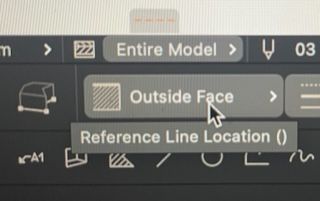
How do you set a keyboard shortcut for 'Reference Line Location' (changing it from the standard 'C')
2022-03-08
12:49 AM
I assigned 'C' to another function therefore removing it from being the preset shortcut to change the reference line location when drawing walls etc.. the problem is now I'm not able to assign another key in place of 'C'.
Under 'Keyboard Shortcuts' in the 'Work Environment Settings' I have searched for 'Reference Line Location' to reassign a key but cant seem to find it.... any suggestions?
Thanks!
Solved! Go to Solution.
1 Solution
Accepted Solutions

Barry Kelly
Moderator
Options
- Mark as New
- Bookmark
- Subscribe
- Mute
- Subscribe to RSS Feed
- Permalink
- Report Inappropriate Content
2022-03-08 02:45 AM
2022-03-08
02:45 AM
Make sure you are looking in 'All Commands in Alphabetical Order'.
Depending what version you are using you should also be able to 'search' by typing part of the command (of course you have to know what the command is called).
This is from 25...

Barry
One of the forum moderators.
Versions 6.5 to 27
i7-10700 @ 2.9Ghz, 32GB ram, GeForce RTX 2060 (6GB), Windows 10
Lenovo Thinkpad - i7-1270P 2.20 GHz, 32GB RAM, Nvidia T550, Windows 11
Versions 6.5 to 27
i7-10700 @ 2.9Ghz, 32GB ram, GeForce RTX 2060 (6GB), Windows 10
Lenovo Thinkpad - i7-1270P 2.20 GHz, 32GB RAM, Nvidia T550, Windows 11
4 Replies 4
Barry Kelly
Moderator
Options
- Mark as New
- Bookmark
- Subscribe
- Mute
- Subscribe to RSS Feed
- Permalink
- Report Inappropriate Content
2022-03-08 02:09 AM
2022-03-08
02:09 AM
The command you want to add a new shortcut to is called "Switch Construction Method".
Barry.
One of the forum moderators.
Versions 6.5 to 27
i7-10700 @ 2.9Ghz, 32GB ram, GeForce RTX 2060 (6GB), Windows 10
Lenovo Thinkpad - i7-1270P 2.20 GHz, 32GB RAM, Nvidia T550, Windows 11
Versions 6.5 to 27
i7-10700 @ 2.9Ghz, 32GB ram, GeForce RTX 2060 (6GB), Windows 10
Lenovo Thinkpad - i7-1270P 2.20 GHz, 32GB RAM, Nvidia T550, Windows 11
PHIL7
Contributor
Options
- Mark as New
- Bookmark
- Subscribe
- Mute
- Subscribe to RSS Feed
- Permalink
- Report Inappropriate Content
2022-03-08 02:36 AM
2022-03-08
02:36 AM
Thanks Barry, but still no luck with that one either. No such shortcut pops up when I search for it. Any other suggestions?
Thanks,
Phil
Barry Kelly
Moderator
Options
- Mark as New
- Bookmark
- Subscribe
- Mute
- Subscribe to RSS Feed
- Permalink
- Report Inappropriate Content
2022-03-08 02:45 AM
2022-03-08
02:45 AM
Make sure you are looking in 'All Commands in Alphabetical Order'.
Depending what version you are using you should also be able to 'search' by typing part of the command (of course you have to know what the command is called).
This is from 25...
Barry
One of the forum moderators.
Versions 6.5 to 27
i7-10700 @ 2.9Ghz, 32GB ram, GeForce RTX 2060 (6GB), Windows 10
Lenovo Thinkpad - i7-1270P 2.20 GHz, 32GB RAM, Nvidia T550, Windows 11
Versions 6.5 to 27
i7-10700 @ 2.9Ghz, 32GB ram, GeForce RTX 2060 (6GB), Windows 10
Lenovo Thinkpad - i7-1270P 2.20 GHz, 32GB RAM, Nvidia T550, Windows 11
PHIL7
Contributor
Options
- Mark as New
- Bookmark
- Subscribe
- Mute
- Subscribe to RSS Feed
- Permalink
- Report Inappropriate Content
2022-03-08 03:34 AM
2022-03-08
03:34 AM
Ahhh yes got it!! I wasn't searching under 'All commands in alphabetical order'!
Thank you!!!!!!!!!!!

Still looking?

Suggested topics
- After 3 years with Archicad, I'm honestly disappointed in General discussions
- Surface / Component Schedule Bug: Automatic Column Wrapping Ignores Folded Geometry and Returns Flat in Project data & BIM
- Railing and Curtain Wall in Modeling
- Archicad 29 - Slow zoom and pan in General discussions
- Archicad 29 MEP – How can I add 2", 4", 6" and Fire Riser pipe sizes? in Modeling
