
Turn on suggestions
Auto-suggest helps you quickly narrow down your search results by suggesting possible matches as you type.
Showing results for
EN
Turn on suggestions
Auto-suggest helps you quickly narrow down your search results by suggesting possible matches as you type.
Showing results for
Options
- Subscribe to RSS Feed
- Mark Topic as New
- Mark Topic as Read
- Pin this post for me
- Bookmark
- Subscribe to Topic
- Mute
- Printer Friendly Page

Daniel_He
Booster
Options
- Mark as New
- Bookmark
- Subscribe
- Mute
- Subscribe to RSS Feed
- Permalink
- Report Inappropriate Content
2021-10-16
06:29 AM
- last edited on
2023-05-09
03:11 PM
by
 Rubia Torres
How to take effect only in one end of rail
2021-10-16
06:29 AM
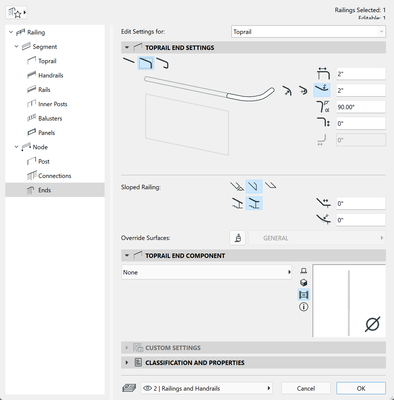
For instance, I only want to make 90digree in one end and keep the straight in another end. But I didn't find way to setup
Daniel.He
ArchiCAD 25 3011 USA - Windows 11 Home 64x
DESKTOP 12600KF 64G RAM 3070 GPU
ArchiCAD 25 3011 USA - Windows 11 Home 64x
DESKTOP 12600KF 64G RAM 3070 GPU
Solved! Go to Solution.
1 Solution
Accepted Solutions

David Maudlin
Rockstar
Options
- Mark as New
- Bookmark
- Subscribe
- Mute
- Subscribe to RSS Feed
- Permalink
- Report Inappropriate Content
2021-10-16 03:04 PM
2021-10-16
03:04 PM
I don't think this can be done during setup. Set the rail end parameters for one End, then after the railing is placed, select the railing, click the Edit button, then select the other End (on plan or 3D), open its settings and change them to suit.
You should add a Signature to your Profile (click the Profile button near the top of this page) with your Archicad version and operating system (see mine for an example) for more accurate help in this forum.
David
David Maudlin / Architect
www.davidmaudlin.com
Digital Architecture
AC29 USA Perpetual • Mac mini M4 Pro OSX15 | 64 gb ram • MacBook Pro M3 Pro OSX14 | 36 gb ram
www.davidmaudlin.com
Digital Architecture
AC29 USA Perpetual • Mac mini M4 Pro OSX15 | 64 gb ram • MacBook Pro M3 Pro OSX14 | 36 gb ram
3 Replies 3
David Maudlin
Rockstar
Options
- Mark as New
- Bookmark
- Subscribe
- Mute
- Subscribe to RSS Feed
- Permalink
- Report Inappropriate Content
2021-10-16 03:04 PM
2021-10-16
03:04 PM
I don't think this can be done during setup. Set the rail end parameters for one End, then after the railing is placed, select the railing, click the Edit button, then select the other End (on plan or 3D), open its settings and change them to suit.
You should add a Signature to your Profile (click the Profile button near the top of this page) with your Archicad version and operating system (see mine for an example) for more accurate help in this forum.
David
David Maudlin / Architect
www.davidmaudlin.com
Digital Architecture
AC29 USA Perpetual • Mac mini M4 Pro OSX15 | 64 gb ram • MacBook Pro M3 Pro OSX14 | 36 gb ram
www.davidmaudlin.com
Digital Architecture
AC29 USA Perpetual • Mac mini M4 Pro OSX15 | 64 gb ram • MacBook Pro M3 Pro OSX14 | 36 gb ram
Daniel_He
Booster
Options
- Mark as New
- Bookmark
- Subscribe
- Mute
- Subscribe to RSS Feed
- Permalink
- Report Inappropriate Content
2021-10-16 04:25 PM
2021-10-16
04:25 PM
Hi David, thanks for your support, it's done by your help. And I updated my signature
Daniel.He
ArchiCAD 25 3011 USA - Windows 11 Home 64x
DESKTOP 12600KF 64G RAM 3070 GPU
ArchiCAD 25 3011 USA - Windows 11 Home 64x
DESKTOP 12600KF 64G RAM 3070 GPU
David Maudlin
Rockstar
Options
- Mark as New
- Bookmark
- Subscribe
- Mute
- Subscribe to RSS Feed
- Permalink
- Report Inappropriate Content
2021-10-17 02:56 PM
2021-10-17
02:56 PM
Daniel.He:
Glad to help, thanks for adding your signature.
David
David Maudlin / Architect
www.davidmaudlin.com
Digital Architecture
AC29 USA Perpetual • Mac mini M4 Pro OSX15 | 64 gb ram • MacBook Pro M3 Pro OSX14 | 36 gb ram
www.davidmaudlin.com
Digital Architecture
AC29 USA Perpetual • Mac mini M4 Pro OSX15 | 64 gb ram • MacBook Pro M3 Pro OSX14 | 36 gb ram

Still looking?
Suggested topics
- Railing break mark in Modeling
- Railing - Post view settings with project2... fragment2 - background foreground in Libraries & objects
- How to schedule the surface area (m2) of a Complex Profile used as a Railing sub-element? in Project data & BIM
- rails added to handrail not showing in 3d or elevation in Libraries & objects
- Railing and Curtain Wall in Modeling
