
Turn on suggestions
Auto-suggest helps you quickly narrow down your search results by suggesting possible matches as you type.
Showing results for
EN
Turn on suggestions
Auto-suggest helps you quickly narrow down your search results by suggesting possible matches as you type.
Showing results for
Options
- Subscribe to RSS Feed
- Mark Topic as New
- Mark Topic as Read
- Pin this post for me
- Bookmark
- Subscribe to Topic
- Mute
- Printer Friendly Page

Anonymous
Not applicable
Options
- Mark as New
- Bookmark
- Subscribe
- Mute
- Subscribe to RSS Feed
- Permalink
- Report Inappropriate Content
2018-05-27 02:57 PM
Is there a way to reduce the number of the lines in the elevation?
2018-05-27
02:57 PM
1 Reply 1

Dontknow
Enthusiast
Options
- Mark as New
- Bookmark
- Subscribe
- Mute
- Subscribe to RSS Feed
- Permalink
- Report Inappropriate Content
2018-05-27 07:10 PM
2018-05-27
07:10 PM
Right click your elevation in the navigator and choose 'Elevation settings...'.
Under 'Model Display' you can change some settings.
You could set the 'Fill Uncut Surfaces with...' or disable the 'Vectorial 3D hatching'.
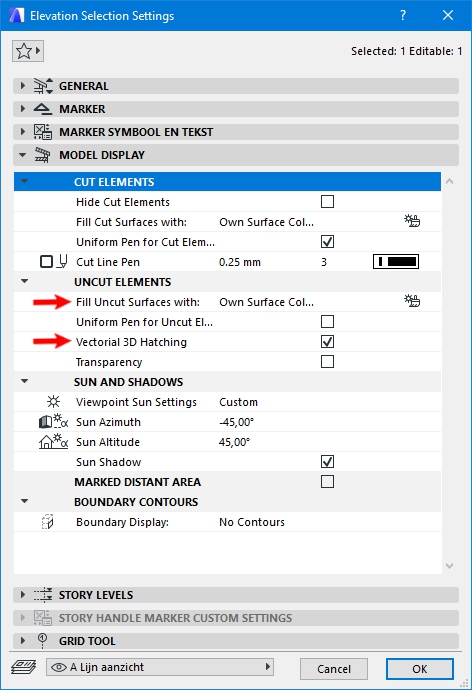
Under 'Model Display' you can change some settings.
You could set the 'Fill Uncut Surfaces with...' or disable the 'Vectorial 3D hatching'.
Architectural construction designer, draftsman, modeller
ArchiCAD 25.
ArchiCAD 25.
Still looking?

Suggested topics
- railing tool in Modeling
- Minor inconsistency in section and elevation icons in Project data & BIM
- Wall end, visible lines in elevation in Modeling
- Triple Sash Casement window panes not showing in Libraries & objects
- Need to extract X, Y, Z of Point Clouds in schedules - But how? in Project data & BIM
