
Turn on suggestions
Auto-suggest helps you quickly narrow down your search results by suggesting possible matches as you type.
Showing results for
EN
Turn on suggestions
Auto-suggest helps you quickly narrow down your search results by suggesting possible matches as you type.
Showing results for
Options
- Subscribe to RSS Feed
- Mark Topic as New
- Mark Topic as Read
- Pin this post for me
- Bookmark
- Subscribe to Topic
- Mute
- Printer Friendly Page

tomyg
Enthusiast
Options
- Mark as New
- Bookmark
- Subscribe
- Mute
- Subscribe to RSS Feed
- Permalink
- Report Inappropriate Content
2023-11-09
05:17 AM
- last edited on
2024-02-06
12:26 AM
by
 Laszlo Nagy
Issues with modeling in 3d - height stretch - AC27
2023-11-09
05:17 AM
Hey all,
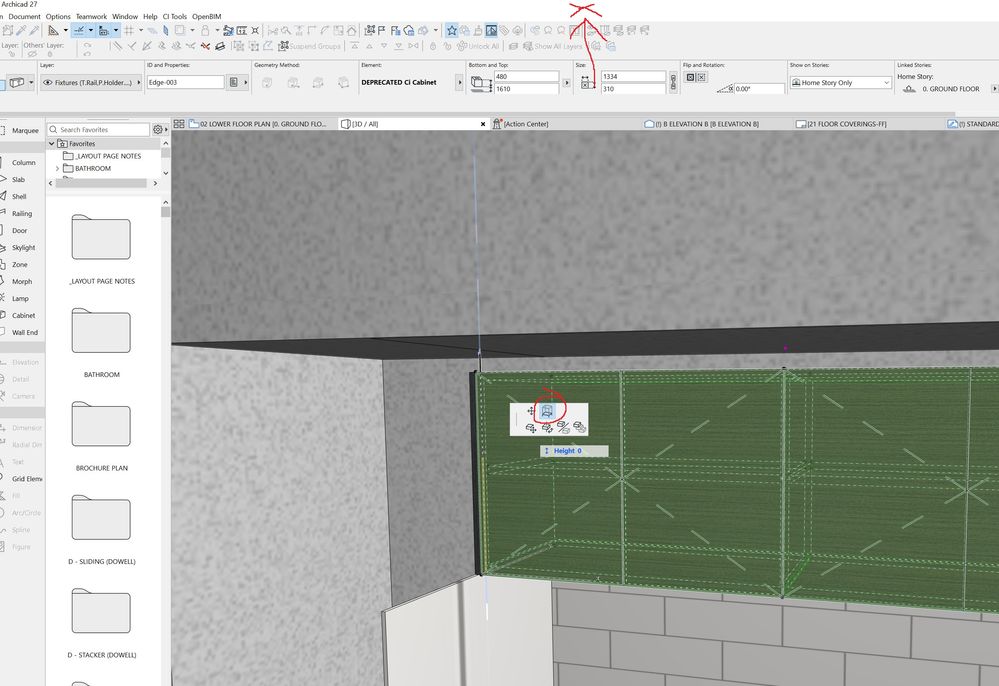
Having issues with using the 'stretch height' command in 3D. It seems to jam up the program, the only way to fix the issue is click off along the top bar of the window and then back into the working space.
Seems to be happing across the board with this command in 3d - not just isolated to cabinets.
the X marks where i need to click to get it back. This is the same across a team of 8.
Solved! Go to Solution.
73 Replies 73

ElmiP
Contributor
Options
- Mark as New
- Bookmark
- Subscribe
- Mute
- Subscribe to RSS Feed
- Permalink
- Report Inappropriate Content
2024-10-18 08:14 AM
2024-10-18
08:14 AM
keep calm! ...and don't think about this tool anymore. Archicad isn't going to do anything to fix this problem anytime soon.

Vaclav Slovak
Booster
Options
- Mark as New
- Bookmark
- Subscribe
- Mute
- Subscribe to RSS Feed
- Permalink
- Report Inappropriate Content
2024-10-18 08:22 AM
2024-10-18
08:22 AM
Of course. It seems the tool will work only for subscribers. 🙄
ElmiP
Contributor
Options
- Mark as New
- Bookmark
- Subscribe
- Mute
- Subscribe to RSS Feed
- Permalink
- Report Inappropriate Content
2024-10-18 08:36 AM
2024-10-18
08:36 AM
no, they are just ignorant as they are with many other issues

PrzemN
Booster
Options
- Mark as New
- Bookmark
- Subscribe
- Mute
- Subscribe to RSS Feed
- Permalink
- Report Inappropriate Content
2024-10-18 11:27 AM
2024-10-18
11:27 AM
Oh, the stretch bug ... Existing on all my computers since I forgot when. I am sure, it is not a bug, but a feature to let you understand our mortality and the passing of time. The only "hack" is to use a keyboard stretch shortcut ( ctrl+h ), strangely it works well

JRS
Participant
Options
- Mark as New
- Bookmark
- Subscribe
- Mute
- Subscribe to RSS Feed
- Permalink
- Report Inappropriate Content
2024-10-23 10:01 AM
2024-10-23
10:01 AM
This has been a problem for a while now. Its amazing that graphisoft havent andressed this problem yet!

Liamthanks
Enthusiast
Options
- Mark as New
- Bookmark
- Subscribe
- Mute
- Subscribe to RSS Feed
- Permalink
- Report Inappropriate Content
2024-11-01 07:56 AM
2024-11-01
07:56 AM
This bug was reported over a year ago and yet we are still waiting for it to be resolved. It's not a minor bug either - it's a significant function that is used frequently and needs to be resolved ASAP! Sort your sh!t out Graphisoft.
AC27 Build 5060 AUS - Windows 10 Pro, Ryzen 7 5800X, RTX 3090, M.2 NVME 0.5TB SSD, 32GB RAM

Barry Kelly
Moderator
Options
- Mark as New
- Bookmark
- Subscribe
- Mute
- Subscribe to RSS Feed
- Permalink
- Report Inappropriate Content
2024-11-01 08:44 AM
2024-11-01
08:44 AM
I have just reported this to tech support.
It would be a good idea if other affected users also reported it to their local support.
Barry.
One of the forum moderators.
Versions 6.5 to 27
i7-10700 @ 2.9Ghz, 32GB ram, GeForce RTX 2060 (6GB), Windows 10
Lenovo Thinkpad - i7-1270P 2.20 GHz, 32GB RAM, Nvidia T550, Windows 11
Versions 6.5 to 27
i7-10700 @ 2.9Ghz, 32GB ram, GeForce RTX 2060 (6GB), Windows 10
Lenovo Thinkpad - i7-1270P 2.20 GHz, 32GB RAM, Nvidia T550, Windows 11
Barry Kelly
Moderator
Options
- Mark as New
- Bookmark
- Subscribe
- Mute
- Subscribe to RSS Feed
- Permalink
- Report Inappropriate Content
2024-11-01 08:47 AM
2024-11-01
08:47 AM
Also, I checked this in the 28 tech preview and I thought it was fixed.
I just checked again in the real version and it is not.
Barry.
One of the forum moderators.
Versions 6.5 to 27
i7-10700 @ 2.9Ghz, 32GB ram, GeForce RTX 2060 (6GB), Windows 10
Lenovo Thinkpad - i7-1270P 2.20 GHz, 32GB RAM, Nvidia T550, Windows 11
Versions 6.5 to 27
i7-10700 @ 2.9Ghz, 32GB ram, GeForce RTX 2060 (6GB), Windows 10
Lenovo Thinkpad - i7-1270P 2.20 GHz, 32GB RAM, Nvidia T550, Windows 11

ryejuan
Advisor
Options
- Mark as New
- Bookmark
- Subscribe
- Mute
- Subscribe to RSS Feed
- Permalink
- Report Inappropriate Content
2024-11-01 08:51 AM
2024-11-01
08:51 AM
Yeah! I also thought they solved this issue but then again they didn't... This is very concerning...
In the end what is your Objective? ArchiCAD 9 onwards
CPU: i9-14900K @ 3.2Ghz; GPU: GeForce RTX 5080 super (16GB); SSD: XPG GAMMIX S70 1TB; RAM: 64GB @ 4200MT/s.
WINDOWS 11 PRO
CPU: i9-14900K @ 3.2Ghz; GPU: GeForce RTX 5080 super (16GB); SSD: XPG GAMMIX S70 1TB; RAM: 64GB @ 4200MT/s.
WINDOWS 11 PRO
Liamthanks
Enthusiast
Options
- Mark as New
- Bookmark
- Subscribe
- Mute
- Subscribe to RSS Feed
- Permalink
- Report Inappropriate Content
2024-11-01 09:14 AM
2024-11-01
09:14 AM
Yep, I checked in 28 after posting that comment and it's still an issue there as well! Lose more and more faith in Graphisoft every year.
AC27 Build 5060 AUS - Windows 10 Pro, Ryzen 7 5800X, RTX 3090, M.2 NVME 0.5TB SSD, 32GB RAM

Still looking?
