
Turn on suggestions
Auto-suggest helps you quickly narrow down your search results by suggesting possible matches as you type.
Showing results for
EN
Turn on suggestions
Auto-suggest helps you quickly narrow down your search results by suggesting possible matches as you type.
Showing results for
Options
- Subscribe to RSS Feed
- Mark Topic as New
- Mark Topic as Read
- Pin this post for me
- Bookmark
- Subscribe to Topic
- Mute
- Printer Friendly Page

tomyg
Enthusiast
Options
- Mark as New
- Bookmark
- Subscribe
- Mute
- Subscribe to RSS Feed
- Permalink
- Report Inappropriate Content
2023-11-09
05:17 AM
- last edited on
2024-02-06
12:26 AM
by
 Laszlo Nagy
Issues with modeling in 3d - height stretch - AC27
2023-11-09
05:17 AM
Hey all,
Having issues with using the 'stretch height' command in 3D. It seems to jam up the program, the only way to fix the issue is click off along the top bar of the window and then back into the working space.
Seems to be happing across the board with this command in 3d - not just isolated to cabinets.
the X marks where i need to click to get it back. This is the same across a team of 8.
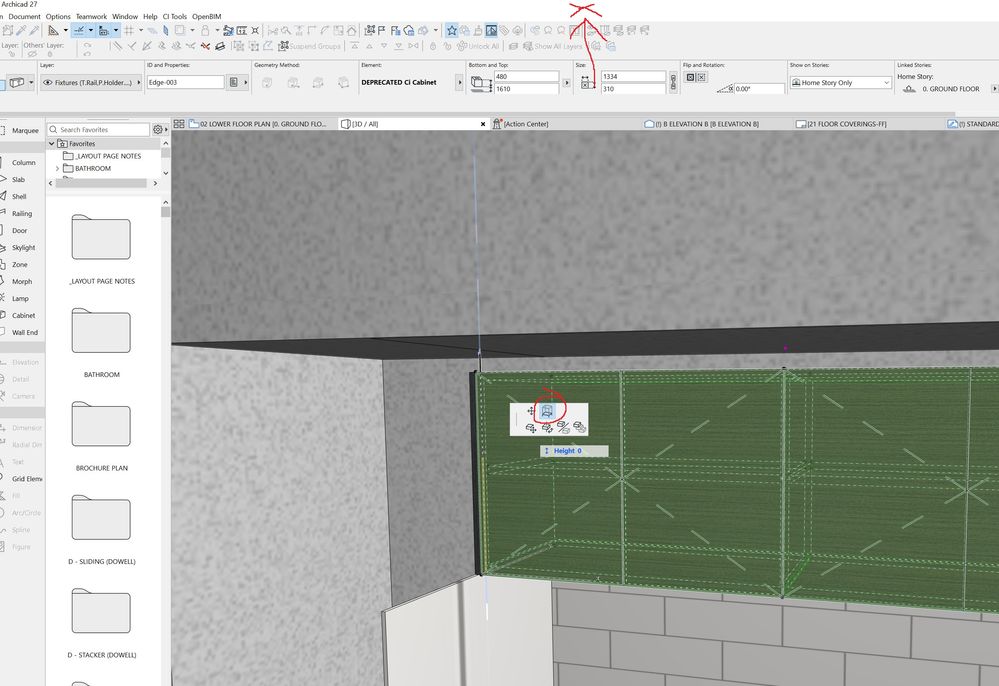
Solved! Go to Solution.
73 Replies 73

Martin Dimitrov
Booster
Options
- Mark as New
- Bookmark
- Subscribe
- Mute
- Subscribe to RSS Feed
- Permalink
- Report Inappropriate Content
2025-11-28 01:35 PM
2025-11-28
01:35 PM
I don't understand how this is not a bigger issue. I guess most of the users really don't model in 3D or there aren't really that many people using 3D in archicad.
Absolutely program breaking bug, that has left me using version 25.
Martin Dimitrov
Booster
Options
- Mark as New
- Bookmark
- Subscribe
- Mute
- Subscribe to RSS Feed
- Permalink
- Report Inappropriate Content
2026-01-08 05:49 PM
2026-01-08
05:49 PM
Bump, This issue has not been fixed. Remove the SOLVED! tag. This is absurd.

Samuel1997
Booster
Options
- Mark as New
- Bookmark
- Subscribe
- Mute
- Subscribe to RSS Feed
- Permalink
- Report Inappropriate Content
2026-03-26 12:02 AM - edited 2026-03-26 12:18 AM
2026-03-26
12:02 AM
Editing my reply as ive just read the whole thread, so still no fix if for 29 without modifying registry and slowing sections, guess we'll wait and see
AC19/24/26 | Win11 | 12th gen i-7 | 32GB | RTX 3070 Ti
Samuel1997
Booster
Options
- Mark as New
- Bookmark
- Subscribe
- Mute
- Subscribe to RSS Feed
- Permalink
- Report Inappropriate Content
2026-03-26 01:03 AM - edited 2026-03-26 01:05 AM
2026-03-26
01:03 AM
Hi Oleksandra,
I read up on this thread and decided to do some tests on drawing performance before and after registry changes, to ensure the change wouldnt disrupt workflow, and im confused to my results. Now i did only measure using screen timer, but that is to the method of real world application for us.
Tested in archicad 26
Pre-registerty change tests (set to 0)
Empty template with a few walls ect
Elevation page update – 2s
External linked notes update – 24s
Large project test
Elevation page update – 14s
External linked notes update –28s
Post-registerty change tests (set to 1)
Empty template with a few walls ect
Elevation page update – 1s
External linked notes update – 22s
Large project test
Elevation page update – 7.5s
External linked notes update –20s
The change somehow dramatically improved update time, in confliction to your warning...(as well as fixed 3d sketch hotspots editing in archicad 29)
AC19/24/26 | Win11 | 12th gen i-7 | 32GB | RTX 3070 Ti

- « Previous
- Next »
- « Previous
- Next »
Still looking?
