
Turn on suggestions
Auto-suggest helps you quickly narrow down your search results by suggesting possible matches as you type.
Showing results for
EN
Turn on suggestions
Auto-suggest helps you quickly narrow down your search results by suggesting possible matches as you type.
Showing results for
Options
- Subscribe to RSS Feed
- Mark Topic as New
- Mark Topic as Read
- Pin this post for me
- Bookmark
- Subscribe to Topic
- Mute
- Printer Friendly Page

Anonymous
Not applicable
Options
- Mark as New
- Bookmark
- Subscribe
- Mute
- Subscribe to RSS Feed
- Permalink
- Report Inappropriate Content
2012-02-24
03:23 PM
- last edited on
2023-05-23
02:43 PM
by
 Rubia Torres
Jerkin head roof in Archicad 15
2012-02-24
03:23 PM
I'm trying to make a jerkin head roof in AC15. I've found a tutorial on youtube (http://youtu.be/dguAopDgmMs) and it's exactly the roof i want. It is without sound though, so i'm stuck near 2:48 where they are extending/connecting the ridges of the roof automatically. I tried holding ctrl or spacebar, but i can't seem to extend the ridges of the large planes to the ridges of the small triangle planes.
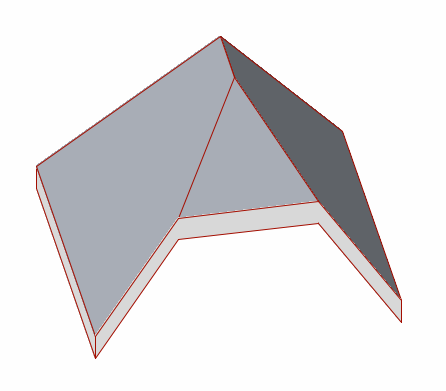
I've managed to move the triangle planes but in the end i get the following:

The eaves? (don't know if that's the correct english term) don't connect fluently.
In the youtube-movie the eaves connect perfectly.
Does somebody knows what shortcut the youtube-poster is using or what i do wrong?
thanks.
1 Reply 1

David Maudlin
Rockstar
Options
- Mark as New
- Bookmark
- Subscribe
- Mute
- Subscribe to RSS Feed
- Permalink
- Report Inappropriate Content
2012-02-25 03:09 PM
2012-02-25
03:09 PM
Rasmazzer:
The tutorial is done with ArchiCAD 14 or earlier, you can tell by looking at the Geometry Methods for the Roof Tool (at 0:25) and seeing the Dome option, which was eliminated in ArchiCAD 15 (also, the video was posted in 2008). It is a bit confusing, as the PolyRoof Geometry Method icon in 14 is the same as the Multi-plane Roof icon in 15. So the Roof is composed of single plane roofs, which can be connected as shown using Command-Click (on Mac) or Control-Click (On Windows); in the AC 15 Help files see: Virtual Building > Construction Elements > Roofs > Editing Roofs > Intersect Single-plane Roofs.
I was able to create the roof you show by using the Multi-plane Geometry Method with the Rectangular Hip/Gable Construction Method and stretching the perimeter back into the roof.
You should add a Signature to your Profile (click the Profile button near the top of this page) with your ArchiCAD version and operating system (see mine for an example) for more accurate help in this forum.
David
The tutorial is done with ArchiCAD 14 or earlier, you can tell by looking at the Geometry Methods for the Roof Tool (at 0:25) and seeing the Dome option, which was eliminated in ArchiCAD 15 (also, the video was posted in 2008). It is a bit confusing, as the PolyRoof Geometry Method icon in 14 is the same as the Multi-plane Roof icon in 15. So the Roof is composed of single plane roofs, which can be connected as shown using Command-Click (on Mac) or Control-Click (On Windows); in the AC 15 Help files see: Virtual Building > Construction Elements > Roofs > Editing Roofs > Intersect Single-plane Roofs.
I was able to create the roof you show by using the Multi-plane Geometry Method with the Rectangular Hip/Gable Construction Method and stretching the perimeter back into the roof.
You should add a Signature to your Profile (click the Profile button near the top of this page) with your ArchiCAD version and operating system (see mine for an example) for more accurate help in this forum.
David
David Maudlin / Architect
www.davidmaudlin.com
Digital Architecture
AC29 USA Perpetual • Mac mini M4 Pro OSX15 | 64 gb ram • MacBook Pro M3 Pro OSX14 | 36 gb ram
www.davidmaudlin.com
Digital Architecture
AC29 USA Perpetual • Mac mini M4 Pro OSX15 | 64 gb ram • MacBook Pro M3 Pro OSX14 | 36 gb ram
Still looking?

Suggested topics
- From one hand-drawn sketch to an Archicad construction model, rebar model and 61 structural drawings in AI solutions
- How to structure prompts for AI Visualizer in Archicad 30 in AI solutions
- Some free useful objects: Road signs, parametric pathway, roof crickets, crowds in Libraries & objects
- Archicad Interactive Schedule shows a single multi-plane hip roof as four separate elements in Documentation
- Roof Builder disapears with skylight input. in Modeling
