
Turn on suggestions
Auto-suggest helps you quickly narrow down your search results by suggesting possible matches as you type.
Showing results for
EN
Turn on suggestions
Auto-suggest helps you quickly narrow down your search results by suggesting possible matches as you type.
Showing results for
Options
- Subscribe to RSS Feed
- Mark Topic as New
- Mark Topic as Read
- Pin this post for me
- Bookmark
- Subscribe to Topic
- Mute
- Printer Friendly Page

Graeme
Booster
Options
- Mark as New
- Bookmark
- Subscribe
- Mute
- Subscribe to RSS Feed
- Permalink
- Report Inappropriate Content
2026-05-18 12:05 PM - edited 2026-05-18 01:25 PM
Opening behaving badly..
2026-05-18
12:05 PM
I've used the Opening tool to add holes for ductwork through my partitions. What is weird is that a lot of these Openings are behaving badly or weirdly as their width and height are swapped around and I can't find a reason why.
The screenshots show two openings one behaving correctly and the other with the weird behaviour namely when you enter the width the height changes and same if you enter the height the width changes.
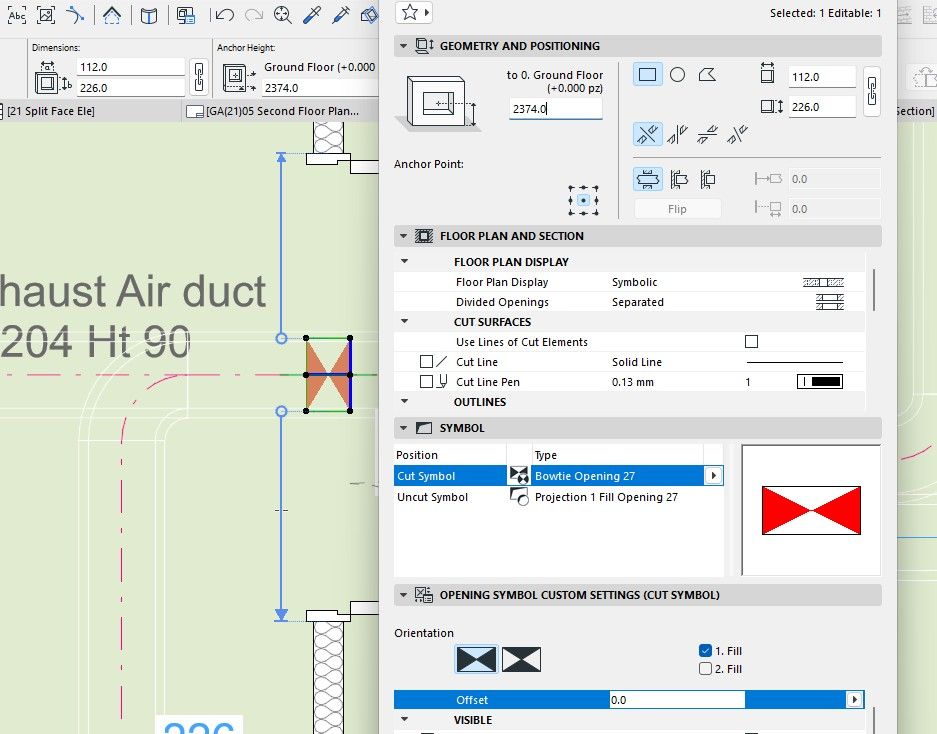

ArchiCAD 3.4 - 28
Windows 11
Windows 11
11 Replies 11

Patrick M
Virtuoso
Options
- Mark as New
- Bookmark
- Subscribe
- Mute
- Subscribe to RSS Feed
- Permalink
- Report Inappropriate Content
2026-05-20 05:16 PM
2026-05-20
05:16 PM
but from the OP's screen shots, it does not appear their openings are polygonal; both are indicated as rectangular. It seems the schedule fields for width/height are reversed.
...
I do wonder if the headings of the schedules have been edited? It's so unlike archicad to have a glaring default, bug, or error like this! <sarcasm>
BIM solutions and trouble shooting (self proclaimed) expert. Using Archicad Version (all of them), on Mac OS (whatever is 1 version older than current)
Graeme
Booster
Options
- Mark as New
- Bookmark
- Subscribe
- Mute
- Subscribe to RSS Feed
- Permalink
- Report Inappropriate Content
2026-05-21 09:12 AM
2026-05-21
09:12 AM
I can assure you the headings of the schedule haven’t been edited. Also half of the openings were wrong the other half were right.
I had to through the model and replace the bad ones. What haven’t yet is tested the “create openings” command was the cause of the issue in the first place. Watch this space I’ll be testing at the weekend
ArchiCAD 3.4 - 28
Windows 11
Windows 11

- « Previous
-
- 1
- 2
- Next »
- « Previous
-
- 1
- 2
- Next »
Still looking?

Suggested topics
