
Turn on suggestions
Auto-suggest helps you quickly narrow down your search results by suggesting possible matches as you type.
Showing results for
EN
Turn on suggestions
Auto-suggest helps you quickly narrow down your search results by suggesting possible matches as you type.
Showing results for
Options
- Subscribe to RSS Feed
- Mark Topic as New
- Mark Topic as Read
- Pin this post for me
- Bookmark
- Subscribe to Topic
- Mute
- Printer Friendly Page

Almanla
Contributor
Options
- Mark as New
- Bookmark
- Subscribe
- Mute
- Subscribe to RSS Feed
- Permalink
- Report Inappropriate Content
2022-11-21 11:03 AM
Room Area overlapping with Window openings
2022-11-21
11:03 AM
Hello all,
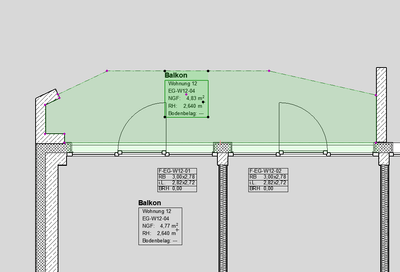
I attached an image showing how the room area overlapping with a portion of the wall near the window opening. this porion is created by the window settings (I don't know what is called in English).
but I looked in window setting I got nothing.
Thanks and best regards
3 Replies 3

Barry Kelly
Moderator
Options
- Mark as New
- Bookmark
- Subscribe
- Mute
- Subscribe to RSS Feed
- Permalink
- Report Inappropriate Content
2022-11-21 01:07 PM
2022-11-21
01:07 PM
If by 'room area' you mean 'zone', then have a look at the Project Preferences > Zone settings.

Barry.
One of the forum moderators.
Versions 6.5 to 27
i7-10700 @ 2.9Ghz, 32GB ram, GeForce RTX 2060 (6GB), Windows 10
Lenovo Thinkpad - i7-1270P 2.20 GHz, 32GB RAM, Nvidia T550, Windows 11
Versions 6.5 to 27
i7-10700 @ 2.9Ghz, 32GB ram, GeForce RTX 2060 (6GB), Windows 10
Lenovo Thinkpad - i7-1270P 2.20 GHz, 32GB RAM, Nvidia T550, Windows 11
Almanla
Contributor
Options
- Mark as New
- Bookmark
- Subscribe
- Mute
- Subscribe to RSS Feed
- Permalink
- Report Inappropriate Content
2022-11-23 03:45 PM
2022-11-23
03:45 PM
Thanks for the Reply Barry,
I have this panel already set and it should be (almost as you presented), however there's still some overlap happening on outerside of the window at the side edges.
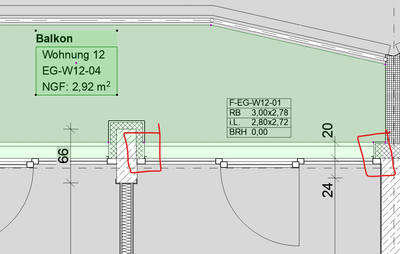
it should take the window area into count, but not where the insulation is covring the window frame.
best.

 Rubia Torres
Graphisoft
Options
- Mark as New
- Bookmark
- Subscribe
- Mute
- Subscribe to RSS Feed
- Permalink
- Report Inappropriate Content
2022-12-01 01:08 PM
2022-12-01
01:08 PM
Hi @Almanla,
I suggest you contact your local Archicad distributor and provide a plan file + steps to reproduce the issue. They will be able to perform a more detailed investigation. You may find their contact here.
Cheers,
Rubia Torres
Community Expert | GRAPHISOFT SE
Did you get a helpful answer on the forum?
Give it back to the Community by marking it as an accepted solution!

Still looking?

Suggested topics
- Bug - Curved window wall cutout in Modeling
- Window Schedule - View from Opening Side Display Colors in Documentation
- Archicad to Revit for MEP: the workaround Graphisoft's own method couldn't give me in Collaboration with other software
- Missing Window / Door Parameters in Project data & BIM
- Best workflow for multiple wall finish combinations without Composite Bloat in Documentation
