
Turn on suggestions
Auto-suggest helps you quickly narrow down your search results by suggesting possible matches as you type.
Showing results for
EN
Turn on suggestions
Auto-suggest helps you quickly narrow down your search results by suggesting possible matches as you type.
Showing results for
Options
- Subscribe to RSS Feed
- Mark Topic as New
- Mark Topic as Read
- Pin this post for me
- Bookmark
- Subscribe to Topic
- Mute
- Printer Friendly Page

ACU
Participant
Options
- Mark as New
- Bookmark
- Subscribe
- Mute
- Subscribe to RSS Feed
- Permalink
- Report Inappropriate Content
2023-05-22 01:19 PM
Skins in composite walls - visibility
2023-05-22
01:19 PM
Hey,
is there a setting that makes a skin (ei. wall tiles) part of the composite but can be turned off from showing in the plans. For example I want wall tiles to be part of composite A1 (solid wall with wall tiles), but in my floorplans I dont want to see wall tiles, only solid wall. At the same time I want to have an option to turn the wall tiles on for schedules.
Kind regards
Labels:
- Labels:
-
Composites
2 Replies 2

Barry Kelly
Moderator
Options
- Mark as New
- Bookmark
- Subscribe
- Mute
- Subscribe to RSS Feed
- Permalink
- Report Inappropriate Content
2023-05-22 04:32 PM
2023-05-22
04:32 PM
Sounds like you want to look at Partial Structure Display.
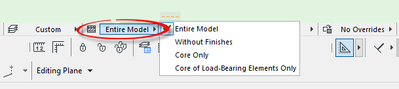
The composite skins can then be set as 'core', 'finish' or 'other', and you control their visibility with the Partial Structure Display.
Be aware though, you need a new set of dimensions for each PSD, as they are linked to each display.
Barry.
One of the forum moderators.
Versions 6.5 to 27
i7-10700 @ 2.9Ghz, 32GB ram, GeForce RTX 2060 (6GB), Windows 10
Lenovo Thinkpad - i7-1270P 2.20 GHz, 32GB RAM, Nvidia T550, Windows 11
Versions 6.5 to 27
i7-10700 @ 2.9Ghz, 32GB ram, GeForce RTX 2060 (6GB), Windows 10
Lenovo Thinkpad - i7-1270P 2.20 GHz, 32GB RAM, Nvidia T550, Windows 11
ACU
Participant
Options
- Mark as New
- Bookmark
- Subscribe
- Mute
- Subscribe to RSS Feed
- Permalink
- Report Inappropriate Content
2023-05-23 02:34 PM
2023-05-23
02:34 PM
Thank you, that makes sense.
Kind regards

Still looking?

Suggested topics
- After 3 years with Archicad, I'm honestly disappointed in General discussions
- Composite wall labels in wall type schedules - please in Documentation
- Walls visible in cross sections are disappearing in interior elevations in Modeling
- Surface / Component Schedule Bug: Automatic Column Wrapping Ignores Folded Geometry and Returns Flat in Project data & BIM
- How to 'return' the plasterboard on the edges of empty opening in Modeling
