
Turn on suggestions
Auto-suggest helps you quickly narrow down your search results by suggesting possible matches as you type.
Showing results for
EN
Turn on suggestions
Auto-suggest helps you quickly narrow down your search results by suggesting possible matches as you type.
Showing results for
Options
- Subscribe to RSS Feed
- Mark Topic as New
- Mark Topic as Read
- Pin this post for me
- Bookmark
- Subscribe to Topic
- Mute
- Printer Friendly Page

Dee
Contributor
Options
- Mark as New
- Bookmark
- Subscribe
- Mute
- Subscribe to RSS Feed
- Permalink
- Report Inappropriate Content
2022-12-02
06:26 PM
- last edited on
2023-05-09
02:27 PM
by
 Rubia Torres
Slab beam and objects with fills turning to transparent in 3D
2022-12-02
06:26 PM
Hey ...I have a problem with my slab roof and objects...they have their fills but have suddenly turned to transparent in 3D
How do I remedy the situation..I've checked all the recommended 3D settings so that isn't the issue
Solved! Go to Solution.
2 Solutions
Accepted Solutions

DGSketcher
Legend
Options
- Mark as New
- Bookmark
- Subscribe
- Mute
- Subscribe to RSS Feed
- Permalink
- Report Inappropriate Content
2022-12-03 10:57 AM
2022-12-03
10:57 AM
Check the layer(s) hosting those elements, within Layer Settings you can have a layer display as wire frame, along with visible & locked. This setting can change according to which Layer Combination is applied to that view.
Apple iMac Intel i9 / macOS Sonoma / AC27UKI (most recent builds.. if they work)
Solution
Dee
Contributor
Options
- Mark as New
- Bookmark
- Subscribe
- Mute
- Subscribe to RSS Feed
- Permalink
- Report Inappropriate Content
2022-12-03 03:54 PM
2022-12-03
03:54 PM
THANK YOU SO MUCH! THIS IS EXACTLY WHAT THE ISSUE WAS...I TRULY APPRECIATE
4 Replies 4

Marc H
Advisor
Options
- Mark as New
- Bookmark
- Subscribe
- Mute
- Subscribe to RSS Feed
- Permalink
- Report Inappropriate Content
2022-12-03 01:12 AM - edited 2022-12-03 01:13 AM
2022-12-03
01:12 AM
Hi Dee,
You may want to post a screen shot of the issue for more accurate responses. By your description and your stating you have checked ‘all 3d settings’ (including GOCs?), I’m thinking perhaps some layers were accidentally turned to wireframe?
“The best thing about the future is that it comes one day at a time.” - Abraham Lincoln
AC28 USA on 16” 2019 MBP (2.4GHz i9 8-Core, 32GB DDR4, AMD Radeon Pro 5500M 8G GDDR5, 500GB SSD, T3s, Trackpad use) running Tahoe OS + extended w/ (2) 32" ASUS ProArt PAU32C (4K) Monitors
AC28 USA on 16” 2019 MBP (2.4GHz i9 8-Core, 32GB DDR4, AMD Radeon Pro 5500M 8G GDDR5, 500GB SSD, T3s, Trackpad use) running Tahoe OS + extended w/ (2) 32" ASUS ProArt PAU32C (4K) Monitors
Dee
Contributor
Options
- Mark as New
- Bookmark
- Subscribe
- Mute
- Subscribe to RSS Feed
- Permalink
- Report Inappropriate Content
2022-12-03 03:34 AM
2022-12-03
03:34 AM
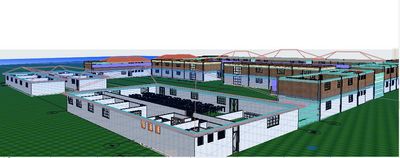
This is what it looks like
DGSketcher
Legend
Options
- Mark as New
- Bookmark
- Subscribe
- Mute
- Subscribe to RSS Feed
- Permalink
- Report Inappropriate Content
2022-12-03 10:57 AM
2022-12-03
10:57 AM
Check the layer(s) hosting those elements, within Layer Settings you can have a layer display as wire frame, along with visible & locked. This setting can change according to which Layer Combination is applied to that view.
Apple iMac Intel i9 / macOS Sonoma / AC27UKI (most recent builds.. if they work)
Solution
Dee
Contributor
Options
- Mark as New
- Bookmark
- Subscribe
- Mute
- Subscribe to RSS Feed
- Permalink
- Report Inappropriate Content
2022-12-03 03:54 PM
2022-12-03
03:54 PM
THANK YOU SO MUCH! THIS IS EXACTLY WHAT THE ISSUE WAS...I TRULY APPRECIATE

Still looking?

Suggested topics
- Parking layouts and solar parks in a site polygon in Libraries & objects
- Object Library Folder Display in Libraries & objects
- Can the Ramp Object Cover Fill Be Made Non-Transparent? in Modeling
- Error displaying 3D view in Visualization
- Floor fill on floor plan showing above items although it is set back! in Documentation
